
RMM Hunting: LOLRMM for Detections

What’s this? Another RMM blog? To join the hundreds that come before?
It’s for good reason. We consider Remote Monitoring and Management (RMM) tool abuse to be among the most prevalent threats currently, and it’s not just us. Huntress recently reported a 277% increase in RMM abuse last year, and a whopping 40% of their investigations involving RMMs. The Arctic Wolf 2025 threat report saw RMM use in 36% of their incident response cases from the preceding quarter, and an overall 59% of ransomware cases traced back to remote access with RMMs sitting alongside VPN and RDP abuse.
Quick Primer on RMMs
Remote Monitoring and Management tools are popular among threat actors for remote access to target networks because they are pre-built, feature rich, often signed, and can blend in as legitimate tool use depending on the business environment. There’s also a lot of them.
AnyDesk, Atera, ScreenConnect, Splashtop, Teamviewer, Quick Assist - chances are one of those are familiar, not because they’re malicious, but because they’re used legitimately for your IT operations.
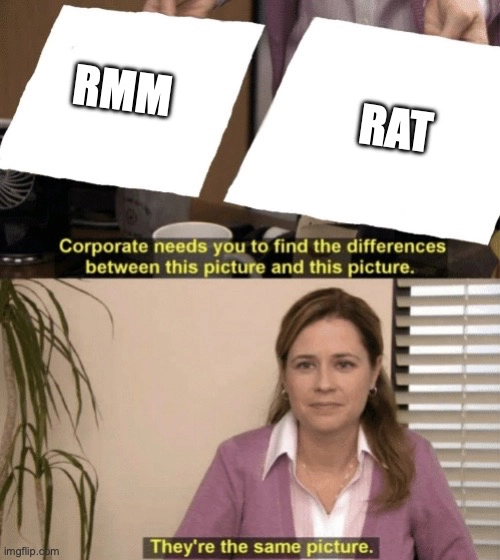
In today’s intrusions, RMM stonks are up 📈 and custom malware is down 📉. From the perspective of the adversary, why pour time into developing an evasive implant or ensuring a common Remote Access Trojan (RAT) doesn’t get flagged when there’s an existing arsenal of trusted tools with nearly every feature needed to carry out the attack? The “trusted” attribute is really pulling weight, and it’s the primary differentiator between an RMM and a RAT while every other aspect between them is blurred.
Approaches to the problem
RMM abuse isn’t new, and it’s been a consistent dot on the radar for years. But the problem cannot be ignored especially now and it warrants a critical look at how your security program deals with it.
There are more or less 3 approaches: inventory, detection, and prevention.
These aren’t mutually exclusive. Generally you want to develop each approach to the point that they complement one another. Know what RMMs you have in your environment, detect when existing or new ones are abused, and build towards a posture of prevention where you know what tools are approved and can block other occurrences. Where prevention fails or cannot realistically be implemented, detection picks up the slack.
Leveraging LOLRMM for detection
Did we mention there’s a lot of RMMs? We’re talking over 200 distinct tools that have at some point been used in an intrusion or could potentially be. Not to mention the list grows. From a detection engineering and threat hunting perspective, we can initially focus on the most commonly abused tools, but overall we want good coverage.
Enter Living Off the Land RMM (LOLRMM), a curated catalog of RMM tools that have been or could potentially be abused by threat actors. It’s one of the most comprehensive, actively maintained collections of RMM artifacts out there, used by threat hunters and DFIR practitioners alike. The tools list can be accessed via API from CSV or JSON, the latter at https://lolrmm.io/api/rmm_tools.json.
Exploring the dataset
Looking through you’ll find a wide range of indicators to work with, such as:
- Process paths
- PE file metadata
- Code signer metadata
- Installation paths
- Disk artifacts
- Registry artifacts
- Service install details
- Network domains
- Remote ports
That’s quite a bit of hunting power, and any one indicator type can make up for the other when the necessary telemetry is suppressed or unavailable. The array of indicators also helps mitigate common evasion techniques such as binary renaming. Even if an attacker renames an AnyDesk executable for example, we can still detect on PE OriginalFileName, known vendor domains contacted by the process, services installed, native spawned processes that are difficult for the attacker to control, code signer info, and host artifacts. LOLRMM extends this multifaceted approach to hundreds of tools.
Wrangling the dataset
Working with the raw JSON dataset is not necessarily plug ‘n play. Some cleanup and normalization has to be done before it’s ready to be a detection driver. These are the most significant areas to address:
- Generic file and process indicators like
connect.exe,dd.exe, andqq.exethat could lead to false positives and mislabeling - Generic, shared, or docs domains not unique to the tool like
github.com,raw.githubusercontent.com,www.komari.wiki, andcloudflarestorage.com - Glob and wildcard patterns (
*,?) that change considerations for matching i.e. whether to use an equals vs starts/ends with or contains - Regex quantifiers in values e.g.
relay-[a-f0-9]{8}... - Placeholders in values e.g.
HKU\{SID}\... - Variations in registry hive naming convention e.g.
HKLM,HKU,HKEY_LOCAL_MACHINE,HKCU,HKEY_CURRENT_USER,HKEY_USERS, plusKLM(HKLM typo) - Mix of full file paths and directory paths
- Unreliable code signing data e.g.
Microsoft CorporationandGoogle LLCsigner names
Note that most of these aren’t data quality issues. RMM tools can have generic indicators and overlap with other products and services. Processing the dataset through a filter and normalizer is enough to address all of these caveats.
Abstract integration
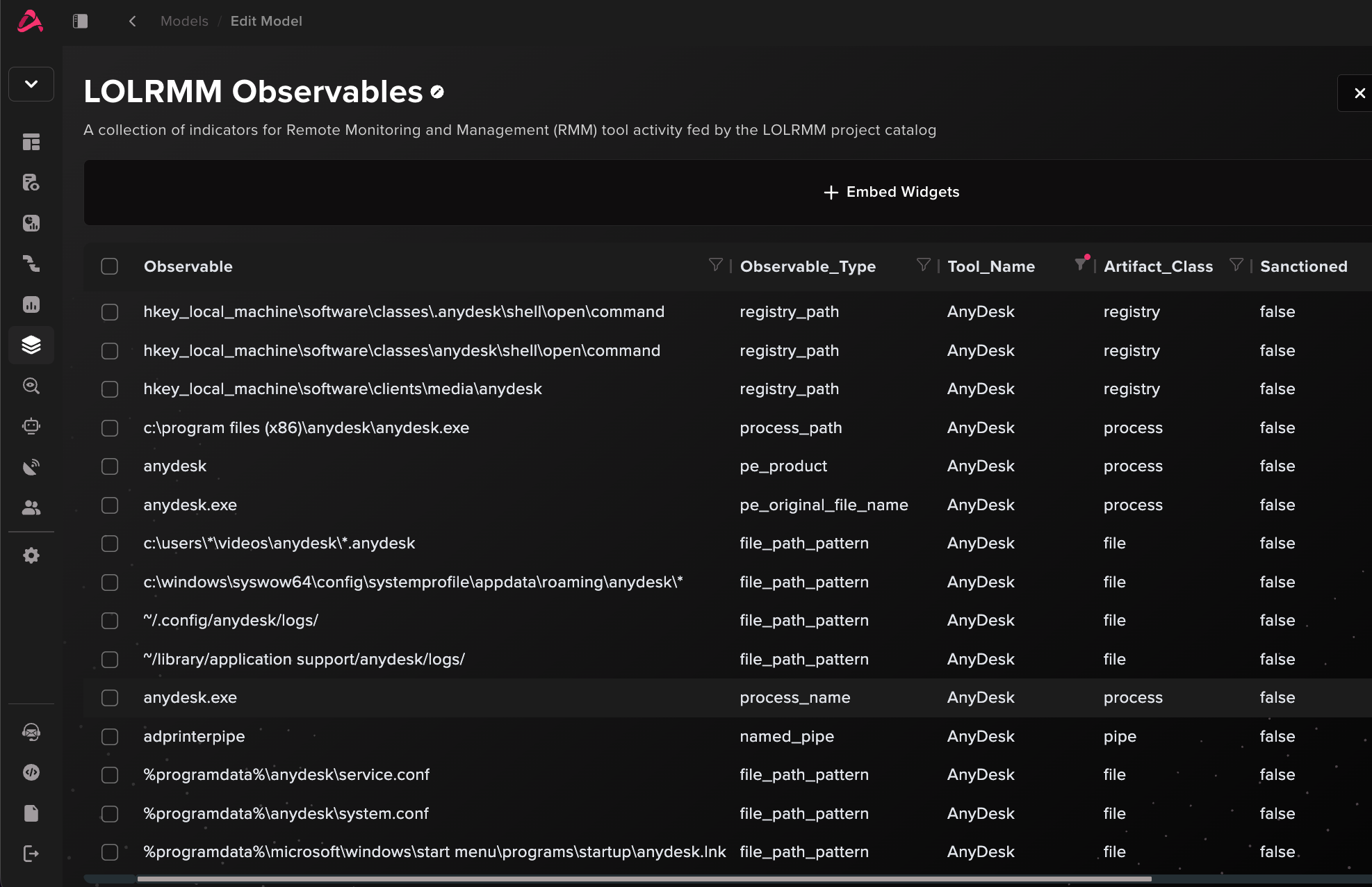
Abstract has a dedicated LOLRMM enrichment integration to pull indicators from its dataset into the platform as a lookup table. RMM observables across process, network, service, registry, file, and hash indicators are normalized and categorized for use in detections and threat hunting.
Tools considered to be legitimate business use can be marked sanctioned in the integration config to be suppressed in downstream analytics.
Detecting RMM abuse with Abstract
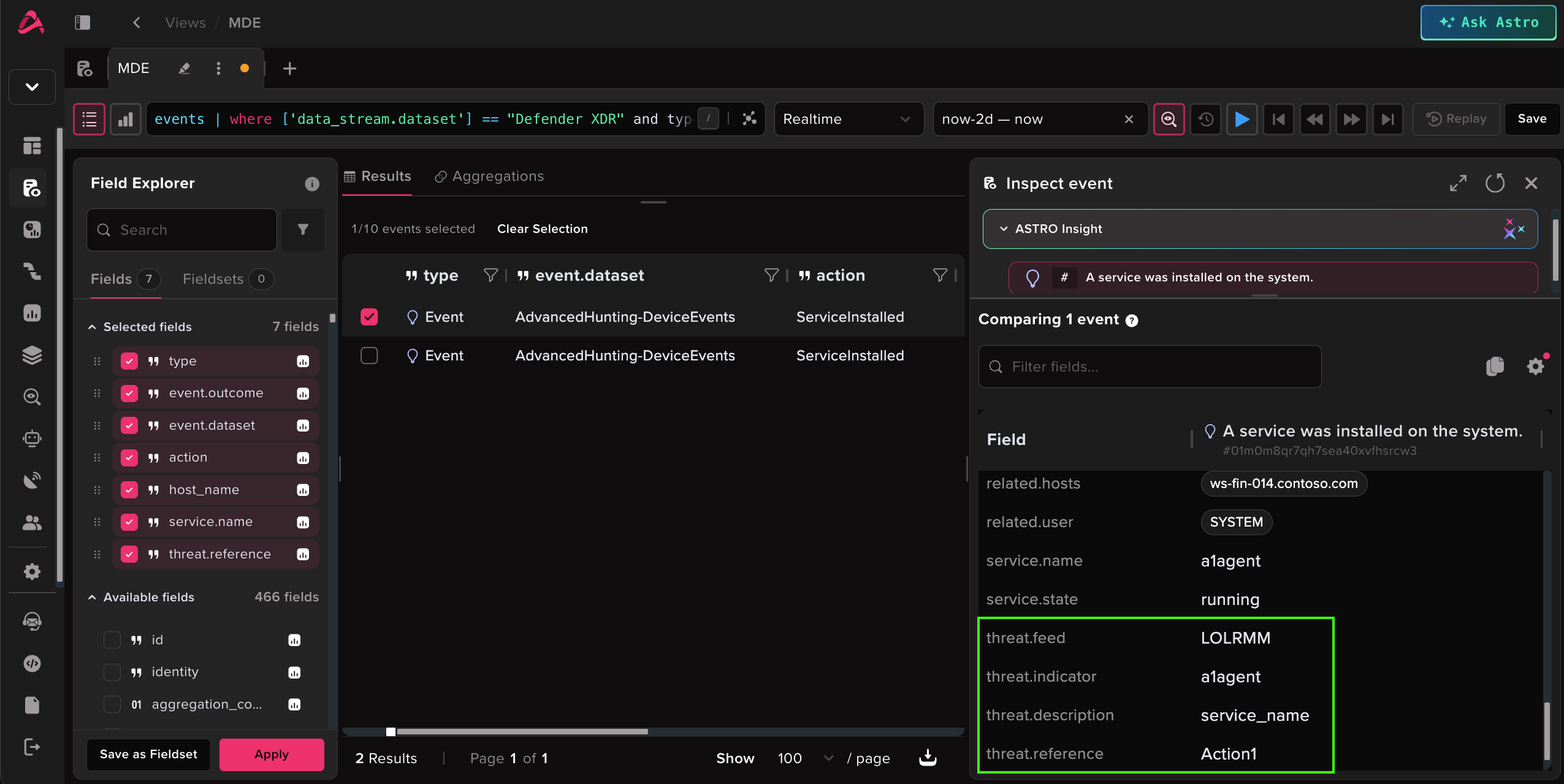
With the LOLRMM dataset at our disposal, let’s leverage it in Abstract. The integration includes out-of-the-box pipeline enrichment that can be attached to a given log source to match incoming events against the dataset. Activity flagged as RMM use directly enriches the event with the observed indicator and, most importantly, the tool detected. In this case, an Action1 service installation is detected and enriched in the pipeline.
That’s the detection per-tool component in place, but we don’t want to alert on every single observable seen. This is where we make use of a more robust approach with new terms i.e. has the user or host in the event been associated with this RMM tool before?
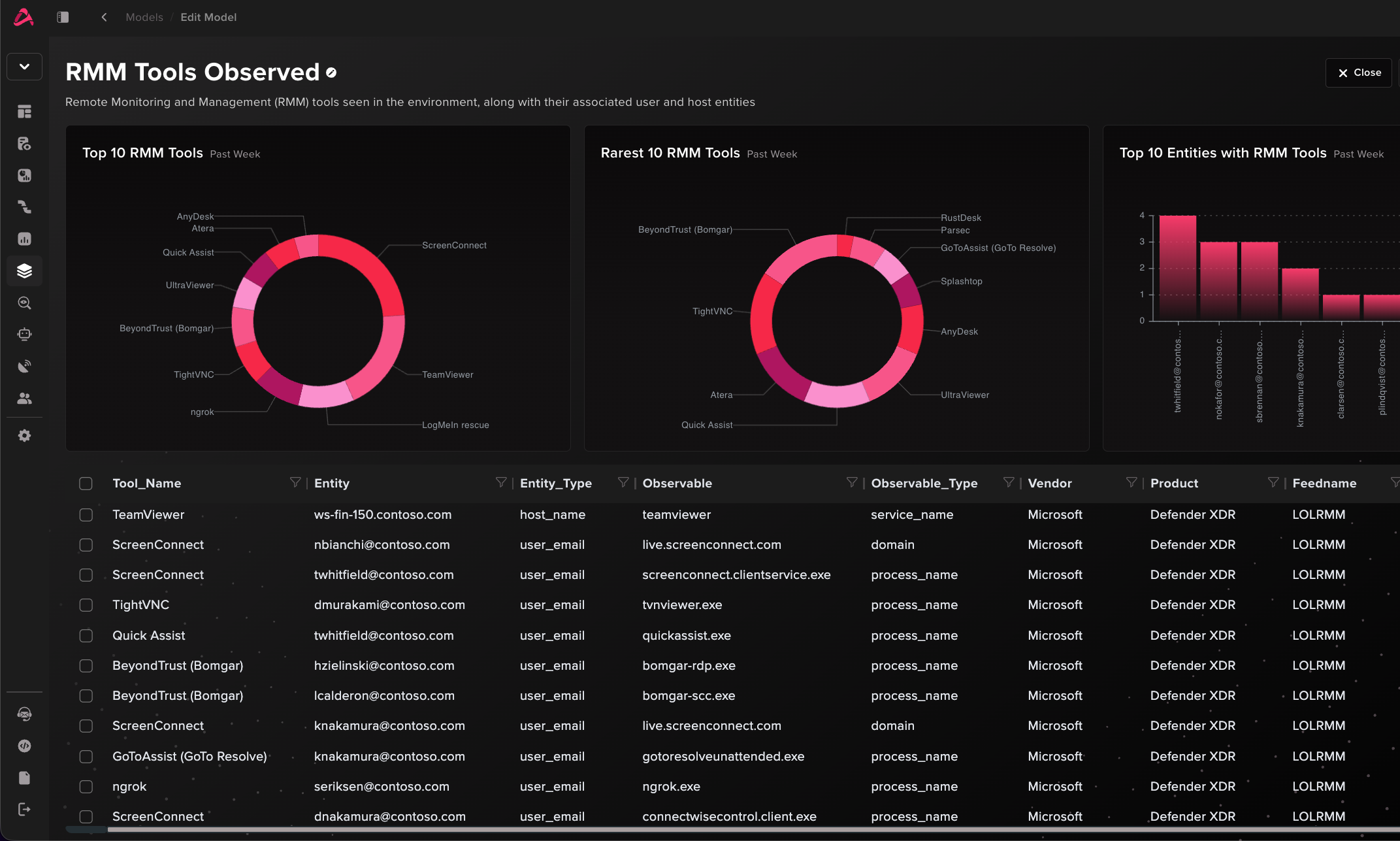
Using an additional RMM Tools Observed model, the flow looks like this:
RMM observed → Tool stored for user/host?
→ Not stored → Signal first seen RMM for user/host → Store in model
→ Stored → Not first seen, no signal
The model also doubles as an inventory of every RMM seen across the environment. Eventually entries drop off after a configured timespan to ensure infrequent activity doesn’t fly under the radar.
Composable detections
Abstract provides the following detections for first seen RMMs within a given timeframe:
- LOLRMM - First Seen RMM Tool for Hostname
- LOLRMM - First Seen RMM Tool for User Email
These alone are good signals, but they’re even better as building blocks. In Abstract, detections are composable. Analytics can be created for correlation where their findings feed into higher order rules. This allows for detection logic to be reusable, written and maintained in a modular fashion. More complex detections become an abstraction of lower-level logic. Let’s explore this with ways to correlate first seen RMMs with other activity for higher fidelity detections.
Detection 1: Microsoft Teams phishing leads to RMM
With the right log sources, we can cross-correlate activity to build an overall picture. For example, we apply the RMM first seen detection to Microsoft Defender for Endpoint Device* events and turn it into a reusable signal to correlate with a plethora of other activity.
Let’s spotlight Microsoft Teams phishing leading to RMM installation, a playbook covered in detail this year by Microsoft security research. Threat actors message users over Microsoft Teams, posing as IT or helpdesk personnel to socially engineer users into divulging sensitive information or granting host access through RMM tools like Quick Assist. We can key on the account object ID or UPN to detect when a user suspected of being phished via Teams also uses an RMM tool for the first time.
In Abstract, we’ll use the OOTB detection Microsoft Defender XDR - Potential Teams Help Desk Impersonation Message which detects 1:1 MessageEvents where the sender email or display name contains helpdesk/support keywords, and the thread includes an external user (IsExternalThread == true).
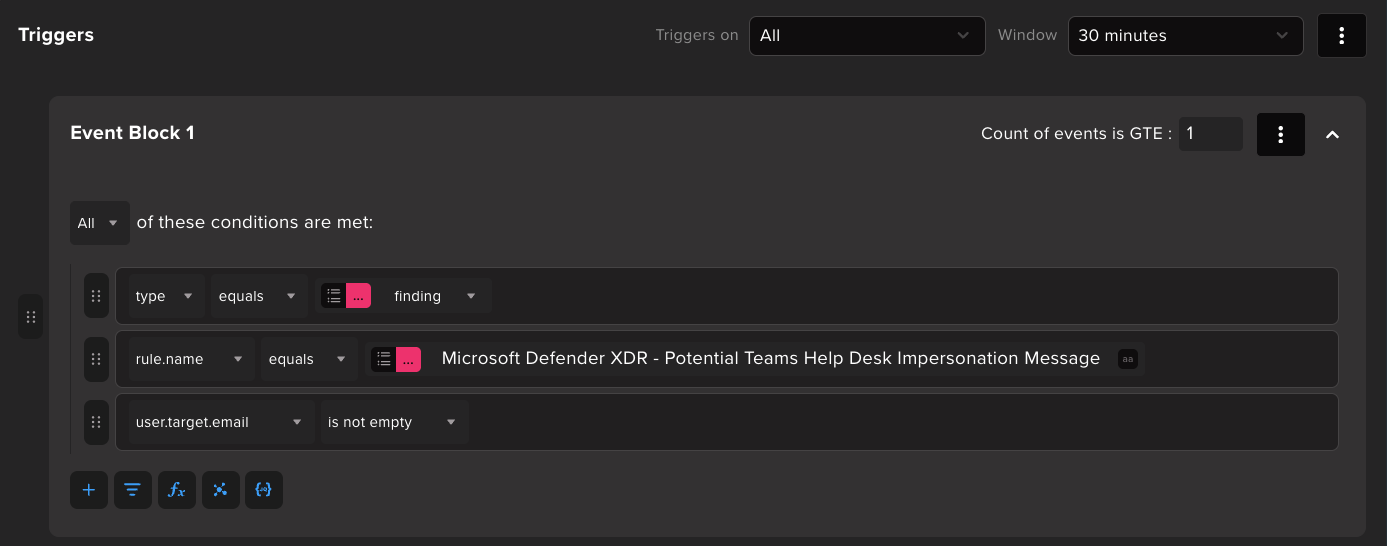
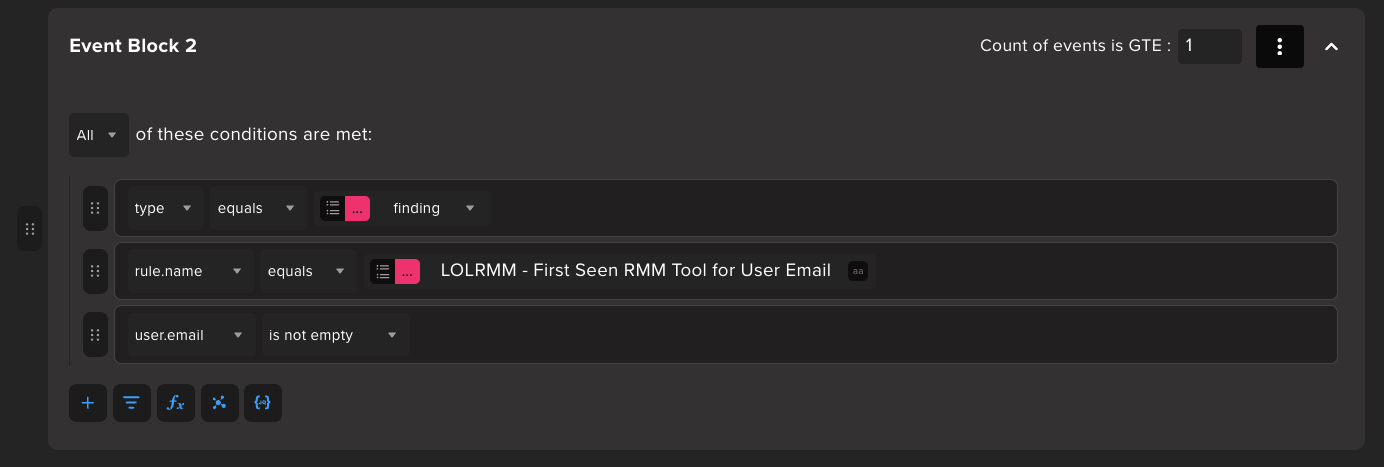
Correlate that finding within 30 minutes with LOLRMM - First Seen RMM Tool for User Email by matching on user.target.email (Teams victim) == user.email (RMM-associated identity).

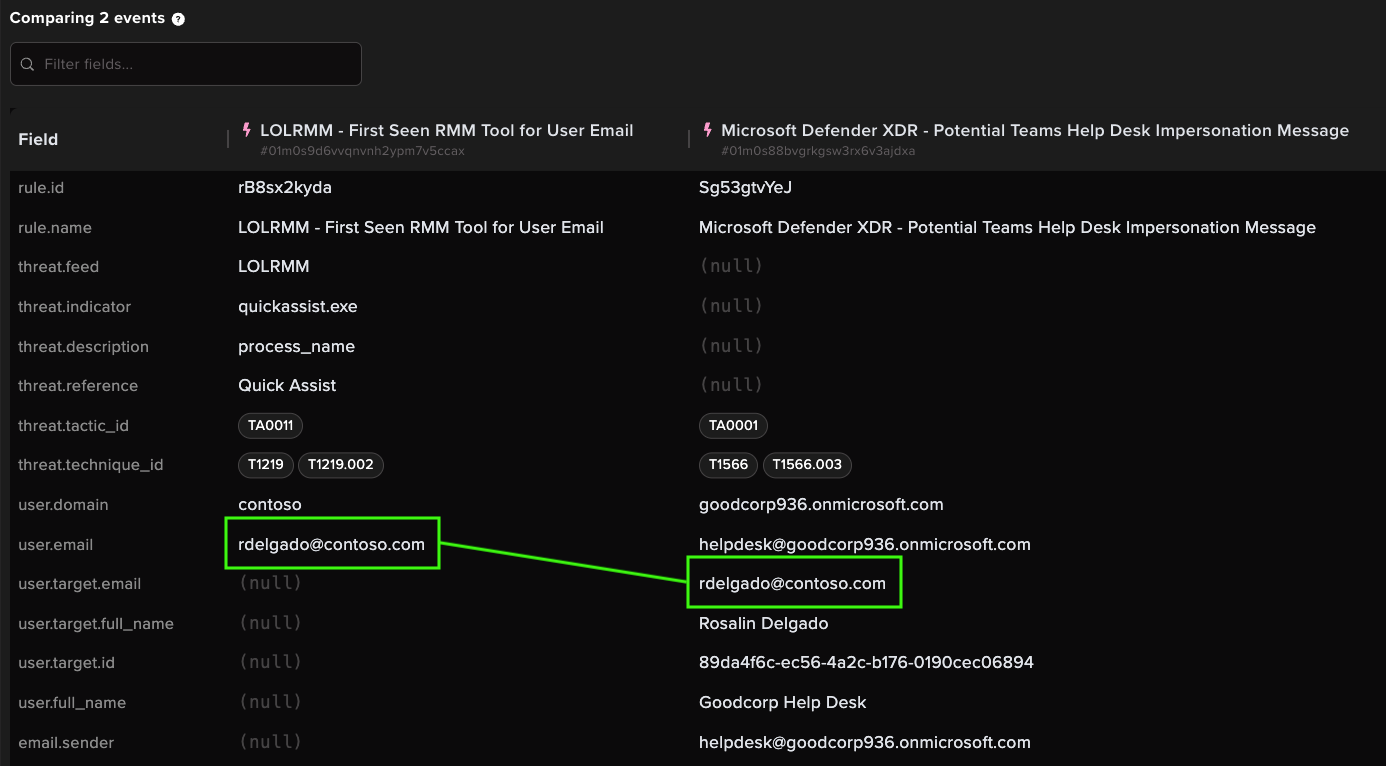
Incoming events confirm that the user.email associated with Quick Assist usage is the same recipient (user.target.email) of the Teams phishing message sent from “Goodcorp Help Desk” helpdesk@goodcorp936.onmicrosoft.com.
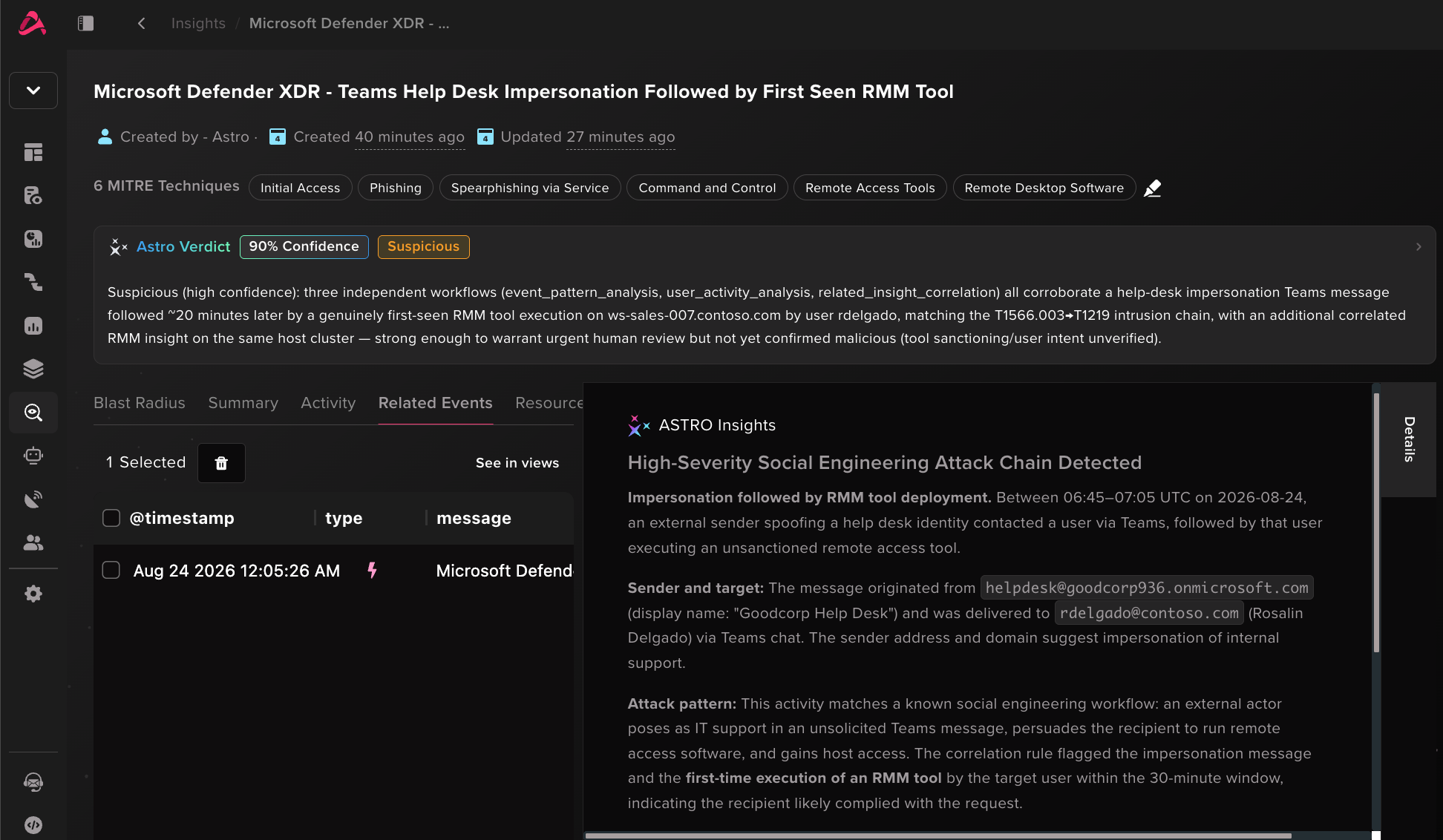
Thanks to correlation, this analytic tells the story for the analyst by the time the alert arrives.
The detection also works for M365 Audit Logs + other endpoint log sources like Sysmon. Microsoft Teams has security features to flag suspected phishing. Signal off these operations in M365 logs, then correlate with RMM usage:
Abstract provides the following M365 Teams phishing detections that can be correlated with RMM activity similarly to the Defender XDR setup above:
- M365 Teams Impersonation Detected
- M365 Teams Security Risk in Call Detected
- M365 Teams Potential Help Desk Impersonation Chat
- M365 Teams External Chat Involving Fallback Domain Tenant
Detection 2: Multiple RMMs on a host
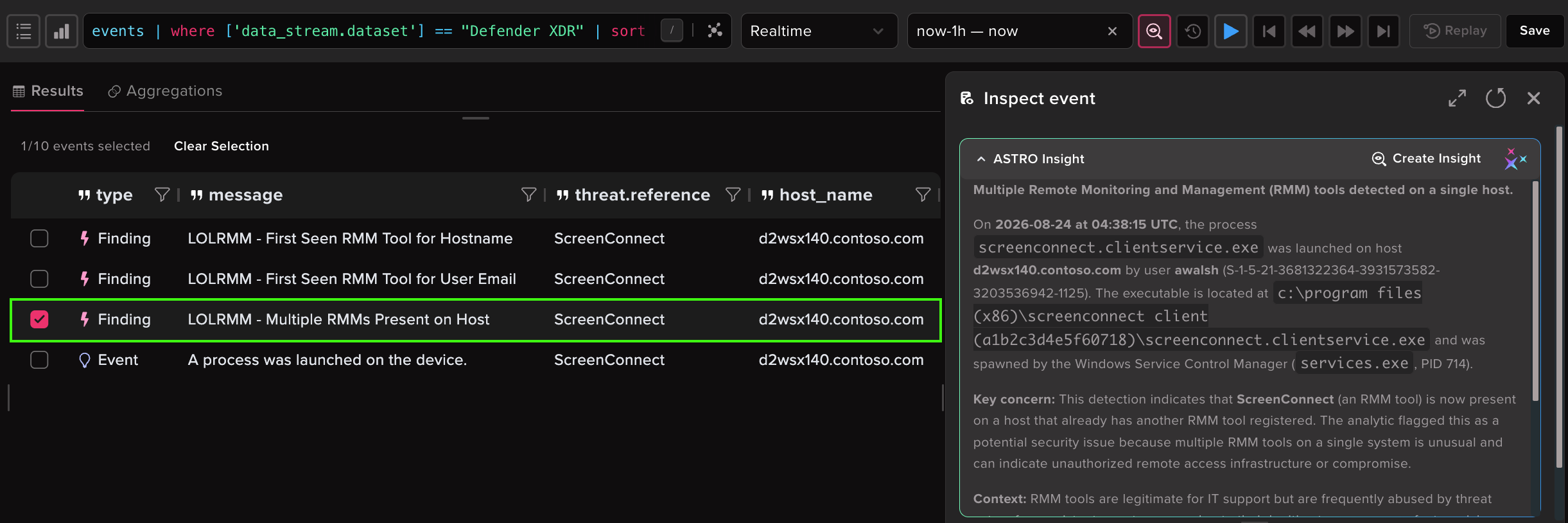
Threat actors have been known to deploy multiple RMM tools to the same host in order to ensure persistence and mitigate their risk of a tool getting blocked. They might even repeat this pattern as they move laterally to other hosts. It’s one of the RMM abuse patterns that itself is already a strong signal for investigation.
Our approach is to leverage the RMM Tools Observed model lookup as shown below. For an incoming RMM-tagged event, determine that:
- The specific RMM observed isn’t already present on the host
- The host has 1 or more existing RMMs present
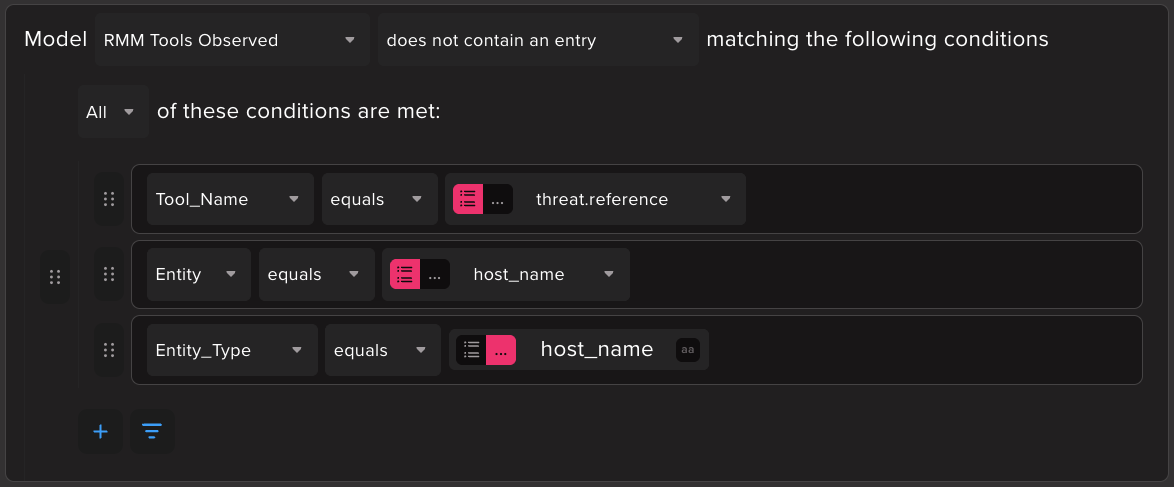
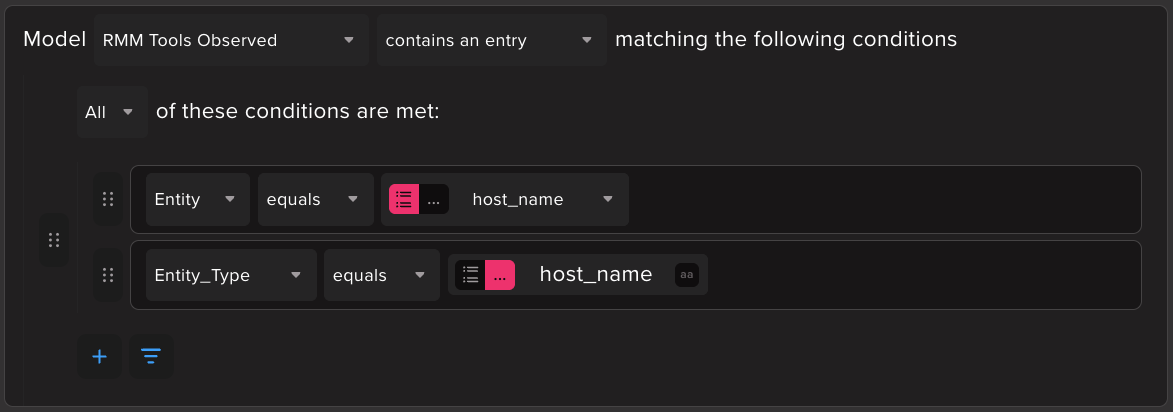
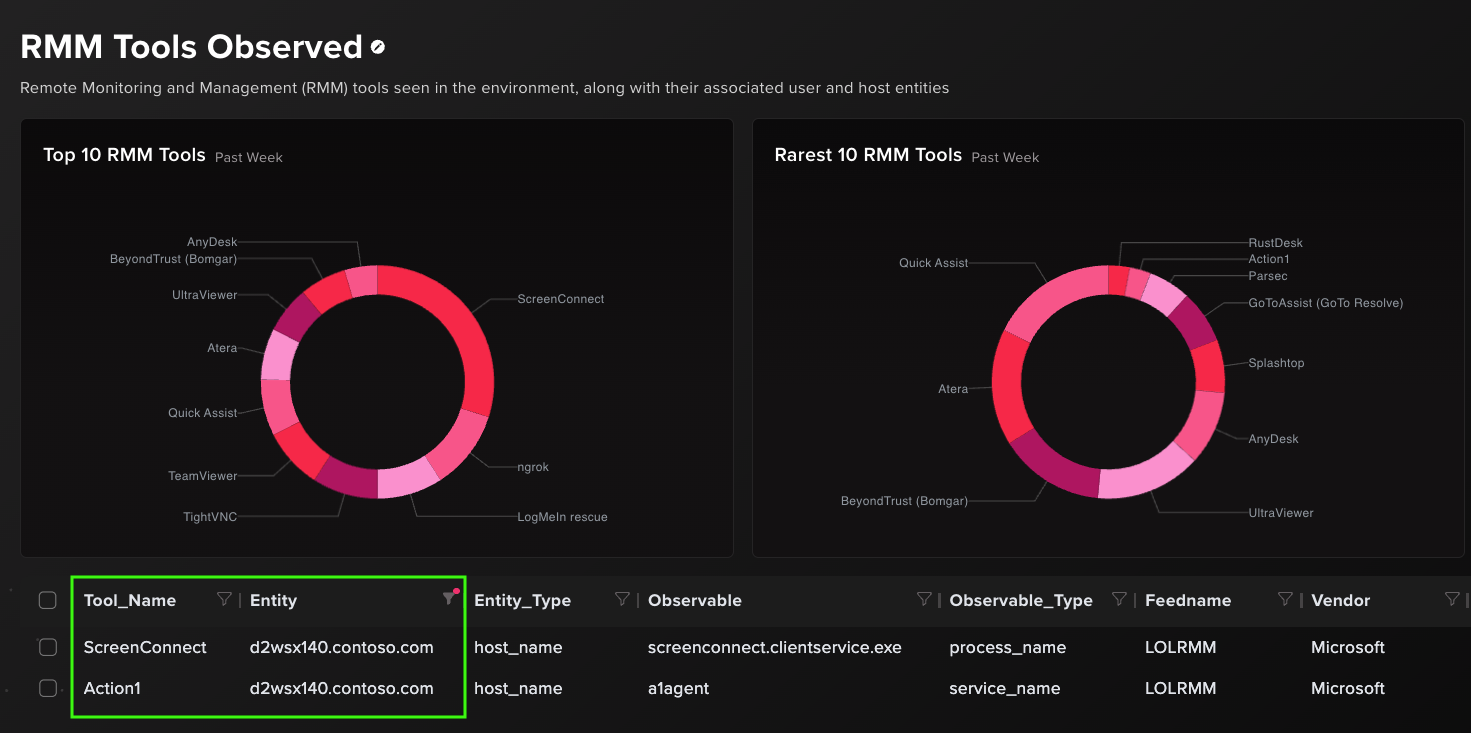
This case features a threat actor leveraging Action1 to deploy ScreenConnect via Microsoft Installer packages. Action1 had already been observed on the host by its prior service install, and ScreenConnect was later detected on the same host by process name. Daisy-chaining RMM tools like this is rarely legitimate.
Other RMM detection tips
Indicator type considerations
Detecting on process names/paths only sacrifices resiliency against evasive techniques and logging failures. With the right log sources, it’s well worth folding in network indicators like hostnames and domains. Since many commercial RMM agents have to connect out to remote endpoints managed by their product company, this presents a detection funnel that attackers generally cannot manipulate (with the exception of tools with user-managed control servers). Remote endpoint detections can be strengthened by process context such as filtering non-browser processes making the connection.
On topic of the detection funnel, many RMM tools spawn other scripts or executables during runtime as part of their normal behavior. These subprocesses are therefore less common for attackers to rename. If you’re focusing on process-based detections, detect RMMs based on those subprocesses and service binaries.
Prevalence vs new terms
We covered the new terms approach above, but not prevalence. While new terms detects first use of an RMM for a given entity compared to a historical baseline, prevalence surfaces outliers in the larger context. That is, for every RMM seen, how common is that tool in the environment relative to the overall number of endpoints and users? This can quickly show which tools are least common and less likely to be legitimate use.
Vendor built-in signatures
Some network appliance vendors already signature and categorize RMM network traffic. Outbound traffic can be traced to the originating endpoint via source address. Examples:
- Palo Alto NGFW remote-access subcategory (sample)
- SonicWall IPS remote-access category
- FortiGuard application control Remote.Access category
Patterns that lean toward abuse
Here’s a speedrun of other detections to implement, in question form.
- Was the RMM installed or was it executed from a portable binary?
- Was the RMM client or installer downloaded from an official source or application deployment process, or was it transferred in from an unexpected remote server?
- Did the RMM connect to a trial network endpoint?
- Was the RMM executable renamed? e.g. determined by PE OriginalFileName
- Did the RMM execute from a suspicious location e.g. %APPDATA% or a location not normally used by the tool?
- Was the RMM installed/executed with suspicious arguments? e.g. AnyDesk can start automatically with
--start-with-winor install silently with--silent - Does the RMM have an unexpected parent process?
- Does the RMM have suspicious child processes? e.g. ScreenConnect > cmd > powershell
- Did the RMM write a binary or script to a suspicious location?
- Is the RMM installation abnormally automated? e.g. AnyDesk can run unattended with a CLI-supplied password like
cmd.exe /c echo J9kzQ2Y0qO |C:\ProgramData\anydesk.exe --set-password - Is the RMM execution in close time proximity to findings from the same host/user?
- Did host/network enumeration happen in close time proximity to the RMM activity?
- Was an RMM installer written to disk or executed by another RMM?
- Was the RMM executed by a user connected via RDP?
- Were log files and session artifacts from the RMM deleted by a different process?
Conclusion
RMM abuse by threat actors has been hotly discussed and analyzed for years, yet in 2026 it’s still the gift that keeps on giving. With the sharp increase in RMM-based threats year over year, it’s time to take a good look at your own detection and, with hope, prevention approaches. To help on the inventory and detection side, use the LOLRMM catalog to know what’s in your environment and how to find it in the first place. In Abstract, we pulled the LOLRMM dataset for indicators, used those indicators to tag RMM activity in the pipeline, used that signal to flag new RMM tools, and correlated that with other signals as part of a composable detection approach. That’s turning data into signals, and signals into alerts.
References
- https://lolrmm.io/
- https://www.huntress.com/blog/rmm-abuse-trusted-tools-untrusted-hands
- https://www.huntress.com/blog/daisy-chaining-rogue-rmm-tools
- https://arcticwolf.com/resource/arctic-wolf-threat-report-2025-lp/arctic-wolf-threat-report-2025
- https://www.microsoft.com/en-us/security/blog/2026/04/18/crosstenant-helpdesk-impersonation-data-exfiltration-human-operated-intrusion-playbook/
- https://applipedia.paloaltonetworks.com/?subcategory=remote-access
- https://software.sonicwall.com/applications/ips/index.asp?ev=catd&catid=REMOTE-ACCESS&cid=60
- https://fortiguard.fortinet.com/encyclopedia?type=app&title_cve=&telemetry=all&category=Remote.Access

ABSTRACTED
We would love you to be a part of the journey, lets grab a coffee, have a chat, and set up a demo!
Your friends at Abstract AKA one of the most fun teams in cyber ;)
.avif)
Your submission has been received.