
How Attackers Disable CloudTrail Without Calling StopLogging or DeleteTrail
How Attackers Disable CloudTrail Without Calling StopLogging or DeleteTrail
Introduction
Most of the detection in CloudTrail is based on monitoring the activities of common APIs in CloudTrail. This includes some frequently used APIs like StopLogging and DeleteTrail. When an attacker first gains access on an AWS tenant, they'd likely first try to use these APIs to impair the CloudTrail logging to reduce the chances of detection.
For that reason, these APIs are heavily monitored and alerted on. But there are many more APIs exposed by AWS that when used correctly (or incorrectly) can degrade, blind, or completely neutralize logging. All without even calling any of the common APIs.
Capable adversaries are aware of this, and can use these less popular APIs to achieve their objectives and cover their tracks.
In this study we will explore some of these APIs, which can be combined and chained to impair logging with an equivalent level of impact.
1. Deep Dive Into APIs
1.1 PutEventSelectors - Blindspot creation
Usage -> This API is used to configure which events a trail will record. It supports both basic event selectors and advanced event selectors. An attacker, instead of stopping the trail can narrow down the selectors util the malicious actions they perform fall outside the scope of recording.
Impact -> If an attacker correctly uses PutEventSelectors API to configure the scope of the records, they can keep the log trail running, (this will prevent the raising of any suspicion). The malicious events will then be left out of scope, completely or partially masking their activity.
Technique and Steps
- Excluding Management Events completely:
- The attacker can set
ReadWriteTypetoNoneor setIncludeManagementEventstofalse. - This will stop all control-plane activities, like IAM changes, security group changes, etc. from being recorded, while continuing to record other events. When configured to
Noneit will log nothing at all.
- The attacker can set
- Narrowing down data events to exclude important sources:
- Using the
advancedEventSelectorsfield an attacker can craft field selectors that exclude specificeventSourcevalues, likes3.amazonaws.com,lambda.amazonaws.cometc. Therefore, effectively hiding data exfiltration activity.
- Using the
- Switch from logging
Allto loggingReadOnly:- This excludes all
Writeoperations while the trail continues to log read events. This gives the appearance of a healthy and active trail.
- This excludes all
A sample request which sets all these parameters would looks something like this:
{
  "TrailName": "arn:aws:cloudtrail:us-east-1:123456789012:trail/main-trail",
  "EventSelectors": [
    {
      "ReadWriteType": "ReadOnly",
      "IncludeManagementEvents": false,
      "DataResources": []
    }
  ]
}
Building Detection logic
- First check the
eventNamefield from CloudTrail which will bePutEventSelectorsAPI - Next check if the field
requestParameters.eventSelectors[].readWriteTypeis set toReadOnlyorNone - Check if the
requestParameters.eventSelectors[].includeManagementEventsis equal tofalse - Check if
requestParameters.advancedEventSelectors[].fieldSelectorshas anynotEqualsornotStartsWithconditions, which can exclude event sources. - Check if
requestParameters.eventSelectors[].dataResourceshas an empty array or not. If data was previously configured, then putting an empty array will result in removing all the pre configureddataResources
If any of these conditions are true then its worth raising an alert with High / Critical severity.
1.2 DeleteEventDataStore - Deleting the Data Lake
Usage -> This API initiates the deletion of a CloudTrail lake event data store. The store enters PENDING_DELETION state and is finally permanently deleted after 7 days.
Per-conditions:
TerminateProtectionEnabledmust befalse(to do thisUpdateEventDataStoreAPI may also be called).FederationStatusmust also be set toDISABLED. For thisDisableFederationAPI may also be called.
Impact: CloudTrail Lake is very important and is used as the centralized, long-term query store for security investigations. Deleting it will destroy months or years of aggregated event history. Even with the 7 day soft-delete window, it is still very dangerous.
So for DeleteEventDataStore you just have to send the the name of the data lake as follows:
{
  "EventDataStore": "arn:aws:cloudtrail:us-east-1:123456789012:eventdatastore/EXAMPLE-store-id"
}
Building Detection Logic
- First the
eventNamehas to beDeleteEventDataStore - Then the
responseElements.statuswill be equal toPENDING_DELETION - Also, you can correlated with a preceding
UpdateEventDataStoreAPI withterminationEnabled: falseand / orDisableFederationAPI calls.
1.3 StopEventDataStoreIngestion - Halting the Event Pipeline
Usage: This API stops live event ingestion into CloudTrail Lake event data store. Since, existing data is preserved, no new events are recorded, thus raising less suspicion.
Pre-conditions:
- First the Event Data Store
statusmust be set toENABLED - The
eventCategorymust beManagement,Data,NetworkActivity, orConfigurationItem.
Impact:
- Even after using this API the data store still exists and still shows as
ENABLEDin the console. Also past data remain queryable. - However, new events completely stop flowing into the data lake.
- The trail keeps flowing into the S3 bucket for CloudTrail, therefore, if you're querying from Data Lake and not from S3, it gives the attacker a gap in detection and opportunity to perform malicious activities.
To use this API you just need to supply the EventDataStore only
{
  "EventDataStore": "arn:aws:cloudtrail:us-east-1:123456789012:eventdatastore/EXAMPLE-store-id"
}
Building Detection Logic
- The
eventNameshould be equal toStopEventDataStoreIngestioni.e. the API name - The value of
responseElements.statusshould change toSTOPPED_INGESTION. This needs to be confirmed later usingGetEventDataStoreAPI, sinceStopEventDataStoreIngestionAPI returns an empty response body. - Finally check if the API call is a success.
Therefore, just the successful calling of this API should be enough to trigger an alert.
1.4 PutInsightSelectors - Stopping Anomaly Detection
Usage: This API configures which CloudTrail Insights event types are collected for a trail or event data store. If the attacker passes an empty list of Insight types, it disables all anomaly detection.
Impact: CloudTrail Insights are used for automatically flagging unusual API call rates and error rates. When Insights are disabled, it removes the automated anomaly detection layer that could catch brute-force enumeration, credential stuffing or probing actions. The trail continues to log raw events, but the system no longer generates alerts for abnormal patterns.
To use this API you need to pass the trail name and keep the InsightSelectors field empty
{
  "TrailName": "arn:aws:cloudtrail:us-east-1:123456789012:trail/main-trail",
  "InsightSelectors": []
}
Building Detection Logic
- First check if the
eventNameis equal toPutInsightSelectors - Then check if the
requestParameters.insightSelectorsarray is empty or not
This is enough to trigger an alert that something is removed from Insights.
1.5 DeleteResourcePolicy - Removing Guardrails
Usage: It removes the resource-based policy from a CloudTrail channel or event data store. In an organisation, resource policies control which accounts can send events and who can manage the resource.
Impact: Resource policies on CloudTrail channels enforce cross-account event delivery and prevent unauthorized modifications. Therefore, deleting them can have the following impact:
- An attacker is allowed to stop cross-account event delivery from member accounts
- Restrictions that prevent non-management accounts from modifying trail configuration are removed
- The policy chain that protects organization trails breaks
However, there are some caveats for calling this API, such as that it can only be called from the management account or delegated administrator.
The request field required the Resource ARN of the channel whose policy we want to remove
{
  "ResourceArn": "arn:aws:cloudtrail:us-east-1:123456789012:channel/EXAMPLE-channel-id"
}
Building Detection Logic
- First check the
eventNameisDeleteResourcePolicy - Then check if the
eventSourceequal tocloudtrail.amazonaws.com - Finally check if the request response is successful or not
1.6 DeregisterOrganizationDelegatedAdmin - Blocking Org-Wide Trail Management
Usage: This removes the delegated administrator account for CloudTrail within the AWS Organizations. The delegated administrator is the account authorized to manage org level trails on behalf of the management account.
Impact:
- Organization level trails provide centralized logging across all member accounts.
- This delegated admin model allows a security account (which is not the management account) to manage these trails.
- Deregistering the delegated admin can:
- Break the delegated account's ability to create/modify/delete org trails
- Leave the org trails in an orphaned or unmanageable state.
- Force all trail management back to the management account, which may not have the capability to monitoring.
{
  "DelegatedAdminAccountId": "123456789012"
}
It only requires the DelegatedAdminAccountId for execution.
Building Detection Logic
- Checking the
eventNamefield to beDeregisterOrganizationDelegatedAdminAPI - Also the response should be a successful one.
This is enough to trigger an alert, since this API requires high privileges to execute.
1.7 DisableFederation - Stopping Athena Query Access
Usage: This disables the Lake Formation / Glue / Athena Federation for a CloudTrail Lake event data store. Once disabled, security teams can no longer use Athena SQL to query cloudTrail data.
Impact: It removes a very important investigation tool that incident responders heavily rely on: the Athena queries. These are used to search CloudTrail data during active investigations. Therefore, disabling federation during an attack makes it more difficult for the defenders to investigate CloudTrail.
This API can be used in conjunction with other destructive APIs like DeleteEventDataStore to impair logging and investigation altogether.
Also, DisableFederation is required to be called before the DeleteEventDataStore API. Therefore, these 3 APIs can also be correlated to trigger an alert.
Building Detection Logic
- Check for the
eventNameto beDisableFederation - Check for a successful execution of the API
- Correlating
DeleteEventDataStoreandDisableFederationAPIs can also indicate an alert of higher severity
2. Possible Scenarios for Creating Evasions
Used in combination, these APIs can allow an attacker to impair CloudTrail logging and erase the footprints that would indicate the that would indicate logging was impaired in the first place.
Here we will be discussing about one such possible combination.
Silently Deleting DataLake
This section discusses a sequence of AWS API calls which are responsible for silently disabling and then destroying CloudTrail Data Lake.
The sequence of API calls are as follows:
UpdateEventDataStore -> DisableFederation -> DeleteEventDataStore -> PutEventSelectors
- UpdateEventDataStore -> Used to set
terminationProtectEnabledtofalse - DisableFederation -> Used to disable
Athena/Gluefederation (required precursor) - DeleteEventDataStore -> Used to put the DataLake into a
DELETE_PENDINGstate for 7 days. - PutEventSelectors -> Used to narrow down the trail selectors to hide follow-on activity or completely remove trail selectors.
The usage of this technique comes from the fact that each step might not trigger an alert by itself and the alerts triggered by these APIs individually may not give much context.
UpdateEventDataStore when used without additional context will look like a routine configuration. Similarly with DisableFederation and DeleteEventDataStore:they may look like normal maintenance action or alert with moderate severity. Also, if we just check the execution of PutEventSelectors APIs, it may also look like normal maintenance action without additional context or checking the rest of the parameters.
Building Detection Logic
In order to build detection logic, we will need to correlate each of these events, as well as look at other aspects of these events that will give us a better understanding of the attack.
First we will check the CloudTrail log for UpdateEventDataStore. The responseElement JSON should have the field terminationProtectionEnabled set to false.
Now we will check that if the same user has done the rest of the API calls within a short period of time. Next would be if DisableFederation and DeleteEventDataStore are called one after another.
Finally, along with all these API calls, we will find that the same user has called PutEventSelectors API with the following detection logic:
- The field
requestParameters.eventSelectors[].readWriteTypeis set toReadOnlyorNone - The
requestParameters.eventSelectors[].includeManagementEventsis equal tofalse requestParameters.advancedEventSelectors[].fieldSelectorshas anynotEqualsornotStartsWithconditions, which can exclude event sources.requestParameters.eventSelectors[].dataResourceshas an empty array or not. If data was previously configured, then putting an empty array will result in removing all the pre configureddataResources
Understanding and investigating the logs
We will be going through the important parts of the log in the Abstract platform and on CloudTrail as well.
- First we take a look at the
UpdateEventDataStoreAPI
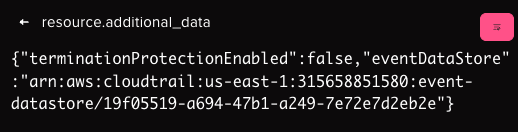
This shows that the value of terminationProtectionEnabled is set to false. Also, when we see this value in responseElements field we can confirm that this was successfully executed also.
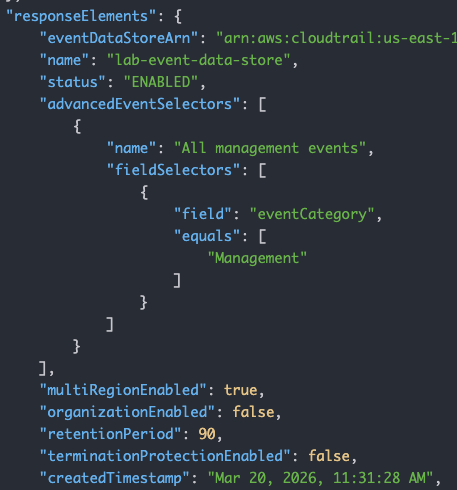
- Next There will 2 consecutive events,
DisableFederationandDeleteEventDataStorewhose successful execution only tells us that an attack was carried out. - Finally, lets take a look at
PutEventSelectorsAPI call, when an attacker tries to remove all data selectors.
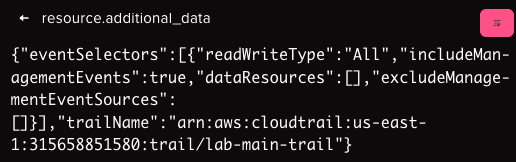
This shows that how the dataResources value is completely empty thus blinding the trail on all data resources.
Conclusion
This study shows that there are multiple APIs which are well documented within AWS, and which when used in a certain way can lead to an attacker completely blinding CloudTrail and other monitoring systems. Without advanced correlation to tie all of these events together, your DFIR teams can easily be stuck behind the 8 ball.
Since, these APIs are not taken into consideration by most detection rules, they usually fly under the radar or may even create a confusion between False Positives and True Positives. For example, if we trigger on all successful PutEventSelectors calls, an analyst would need to check the requestParameters field for every event manually in order to understand if the call was actually a legitimate maintenance operation or a malicious method to blind CloudTrail.
With Abstract, all of these advanced correlation rules, and more, are available from the moment you enable the CloudTrail integration.
Detecting What Others Miss with Abstract
The techniques covered in this research share a common trait: individually, they look like routine maintenance. Collectively, they represent a coordinated effort to blind your logging infrastructure before an attack unfolds. Most SIEM rules aren't built to see that pattern. They fire on individual events, not on the sequence.
Abstract's streaming correlation engine is built specifically for this problem. Rather than waiting for data to land in storage before running detection logic, Abstract evaluates events in-stream, correlating API calls across time, user context, and sequence as they happen. When UpdateEventDataStore disables termination protection, then DisableFederation fires, then DeleteEventDataStore follows, Abstract connects those dots in real time, not after the fact.
The detection rules that catch these techniques ship out of the box, built and maintained by ASTRO, Abstract's internal team of detection engineers and threat researchers. ASTRO continuously publishes detection content tuned for streaming execution, which means coverage for evasion techniques like these is live from day one of your CloudTrail integration. No custom rule writing required.
The eight rules listed below are available the moment you connect CloudTrail to Abstract.
Abstract Detection Rules
The Abstract platform can correlate and detect all of these, out of the box. The following are the detection rules for the techniques in this study:
- AWS CloudTrail Impair Insight PutInsightSelectors API
- AWS CloudTrail Detect Event Lake Deletion to Bypass Logging
- AWS CloudTrail Detect Impair Logging using DeleteEventDataSource
- AWS CloudTrail Detect StopEventDataStoreIngestion
- AWS CloudTrail Impair Logging StopEventDataStoreIngestion Followed by Persistence
- AWS Modify CloudTrail Using PutEventSelectors Succeeded
- AWS CloudTrail Remove Delegated Admin DeregisterOrganizationDelegatedAdmin API
- AWS CloudTrail Remove Resource Based Policy DeleteResourcePolicy API
ABSTRACTED
We would love you to be a part of the journey, lets grab a coffee, have a chat, and set up a demo!
Your friends at Abstract AKA one of the most fun teams in cyber ;)
.avif)
Your submission has been received.