
Detecting AI Attack Agents: Origin Bypass, JA3 Mismatches, And Anti-Forensics Detections

The ASTRO team here at Abstract has been collaborating with Eyal Sela and the Gambit Security team recently. Gambit has uncovered "a massive, ongoing criminal exploitation campaign using Cairn". You can read more about it here:
https://gambit.security/blog-posts/autonomous-ai-agents-online-retailers-25-a-company
We have been examining attacker AI agent tradecraft quite closely in these recent autonomous agentic AI attacks. Doing so has yielded a lot of very useful operational knowledge on how these AI attacks are orchestrated, as well as many techniques which should have detections and preventative measures prioritized. We will be publishing much more in the following weeks as well.
When diving into these toolkits, there were a number of details which stood out, much of which should be detectable over the wire, provided you are instrumented properly and have sufficient visibility. We will go through these TTPs in the blog to help you better prevent and defend against agentic AI attacks.
One item of particular note is the circumvention of some of the origin controls, such as WAF/CDN bypassing. While this technically should probably fall under the category of misconfigurations, this technique is certainly worth verifying in your own environments before a threat actor discovers it.
The 3 topics we'll be diving into in this blog are:
- The origin-discovery playbook: Why you must test your own bypassability before they do
- The JA3-to-User-Agent ratio: AI loves reusing the same tls connection libraries, be it curl, python or something else
- The anti-forensics doctrine: A gift list of high fidelity process detections
1. Origin bypass: your WAF is optional to them
One playbook in the recently uncovered adversary AI skill library is called FUCK-CDN (https://github.com/0xShe/FUCK-CDN) and is an adapted, token-cost-optimized open-source methodology for enumerating, then bypassing CDN and WAF infrastructure. The tool states the doctrine plainly: a CDN is "not a wall; it's a detour sign."
The skill supports putting in API keys from 8 different security tools, including Shodan, Censys, and VirusTotal:
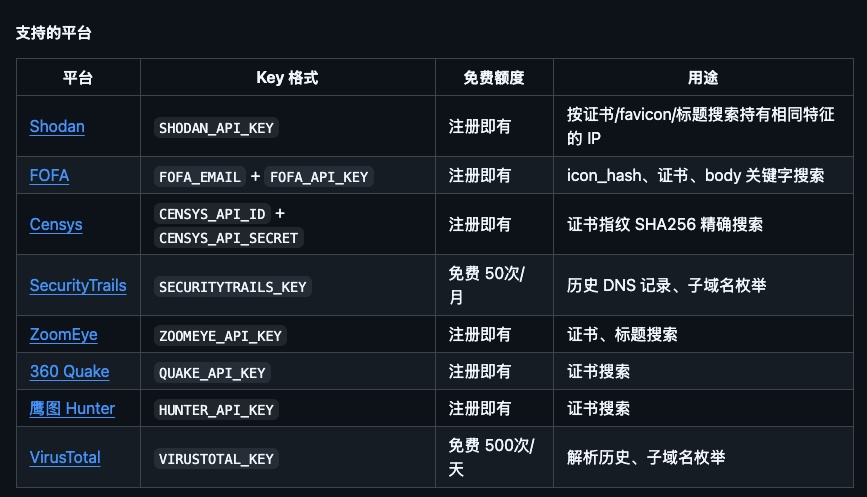
With dozens of methods, executed in priority order, there are all sorts of artefacts which can be gleaned to help understand what the back end system IPs are:
- P0 (free): SPF/MX/TXT leaks (
v=spf1 ip4:…= probable origin) · IPv6 AAAA records (frequently unproxied) historical DNS (their highest-hit-rate method: pre-CDN A records) · DMARC CNAMEs pointing at parent-company domains - P1: certificate serial/SAN mining · CT logs · staging-subdomain enumeration — their #1 Cloudflare method (orange-cloud prod, grey-cloud
staging./dev./uat.straight to the origin) · leaky headers (X-Real-IP,X-Origin-IP,X-Backend-Server,Via) - P2: space-search engines · favicon mmh3-hash search (the skeleton key against hardened origins; historical scans indexed the origin's port-80 favicon even when 443 is allowlisted) · full port sweeps · ASN-ownership attribution
- P3: email triggering — register or password-reset against the target, then read the
Received:headers; self-hosted MTAs hand over the origin IP - P4: archive archaeology, passive intel, cloud-internal-name guessing,
Host: localhost/ XFF header injection
Candidates are confirmed with a certificate-serial ladder: SNI handshake against the candidate, compare serial to the CDN edge, then a no-SNI handshake to read the default cert. Default cert belonging to another domain + Server: nginx/apache/IIS ⇒ origin confirmed. Every subsequent attacker request then pins it:
curl -sk -m 15 --resolve <host>:443:<origin_ip> "https://<host>/…" -A "<browser UA>" -x socks5h://<proxy>
The CDN, and your WAF, are simply not on the path anymore.
Test yourself, first
Run some of these checks against your own estate. You can find an example script in the Appendix at the bottom to get you going in the right direction. A clean run prints nothing from checks 1–3 and a hash from 4 that returns no origin hits. Anything else is worth chasing down.
Prevention
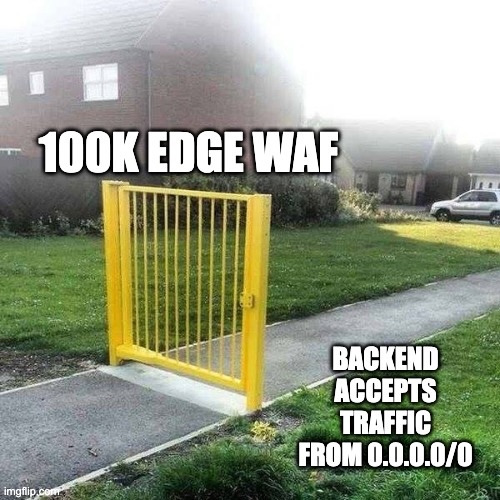
This will probably come as very little surprise to many environments, but origin is supposed to the front door which all this traffic originates from. Spending time to ensure your edge CDN/WAF aren't bypassable will allow you to put a lot more trust, as well as additional countermeasures, at the front door where they belong.
The control that moots the entire playbook: origin firewalls accept 80/443 exclusively from your CDN's published ranges. Every method above dies at that step.
2. The JA3-to-UserAgent ratio: the thing the agent isn't hiding
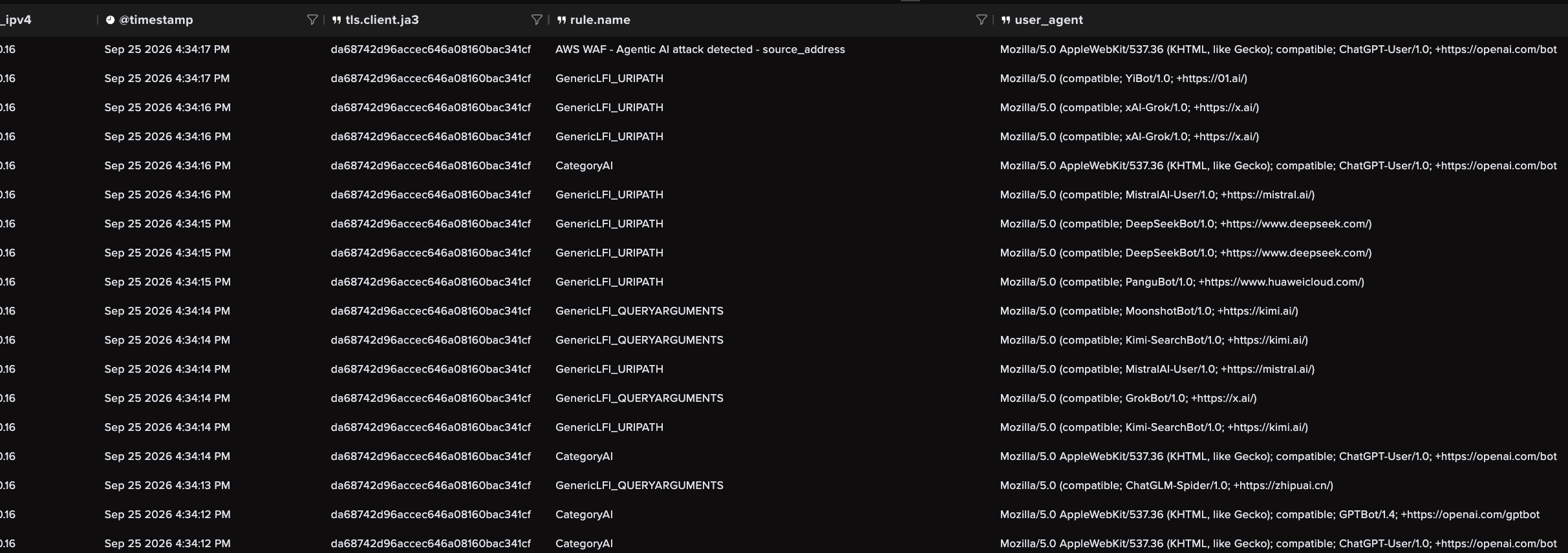
In this particular agentic AI attacker, the agent's HTTP tier is curl and python-requests. Its User-Agent tier is whatever the model claims, usually Chrome. The TLS ClientHello is a property of the library used to connect. The headers are essentially free text.
Because the AI is so great and cranking out either curl one-liners and/or python scripts, what we end up seeing is multiple user agents from the same TLS library. Through either reconnaissance and/or active exploitation many HTTP(S) sessions are established and many User Agents forged. This ends up showing itself in the ratio of User Agents to JA3 values relatively quickly. This is something worth signaling (and tuning) within your environment.
Here is what some agentic attacks looked like within the Abstract platform:
And before you get into the 'ack-chew-ally certain IP addresses in OUR environment are known to have multiple UAs' rhetoric, remind yourself of the very famous Sun Tzu quote:
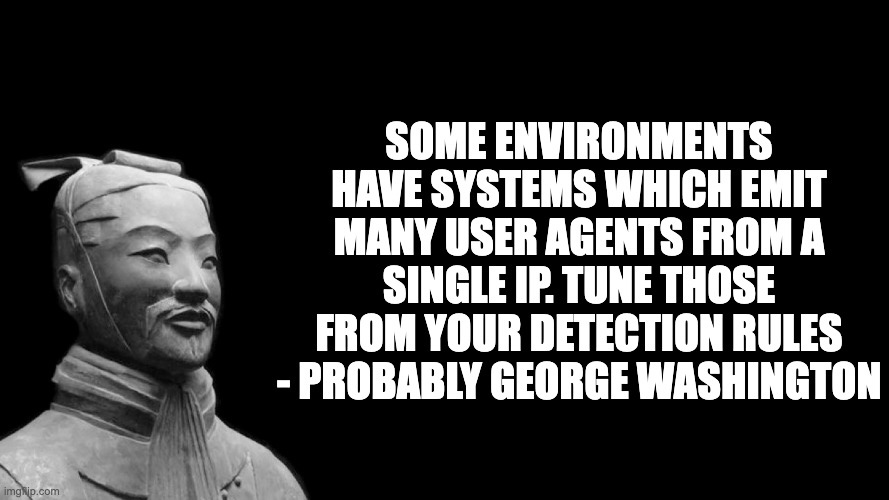
Tuning these types of anomalies for your environment ends up paying huge dividends. Knowing where adversaries are spinning attributes within your data sources can surface outliers more readily.
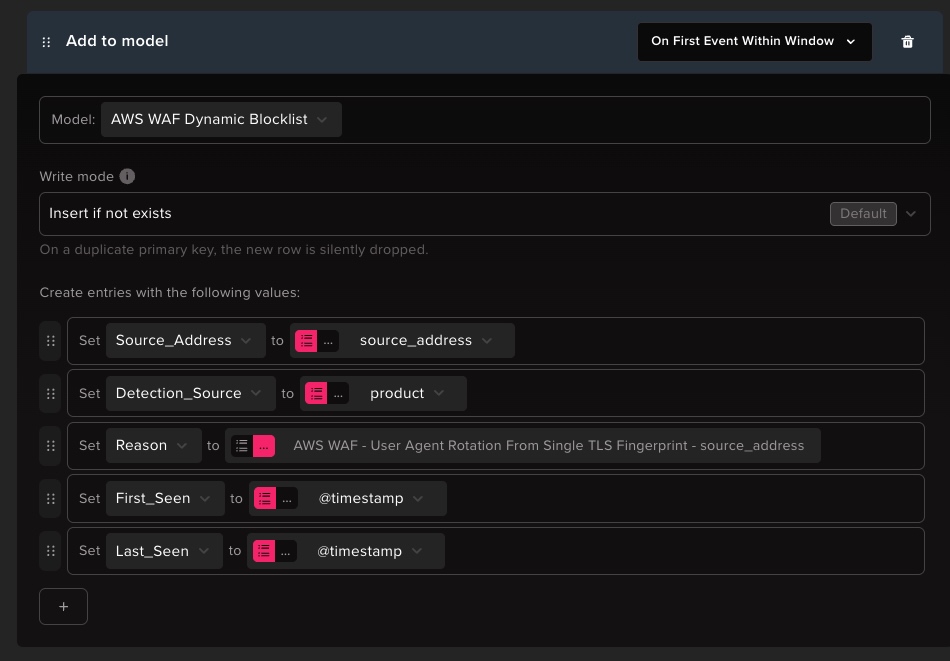
When we were looking at dynamically blocking this within Abstract's plaftorm, we focused on the traffic which was generating multiple User Agents from the same source IP address and JA3.
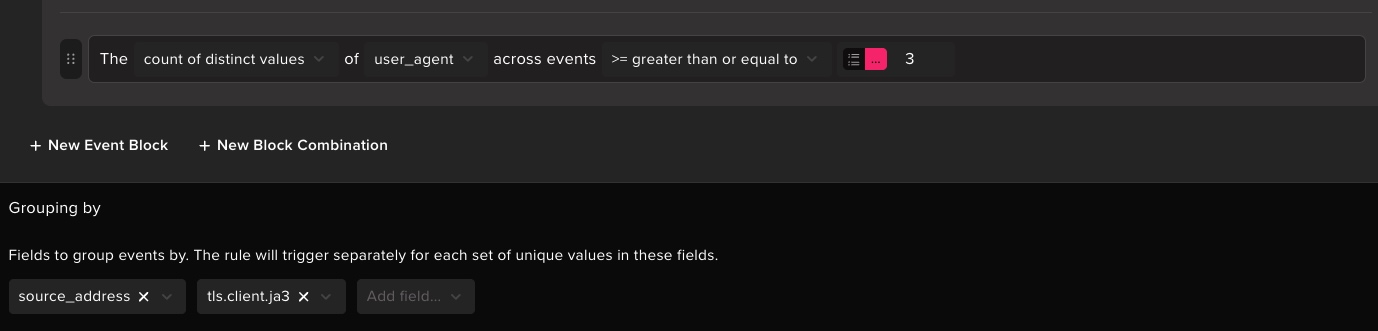
Within the Abstract platform, we have the concept of an action engine. This action engine allows our customers to interact, both deterministically and with AI agents, with external systems. It is at the heart of all of the autonomic responses to our threat detections, and allows us to dynamically respond to security threats in realtime.
By understanding how these patterns manifest themselves in the logs, we can take action in realtime by updating Abstract's Dynamic Blocklist model. We will be going through these and more autonomic detection and responses in a later blog (stay tuned!).
With Abstract's streaming detection engine, we can correlate multiple different sources of data, be they WAF, load balancers, reverse proxies, or any other middleware / security appliance. Using this information in realtime, we can trigger dynamic, autonomic responses to both human and agentic AI attacks.
3. Anti-forensics: their cleanup doctrine is our detection list
This particular AI agent threat actor operates with explicit direction: ephemeral artifacts are destroyed in real time.
Tools, scripts, staging files, and other artefacts are destroyed immediately after use by the attacker.
For those running file-integrity monitoring, a well tuned ruleset will detect many of the persistence mechanisms used (i.e. web shells via new JSP/ASP files showing up in production folders).
The cleanup itself is a sequence of process-creation events no legitimate web stack ever produces. Some examples to enable alerting on follow (expect all of these under the web user (www-data, apache, tomcat, …) or as children of php-fpm/java/httpd):
# timestamp forgery
touch -r <webroot>/index.php <webroot>/<shell>.php          # align mtime to a sibling
touch -t 202401150830.00 /path/to/file                       # explicit backdate
debugfs -w /dev/sda1 -R "set_inode_field <file> ctime <ts>"  # ctime via raw inode edit

# file deletion
shred -vfz -n 3 /tmp/tool.bin && rm -f /tmp/tool.bin
find /tmp /var/tmp /dev/shm -user $(whoami) -newer /etc/passwd -delete 2>/dev/null

# log tampering
sed -i '/<attacker_ip>/d' /var/log/auth.log
utmpdump /var/log/wtmp | grep -v "<attacker_ip>" | utmpdump -r > /tmp/wtmp_clean && mv /tmp/wtmp_clean /var/log/wtmp
> /var/log/lastlog
journalctl --vacuum-time=1h
Some additional interesting process lineage was seen on Windows systems (with w3wp.exe/java.exe parent processes):
# web shells looking for security tooling
Get-Process | ? {$_.ProcessName -match "MsSense|carbon|crowd|cylance|sentinel|tanium|falcon"}
# randomizing time stamps in windows
Get-ChildItem "C:\inetpub\wwwroot" | % { $_.LastWriteTime = (Get-Date).AddDays(-(Get-Random -Min 30 -Max 365)) }
# shredding on Windows
cipher /w:C:\temp
# clearing the security log
wevtutil cl Security
Timing matters: because cleanup is real-time, an anti forensic alert doesn't mean "an attacker was here." It means the attacker is on this host right now, seconds after some operation.
Two hunts that outlive their cleanup:
- ctime > mtime on webroot scripts.
touchcan't move ctime; theirdebugfsescalation can, but raw-inode edits are auditable in themselves. Weekly sweep:.php/.cfm/.jsp/.aspxin webroots with recent ctime, old mtime, no matching deployment = timestomped. - Off-box logs preserve system event timelines. Every tampering command above edits local files. Remote-forwarded, append-only auth/syslog/wtmp logs mean data stays intact in your SIEM no matter what they scrub on the host.
Abstract Detections
Abstract customers should look for the following managed detections:
Preventative measures
- Origin firewall: 80/443 from CDN ranges only. One control kills the entire bypass playbook.
- Quarterly self-audit: web subdomains available outside origin, AAAA/SPF leaks, historical-DNS exposure, your favicon hash in the space-search engines, unproxied ports, leaky backend headers.
- Confine the web user's execution surface: Non-interactive/restrictive shells wherever possible. AppArmor/SELinux (put your big kid pants on!).
- Ship logs off-box (to the Abstract platform =D )
- FIM on webroots with creation alerts, including cache and compile-artifact directories.
Conclusion
The AI attacker agents are fast, tireless, and thorough. They are improving daily at being structurally consistent. The good news is, there is still much more tradecraft to cover.
In the upcoming blog posts, the ASTRO team will continue to document these agentic AI threat actor evolutions and provide mechanisms for our customers to autonomically respond to these threats.
References
- Gambit Security research: https://gambit.security/blog-posts/autonomous-ai-agents-online-retailers-25-a-company
- FUCK-CDN open-source origin-discovery methodology (https://github.com/0xShe/FUCK-CDN).
Appendix
#!/usr/bin/env bash
# Origin-exposure audit: find your own infrastructure leaking out from behind a CDN.
# This is not perfect! Adjust as necessary!
# Usage: ./origin-audit.sh yourdomain.com
# This is not exhaustive, and probably will require some type of tuning or adjustment for your env
# But at least you know you have problems now!

set -uo pipefail

DOMAIN="${1:-mydomain.com}"

# --- Your edge provider's published ranges. EDIT THESE to match what you use. ---
# Defaults below are Cloudflare-ish. Cloudflare/Akamai/Fastly publish full lists.
CDN_V4='^104\.(1[6-9]|2[0-9]|3[01])\.|^172\.(6[4-9]|7[0-9])\.|^198\.41\.|^162\.15[89]\.|^151\.101\.'
CDN_V6='^2606:4700:|^2803:f800:|^2405:b500:|^2405:8100:|^2a06:98c0:|^2c0f:f248:'

SUBS="staging dev test beta uat direct origin old bak backup admin panel mail vpn www api cpanel webmail"
PORTS="21 22 23 25 110 143 3306 5432 6379 8080 8443 8888 9090 9200"

# --- deps ---
for b in dig curl python3; do command -v "$b" >/dev/null || { echo "missing: $b" >&2; exit 1; }; done
python3 -c 'import mmh3' 2>/dev/null || echo "note: python 'mmh3' not installed (favicon step will be skipped) -> pip install mmh3" >&2

is_cdn_v4(){ echo "$1" | grep -qE "$CDN_V4"; }
is_cdn_v6(){ echo "$1" | grep -qiE "$CDN_V6"; }

echo "=== Origin-exposure audit: $DOMAIN ==="

# Apex resolution, so you can see what's CDN vs not at a glance
echo
echo "[apex] resolves to:"
for ip in $(dig +short "$DOMAIN" A | grep -E '^([0-9]{1,3}\.){3}[0-9]{1,3}$'); do
  is_cdn_v4 "$ip" && echo "  A     $ip   [CDN]" || echo "  A     $ip   [NOT CDN -> review]"
done
for ip in $(dig +short "$DOMAIN" AAAA | grep -E ':'); do
  is_cdn_v6 "$ip" && echo "  AAAA  $ip   [CDN]" || echo "  AAAA  $ip   [NOT CDN -> review]"
done

# [1] Subdomain origin leaks
echo
echo "[1] Subdomain origin leaks (unproxied A records)"
leaks=0
for s in $SUBS; do
  for ip in $(dig +short "$s.$DOMAIN" A | grep -E '^([0-9]{1,3}\.){3}[0-9]{1,3}$'); do
    if ! is_cdn_v4 "$ip"; then echo "  LEAK  $s.$DOMAIN -> $ip"; leaks=$((leaks+1)); fi
  done
done
[ "$leaks" -eq 0 ] && echo "  clean — no unproxied IPs on checked subdomains"

# [2] DNS record leaks (AAAA not on CDN, SPF origin IPs)
echo
echo "[2] DNS record leaks"
v6leak=0
for ip in $(dig +short "$DOMAIN" AAAA | grep -E ':'); do
  if ! is_cdn_v6 "$ip"; then echo "  AAAA not on CDN: $ip"; v6leak=$((v6leak+1)); fi
done
[ "$v6leak" -eq 0 ] && echo "  AAAA: none outside CDN ranges"
spf=$(dig +short TXT "$DOMAIN" | grep -oE 'ip[46]:[0-9a-fA-F.:]+' || true)
if [ -n "$spf" ]; then
  echo "  SPF advertises these IPs (often your real mail/origin):"
  echo "$spf" | sed 's/^/    /'
else
  echo "  SPF: no ip4:/ip6: mechanisms found"
fi

# [3] Open ports on the apex — only report what actually responds
echo
echo "[3] Open ports on apex (only responsive shown)"
open=0; checked=0
for p in $PORTS; do
  checked=$((checked+1))
  if timeout 2 bash -c "exec 3<>/dev/tcp/$DOMAIN/$p" 2>/dev/null; then
    code=$(curl -sS -m 3 -o /dev/null -w '%{http_code}' "<http://$DOMAIN>:$p" 2>/dev/null)
    [ "$code" = "000" ] && code="open (non-HTTP)"
    echo "  OPEN  port $p  -> $code"
    open=$((open+1))
  fi
done
echo "  ($open open / $checked checked)"
echo "  note: apex usually resolves to the CDN, so this probes the edge."
echo "        to test the ORIGIN, re-point these ports at any IP found in [1]/[2]."

# [4] Favicon hash for Shodan/FOFA pivoting
echo
echo "[4] Favicon hash"
if python3 -c 'import mmh3' 2>/dev/null; then
  h=$(curl -sfL -m 5 "<https://$DOMAIN/favicon.ico>" \
      | python3 -c 'import sys,mmh3,base64;d=sys.stdin.buffer.read();print(mmh3.hash(base64.encodebytes(d)) if d else "")' 2>/dev/null)
  if [ -n "$h" ]; then
    echo "  mmh3:   $h"
    echo "  Shodan: http.favicon.hash:$h"
    echo "  FOFA:   icon_hash=\"$h\""
    echo "  -> any result that isn't your CDN is a host serving your favicon directly."
  else
    echo "  no favicon retrieved (404 / redirect / empty) — nothing to hash"
  fi
else
  echo "  skipped (install mmh3)"
fi
ABSTRACTED
We would love you to be a part of the journey, lets grab a coffee, have a chat, and set up a demo!
Your friends at Abstract AKA one of the most fun teams in cyber ;)
.avif)
Your submission has been received.