
Moving Laterally through Abuse of Managed Identities attached to VMs

Managed Identities
A managed identity is an identity that can be assigned to an Azure compute resource (Azure Virtual Machine, Azure Virtual Machine Scale Set, Service Fabric Cluster, Azure Kubernetes cluster) or any App hosting platform supported by Azure. Once a managed identity is assigned on the compute resource, it can be authorized, directly or indirectly, to access downstream dependency resources, such as a storage account, SQL database, Cosmos DB, and so on. Managed identity replaces secrets such as access keys or passwords.
Managed Identities can also be considered as Service Principal that can be used with Azure Resources
There are 2 different types of Managed Identities in Azure:
- System Assigned Managed Identity -> It is essentially tied to a particular resources and cannot be shared or attached to another resource
- User Assigned Managed Identity -> It is independent and can be shared with other resources. It also gives the user a more granular way to access resources
In this post, we demonstrate a managed identity lateral movement path we reproduced in a controlled Azure environment and show the exact activity and sign-in artifacts it generates.
Introduction to Managed Identity Abuse
Managed Identities in Azure provide a seamless way for resources to authenticate to Azure services without storing credentials in code. However, this convenience can become a significant security risk when attackers gain the ability to execute code on resources with attached Managed Identities, like Azure FunctionApps, App Services, and Virtual Machines.
In this blog we will take the example of Virtual Machines.
When a VM has a System Assigned or User Assigned Managed Identity, any code running on that machine can request tokens from the Azure Instance Metadata Service (IMDS) and inherit whatever permissions that identity has been granted. This means that an attacker who achieves code execution on a VM doesn't just compromise that single machine, they can potentially gain access to every Azure resource that Managed Identity can reach, from Storage Accounts to Key Vaults to other subscriptions entirely.
The Attack Flow
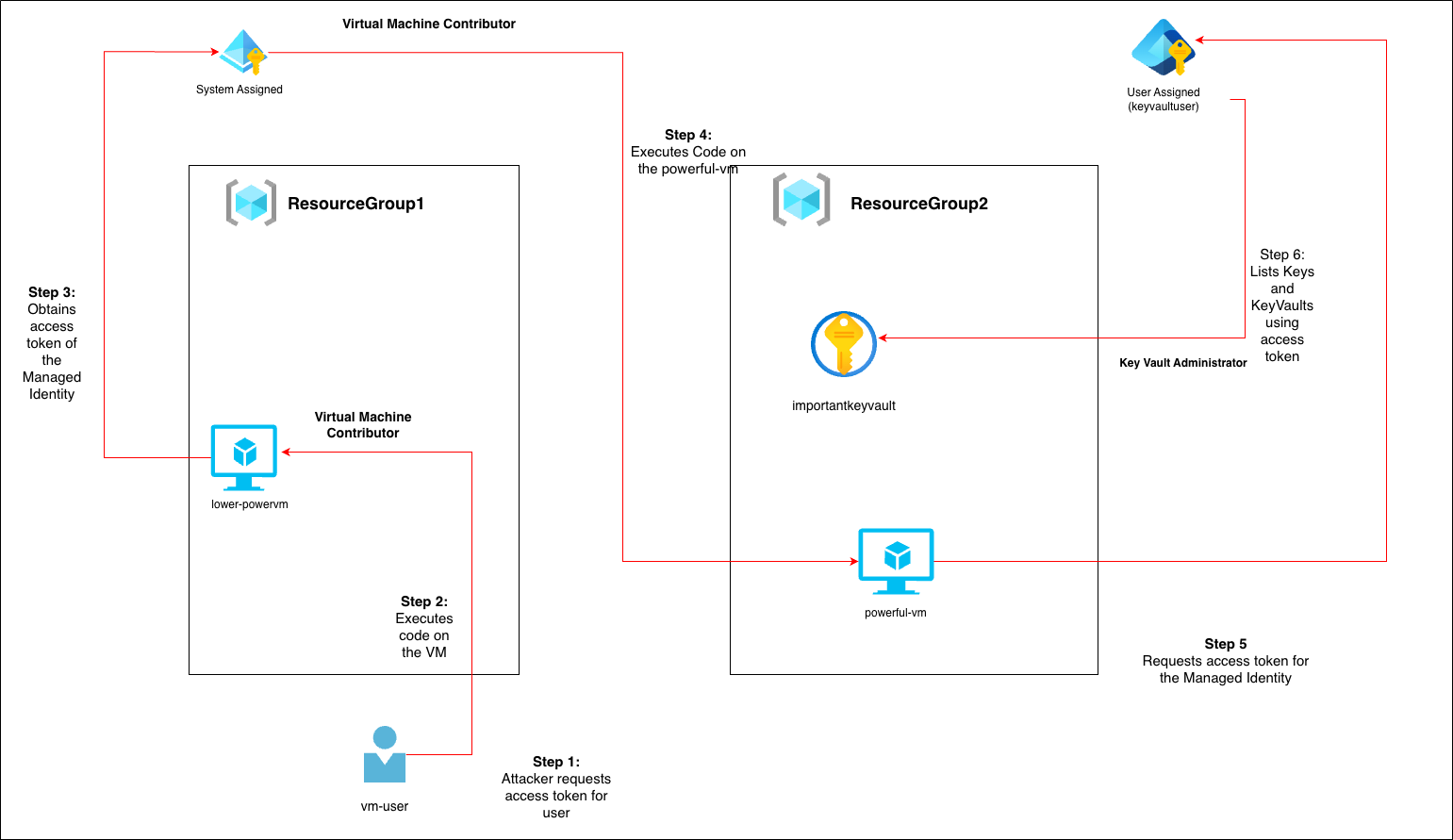
Here we will be focusing on abusing Managed Identities attached to Virtual Machines. The attack flow will look something as follows:
The Initial Compromise
Our scenario begins with an attacker who has compromised credentials for a user account called vm-user. On its own, this account has fairly limited permissions: it holds the Virtual Machine Administrator role on a single Linux VM sitting in ResourceGroup1. At first glance, the blast radius seems contained.
Discovering the First Managed Identity
That Linux VM has a System Assigned Managed Identity attached to it. This identity has been granted Virtual Machine Contributor permissions on a completely different VM located in ResourceGroup2.
The attacker's first move is straightforward: they use the Azure CLI to request an access token for their compromised vm-user account. With this token in hand, they call the Azure Virtual Machine API to execute commands on the Linux VM they have access to.
Now comes the pivot. From within that command execution, the attacker queries the Azure Instance Metadata Service (IMDS), which is a local endpoint available to any code running on the VM. This endpoint happily returns an access token for the System Assigned Managed Identity. The attacker has just inherited a new set of permissions without compromising any additional user accounts.
Moving Laterally to the Second Resource Group
Using the Managed Identity's token, the attacker can now execute commands on the VM in ResourceGroup2, even though vm-user has absolutely no direct permissions here.
This is where the attack becomes a little difficult to detect. The second VM might have strict network controls in place. For example only specific IP addresses are allowed to SSH into it, or there's no public endpoint at all. This can be bypassed through use of the access token, since that attacker isn't logging in through the network. They are executing commands through Azure's control plane. Thus, completely bypassing traditional network based defenses.
Reaching the Final Destination
The VM in ResourceGroup2 has a User Assigned Managed Identity with the Key Vault Administrator role.
Following the same pattern as before, the attacker executes code on this second VM. Then queries the metadata endpoint. However, this time the token is scoped to vaule.azure.net and then extracts the Managed Identity's access token
With the Key Vault Administrator permissions, the attacker can now enumerate Key vaults across the environment, list keys and secrets and event potentially extract credentials, certificates or encryption keys that unlock even more of the organisation's infrastructure.
The Attack Execution
Considering that the attacker has already compromised a user called vm-user, they can list the role assignments this user has.
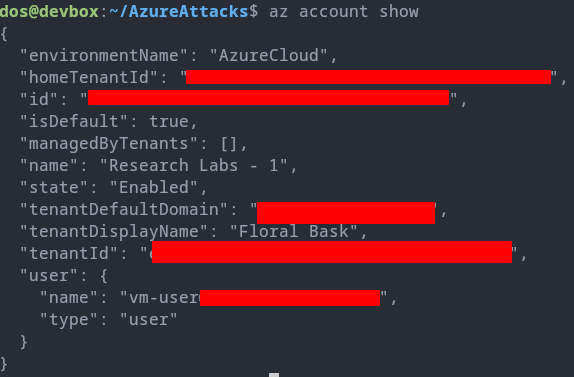
The attacker find that the vm-user user has Virtual Machine Contributor on the ResourceGroup1.
az role assignment list --scope "/subscriptions/17ca970a-212c-430b-9aa6-6365b4d82b92/resourceGroups/ResourceGroup1/providers/Microsoft.Compute/virtualMachines/lower-powervm" --output json --query '[].{principalName:principalName, roleDefinitionName:roleDefinitionName, scope:scope}'

Attacker uses az cli to further enumerate the role assignments and its scope. The users role allows the attacker to execute code on the lower-powervm in ResourceGroup1.
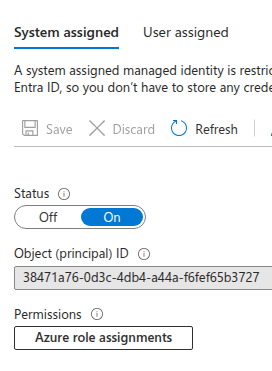
Also, the Azure Portal shows that there is a System Assigned Managed Identity attached to this VM. The VM Contributor role doesn't have enough privileges to check what access this have on other resources.
This is why the attacker needs to first authenticate using this Managed Identity and then use it to enumerate the resources.
They can either use az vm run-command invoke to execute a shell command on the VM or they can directly use Azure Resource Manager API to execute code on the VM.
The attacker first obtains access token for the current user with the Resource Manager API as its default scope.
az account get-access-token
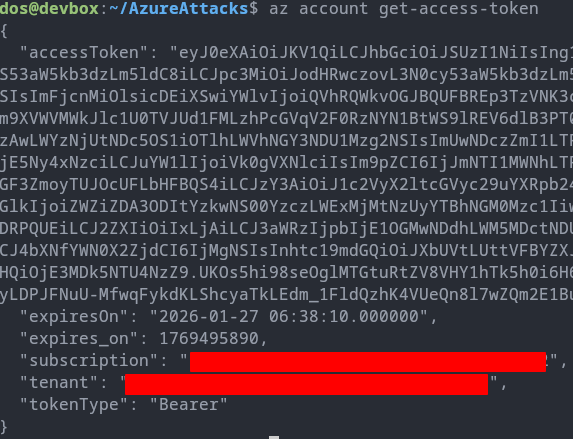
Obtaining access token from the first VM
Now the attacker executes code on the lower-powervm using this access token. To execute code on a Virtual Machine the following Resource Manager API can be used: https://management.azure.com/subscriptions/{}/resourceGroups/{}/providers/Microsoft.Compute/virtualMachines/{}/runCommand?api-version=2023-03-01
In order to obtain an access token the attacker needs to send a request to the Managed Identity endpoint using curl.
curl '<http://169.254.169.254/metadata/identity/oauth2/token?api-version=2018-02-01&resource={}>' -H \\\\"Metadata: true\\\\"
This command is going to send a GET request to the metadata endpoint. In this case the resource will be the Azure RM API, i.e. https://management.azure.com. This will spit out the access token with Azure RM API as its scope, with the permissions that the Managed Identity has
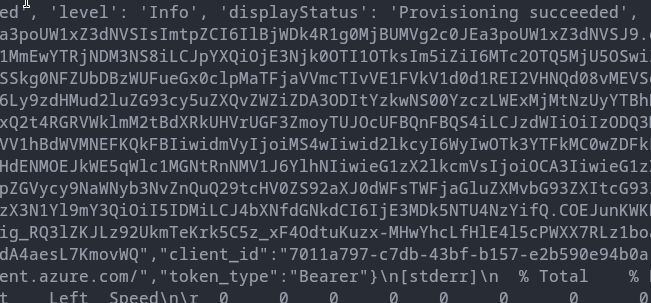
Laterally Moving to the second VM
Using this access token attacker can further enumerate resources in the tenant. Enumeration shows that this access token has permissions on another VM in ResourceGroup2 called powerful-vm.
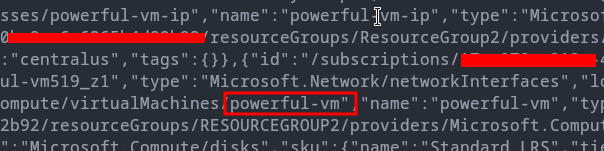
Repeating the steps as before attacker executes code on this second VM in ResourceGroup2 and requests a new access token with Azure RM API as the scope again. This allows the attacker to further enumerate the resources that the User Assigned Managed Identity keyvaultuser has access to.

Listing all the resources attacker finds that there is an access to a KeyVault called importantkeyvault in ResourceGroup2.
Furthering Enumerating and Listing KeyVault
Armed with the new access token from powerful-vm , attacker wants to enumerate the KeyVault called importantkeyvault. To enumerate KeyVaults one needs access token with the scope https://vault.azure.net which is the Key Vault URI. So, the endpoint request will look something as follows:
curl '<http://169.254.169.254/metadata/identity/oauth2/token?api-version=2018-02-01&resource=https://vault.azure.net> -H \\\\"Metadata: true\\\\"
This enables the attacker to send request to the Key Vault URI as follows:
GET <https://importantkeyvault.vault.azure.net/keys?api-version=2025-07-01>

They can also list the contents of a particular key inside the key vault.
GET <https://importantkeyvault.vault.azure.net/keys/veryimportantkeys?api-version=2025-07-01>

Finally, this gives the attacker a clear path from ResourceGroup1 to a KeyVault in ResourceGroup2. The attacker also didn't need to login to any of the Virtual Machine.
Detections
Now that we have a clear view of the attack, we can start developing a detection logic for this. First we will analyse the AzureActivityand AADManagedIdentitySignInLogs in Microsoft Sentinel and then based on that we will be developing the detection.
Analysing the Logs
- This technique does not need to login to a specific VM
- It also does not require you to login to a Managed Identity from within a particular VM
- Other than that we are using the Key Vault URI directly to view the key vaults
- We will investigate if this attack flow also generates enough logs that will allow us to develop a definitive detection
Activity Logs
First we check AzureActivityLogs which will tell us the actions that have been executed on the VMs
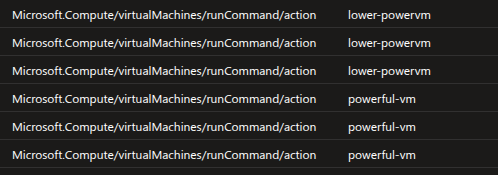
We will see that actions have been performed on the lower-powervm and powerful-vm as well
If we check the callers of these actions, we will find the following
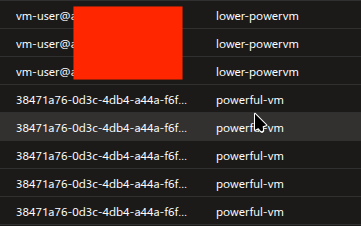
Here we can see that the lower-powervm had been access from vm-user user, which is normal in this case. However, powerful-vm doesn't have any user against its logs. Instead, its a Managed Identity object ID. Upon checking the type we will find that its a Service Principal and Managed Identities are also a type of Service Principal.
.png)
Now the presence of Service Principal which belongs to another resource tells us that there is some sort of lateral movement that has occurred. This is because usually the System Assigned Managed Identity is attached to a single resource and always indicates to that particular resource. Now the Managed Identity of a Virtual Machine should not be executing code on another Virtual Machine or execute code on another resource under normal circumstances.
Analysing the Managed Identity Sign-in Logs

We first notice that the Service Principal ID of the lower-powervm VM logging into the resource for Azure Resource Manager API. This was triggered when we requested access token from within the lower-powervm using System Assigned VM.
Next we find that there was a login into the Azure RM API using different Service Principal ID. This essentially belongs to the User Defined MI keyvaultuser
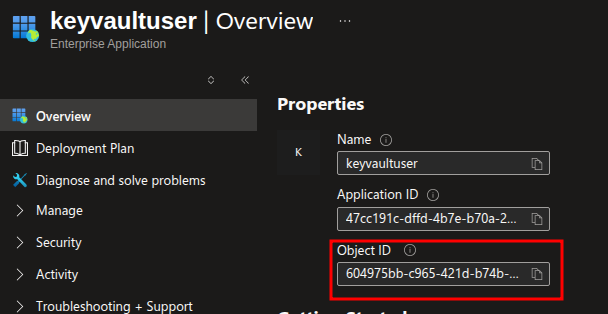
This is the Managed Identity that is attached to the other Linux VM powerful-vm. Then there's another login to a Azure Key Vault resource using this same Managed Identity.
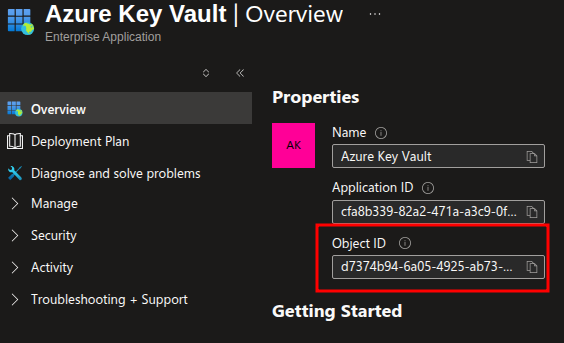
This is the fixed Object ID for Application for Azure Key Vault. This was triggered when we requested an access token for vault.azure.net.
Developing the Detection logic
In this case we will not be considering logs from endpoint like Sysmon logs or Linux Diagnostic Agent Logs. This will come during the investigation part when the attack has already been detected.
The first point of check will be when there is a Managed Identity accessing a Virtual Machine and executing code, in our case it will be powerful-vm. Also, if we check the xms_mirid under Claims field we will find that the name of the entity who has initiated the activity is passed.
Even though we already have the Service Principal ID, we can see that its another resource that initiated the activity.
AzureActivity
| where TimeGenerated > ago(100m)
| extend Caller = tostring(parse_json(Properties)["caller"]),
         Entity = tostring(parse_json(Properties)["entity"]),
         EventCategory = tostring(parse_json(Properties)["eventCategory"]),
         ActivityStatus = tostring(parse_json(Properties)["activityStatusValue"]),
         Message = tostring(parse_json(Properties)["message"]),
         Resource = tostring(parse_json(Properties)["resource"]),
         ResourceProvider = tostring(parse_json(Properties)["resourceProviderValue"]),
         Action = tostring(parse_json(Authorization)["action"]),
         PrincipalId = tostring(parse_json(parse_json(Authorization)["evidence"])["principalId"]),
         principalType = tostring(parse_json(parse_json(Authorization)["evidence"])["principalType"]),
         role = tostring(parse_json(parse_json(Authorization)["evidence"])["role"]),
         roleAssignmentScope = tostring(parse_json(parse_json(Authorization)["evidence"])["roleAssignmentScope"]),
         roleDefinitionId = tostring(parse_json(parse_json(Authorization)["evidence"])["roleDefinitionId"]), scope = tostring(parse_json(Authorization)["scope"]),
         InitiatedBy = tostring(parse_json(Claims)["xms_mirid"])
| where principalType == "ServicePrincipal" and InitiatedBy contains "resourcegroups"
| project LocalTime, OperationNameValue, ActivityStatus, Caller, CategoryValue, EventCategory, Message, Resource, ResourceProvider, Action, PrincipalId, principalType,
          role, roleAssignmentScope, roleDefinitionId, scope, Entity, InitiatedBy
This will filter out all the events where a Managed Identity accessed another resource.
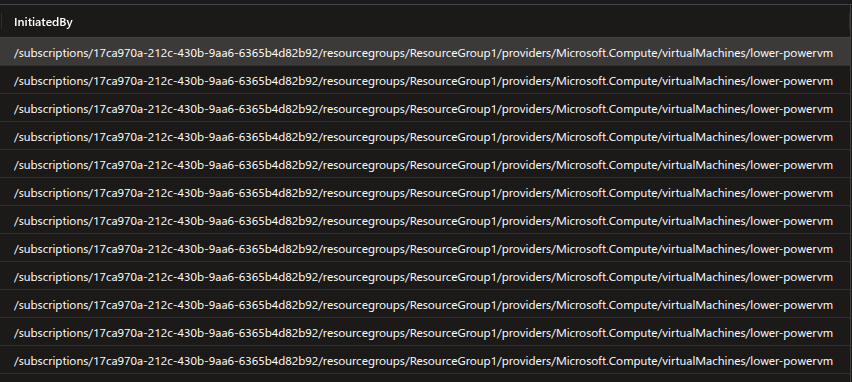
Now we can use the Managed Identity ID from hre and look into the Managed Identity SignIn logs
let MIActivityLogs = (AzureActivity
| where TimeGenerated > ago(100m)
| extend ServicePrincipalId = tostring(parse_json(Properties)["caller"]),
         Entity = tostring(parse_json(Properties)["entity"]),
         EventCategory = tostring(parse_json(Properties)["eventCategory"]),
         ActivityStatus = tostring(parse_json(Properties)["activityStatusValue"]),
         Message = tostring(parse_json(Properties)["message"]),
         Resource = tostring(parse_json(Properties)["resource"]),
         ResourceProvider = tostring(parse_json(Properties)["resourceProviderValue"]),
         Action = tostring(parse_json(Authorization)["action"]),
         PrincipalId = tostring(parse_json(parse_json(Authorization)["evidence"])["principalId"]),
         principalType = tostring(parse_json(parse_json(Authorization)["evidence"])["principalType"]),
         role = tostring(parse_json(parse_json(Authorization)["evidence"])["role"]),
         roleAssignmentScope = tostring(parse_json(parse_json(Authorization)["evidence"])["roleAssignmentScope"]),
         roleDefinitionId = tostring(parse_json(parse_json(Authorization)["evidence"])["roleDefinitionId"]),
         scope = tostring(parse_json(Authorization)["scope"]),
         InitiatedBy = tostring(parse_json(Claims)["xms_mirid"])
| where principalType == "ServicePrincipal" and InitiatedBy contains "resourcegroups"
| project LocalTime, OperationNameValue, ActivityStatus, ServicePrincipalId, CategoryValue, EventCategory, Message, Resource, ResourceProvider, Action, PrincipalId, principalType,
          role, roleAssignmentScope, roleDefinitionId, scope, Entity, InitiatedBy);
AADManagedIdentitySignInLogs
| extend LocalTime = datetime_utc_to_local(TimeGenerated, 'Asia/Kolkata')
| where TimeGenerated > ago(100m)
| join kind=inner MIActivityLogs on ServicePrincipalId
| project LocalTime, OperationName, ResultSignature, ResourceGroup, Category, ClientCredentialType, ResourceDisplayName, ResourceIdentity, ResourceServicePrincipalId, ServicePrincipalId, UserAgent, OperationNameValue, ActivityStatus, Message, Resource, ResourceProvider, Action, InitiatedBy
Now if we see the User Agents carefully, we will find that this Managed Identity which also happens to belong to another Virtual Machine uses ImdsIdentityProvider. This indicates that they have accessed the managed idneity through the use of Metadata endpoint (which the attacker actually did).
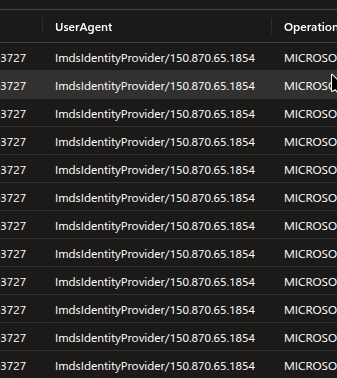
So we will add this as well in our detection.
Analysing the Logs in Abstract SecurityPlatform and writing a detectionrule
Now we will see how we can correlate and analyse the logs in Abstract Security platform and write detection rules according to the events.
Searching for Events
We will be looking for event categories Administrative and ManagedIdentitySignInLogs
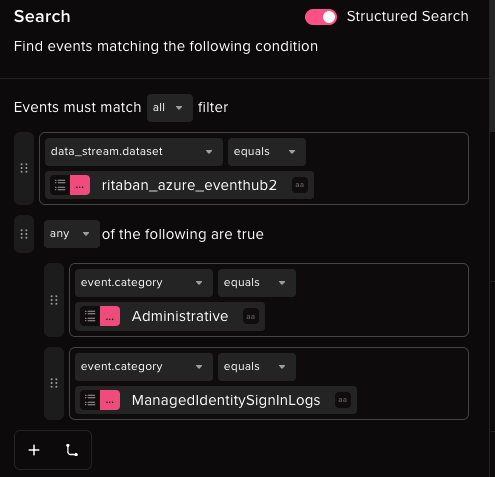
Upon narrowing down the events we will find the main important events that are required for detection.
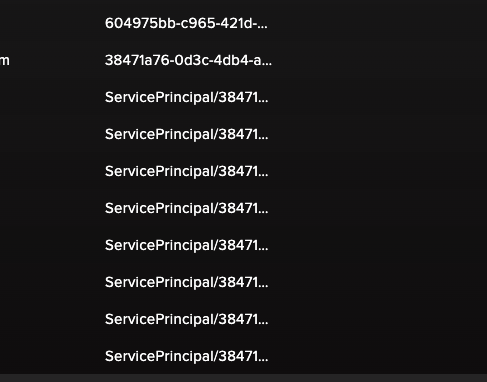
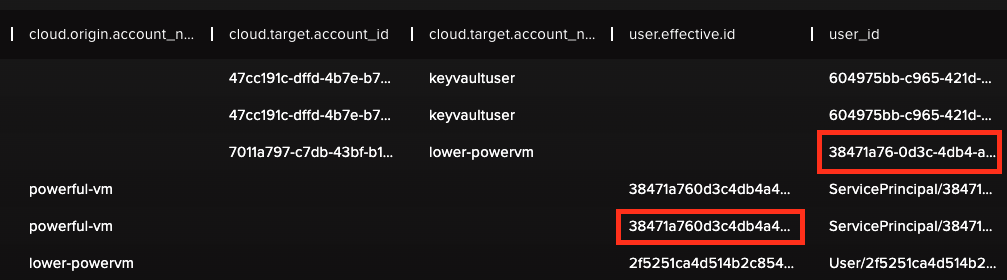
Here we can see that the user who executed a Run command against powerful-vm is the lower-powervm which is another resource. This is very suspicious under normal circumstances.
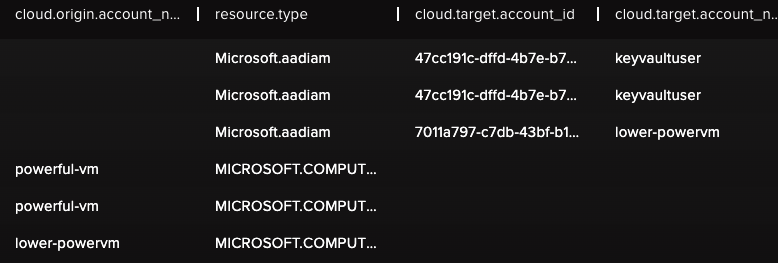
We can also confirm that lower-powervm is actually a Virtual Machine that is executing code on another Virtual Machine.
Writing Detection rule
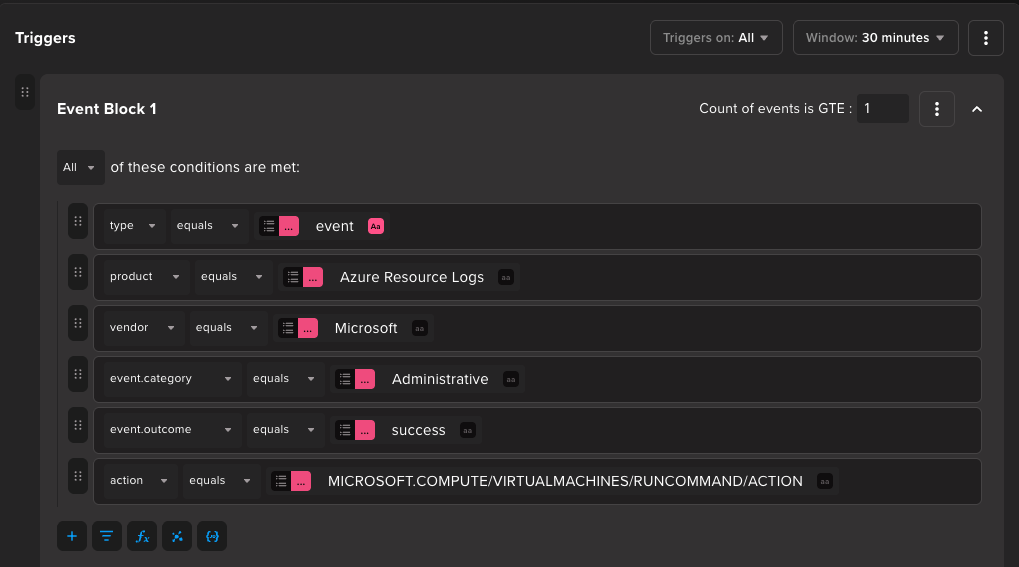
For this we will write a detection rule to detect the first step of the Lateral Movement. This will stop the later steps of the Lateral movement.
So, for the first detection rule we will look for a Run command against a Virtual Machine.
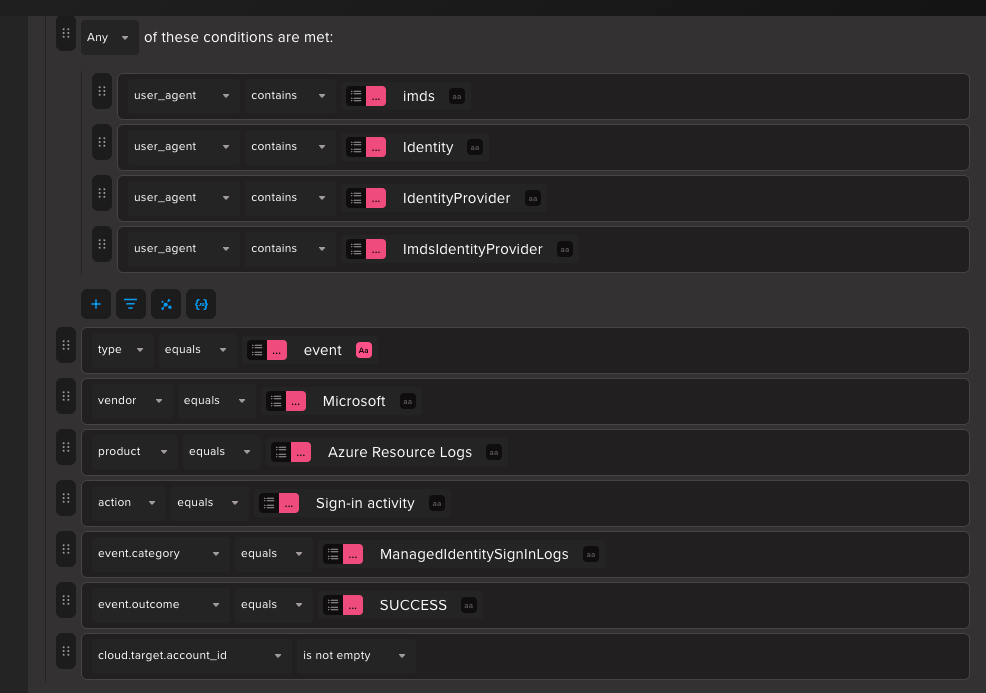
Next we will look for a Managed Identity Sign-in Log where the User Agent has Imds . This will indicate that the Managed Identity login was done through directly accessing the Metadata endpoint.
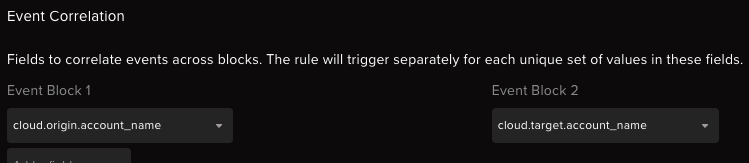
Finally we will group events from these 2 filter using the cloud.origin.account_name which will be the origin account which executed the command on the VM and cloud.target.account_name from MI Sign-in Log which will be the target of the login attempt. It these 2 are equal then we can confirm that there was a direct login to Managed Identity through metadata endpoint that too using a command execution in the VM.
Alert Investigation
In case of the first step of the attack when the attacker tries to execute code on lower-powervm and requests access token directly from the metadata endpoint, we will get a trigger on the first rule.

Through this alert we can investigate against which events this was triggered. It can be found in the field related_events.
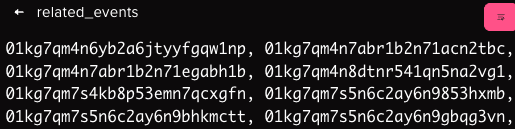
Each of these Event ID will show us the events which were responsible for triggering the rule
The first ID points to a Sign-in activity to the Managed Identity attached to lower-powervm.

Another one of the related event show us that its among the runcommand action against the lower-powervm.

This shows us that we are successfully able to get an alert against the first step of the attack when an attacker executes code on a Virtual Machine and tries to get access token for a Managed Identity that is attached to that Virtual Machine.
Abstract Platform
The following rules are available in the Abstract platform to detect this behavior:
- Azure Lateral Movement through Managed Identity
- Azure Managed Identity Access Token Stealing from FunctionApp
- Azure Managed Identity Access Token Stealing through VM Code Execution
Conclusion
This research gives us an idea about how one can put some detection for some type of Managed Identity abuse. Since Managed Identities are very useful tools for the proper functioning of an Azure environment, it becomes difficult in case there are multiple resources attached to a single Managed Identity.
This can lead to the abuse of Managed Identities. Even though detection may vary depending on environment. For example, there might be some script which uses Managed Identities to access other resources like another Virtual Machine. Therefore, this detection is very generalised form of detecting some type of Managed Identity abuse.
ABSTRACTED
We would love you to be a part of the journey, lets grab a coffee, have a chat, and set up a demo!
Your friends at Abstract AKA one of the most fun teams in cyber ;)
.avif)
Your submission has been received.